
Screenshots
Overview
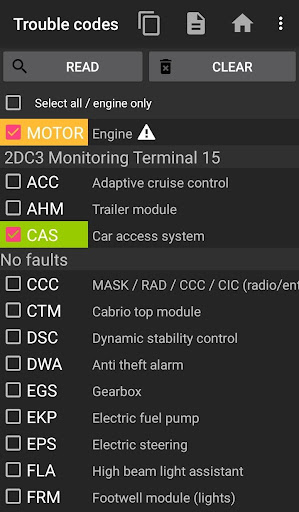
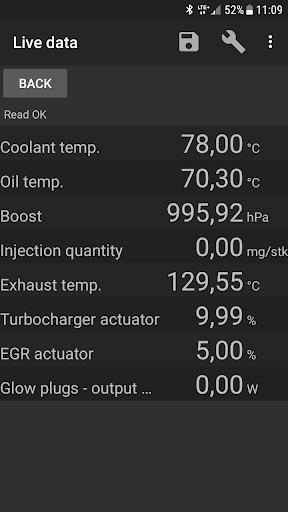
Bimmer-tool allows to read & clear fault codes, request Dpf regeneration, read engine live data and much more in Bmw cars. Try bimmer-tool lite to see whether the app is compatible with your Bmw and your Obd adapter. For cars below model year 2008 application functionality is limited and K+DCan USB cable connection is recommended. Wireless Elm adapter connection with cars below 2008 may not be possible or not all functions may be available.
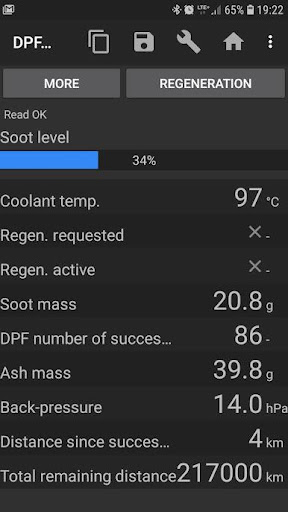
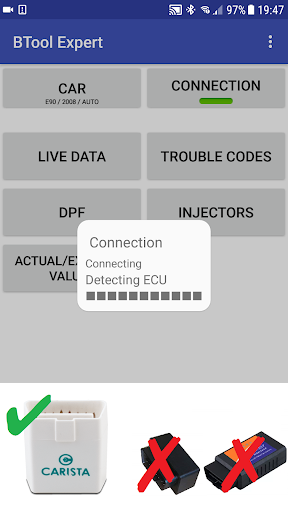
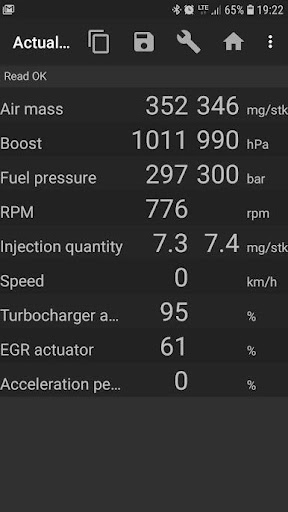
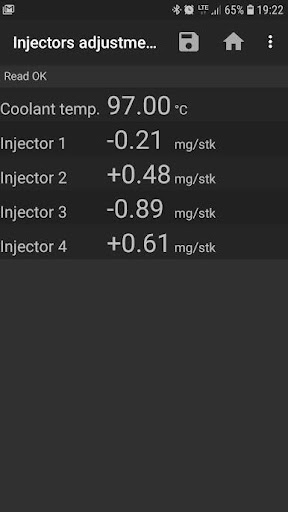
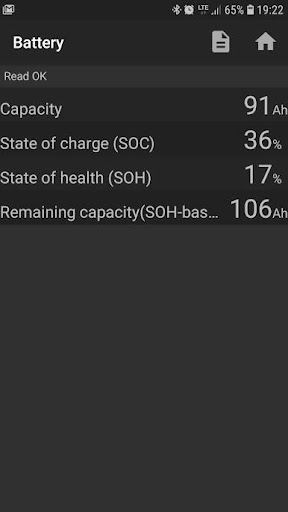
Important: This application requires a reliable Obd adapter. K+D-Can cable, Enet adapter (for F/G series) or below Bluetooth adapters are recommended: Vgate vLinker MC/FS/BM/FD UniCarScan Ucsi-2000/Usci-2100: Choose setting: D-Can mode: MODE2 Veepeak OBDCheck BLE Application allows to: - read Dpf regeneration status and detailed information - request Dpf regeneration - reset Dpf adaptation values (required after filter replacement) - read exhaust fumes pressure - read injectors adjustments - read actual and expected values for air mass, intake manifold pressure, fuel pressure - log data to CSV file for further analysis - register battery replacement (without changing battery properties) - reset lamps circuits blocked due to short-circuit error in E-series - reset oil/brakes service and change interval Supported Obd adapters K+D-Can USB: This is recommended and most reliable adapter.
You will also need USB-Otg cable. Enet cable/Wifi Adapter: recommended for F & G series. Enet cable connections you need additionally USB-C to Ethernet adapter. ELM327 Bluetooth: Bluetooth connection may be slower than USB. Only genuine ELM327 or PIC18-based adapters will work. It may not work with older engines. More info below. ELM327 WiFi: Like Elm Bluetooth connection may be less stable.
Features
Devices mobile data transmission needs to be disabled to use WiFi adapter. You can find our address at the bottom of the page. Quick start 1) Connect adapter to Obd II socket 2) Turn ignition on 3) Connect adapter to your phone: USB: Connect adapter to the. The interface is organized for quick access to the most frequently used functions, reducing the time needed to complete common tasks. Advanced options are available for users who want to customize their experience and optimize the application for their workflow. Data sync and backup features help users keep their information safe and accessible across multiple devices when needed.
The application supports a wide range of file formats and integrates with popular services to extend its usefulness. Performance optimization ensures smooth operation even on older hardware, making it accessible to a broad user base. Comprehensive documentation and in-app guidance help new users get started quickly while power users can explore advanced capabilities. Users can organize content, apply filters, and access key functions through an intuitive layout that minimizes learning curve. Cross-platform support and cloud integration extend the application's reach across different devices and ecosystems. Built-in tutorials and contextual help ensure that users can discover and master features at their own pace.
The interface is organized for quick access to the most frequently used functions, reducing the time needed to complete common tasks. The application supports a wide range of file formats and integrates with popular services to extend its usefulness. The interface is organized for quick access to the most frequently used functions, reducing the time needed to complete common tasks. Advanced options are available for users who want to customize their experience and optimize the application for their workflow. Data sync and backup features help users keep their information safe and accessible across multiple devices when needed.
Pros
- User-friendly interface for smooth experience
- Comprehensive feature set for various needs
- Regular updates and maintenance
- Widely used and well-reviewed
- Good value for the functionality offered
Cons
- May have a learning curve for new users
- Some features may require subscription
- Performance may vary by device
- Interface design could be improved
- Support availability may be limited
Top Apps

Alien Food Invasion Premium
Enjoy the alien invasion without ads and without any pay-to-win purchases! br br Improve ...

Big Boss Idle Business Tycoon
BUILD, AUTOMATE, PROFIT - THE ULTIMATE IDLE BUSINESS TYCOON GAME br br Grow from $100 to ...

Christmas Magic
? Christmas Magic Watch Face for Wear OS ? br br Unwrap the joy of the season with our Ch...

Christmas Snow On/Off Watch
Collection https://play.google.com/store/apps/dev?id=5351976448109391253 br Pretty and cut...

Christmas Village
font color="#28c0fa" Perfect watch face for this Christmas season! /font br br b Teleg...

Code Blue CPR Timer
Code Blue CPR Timer was developed and extensively tested to provide crucial information in...

Coexisting Diseases & Surgery
A comprehensive medical disease app that contains the following: br br 1) Gives the descr...

Currency Converter Pro
No Ads. br br Currency Converter providing real time exchange rates for over 180+ currenc...
Similar Apps

Hush: Android Auto Audio Fix
Android Auto is great, but sometimes you want Google Maps while listening to audio from an...

AAWireless for Android Auto™
Using an AAWireless adapter to wirelessly connect your phone to Android Auto™? Use this co...
CarGurus: Used & New Cars
Get great deals, compare listings, find financing options, and sell your car. With access ...

Carvana: Buy/Sell Used Cars
Buy, sell or trade your car 100% online. With the Carvana app, you can shop where you want...

Kelley Blue Book: We Know Cars
We’re excited to announce the new fully loaded, easy-to-navigate mobile app experience. Si...

Lexus
Stay Connected. Stay in Control. With the Lexus App. br br The Lexus app makes it easy to...

Marathon ARCO Rewards
Marathon ARCO Rewards is a customer loyalty program where members earn and redeem rewards ...

MotoJitsu
Want to control your motorcycle in virtually any street environment? Whatever your current...