
Screenshots
Overview
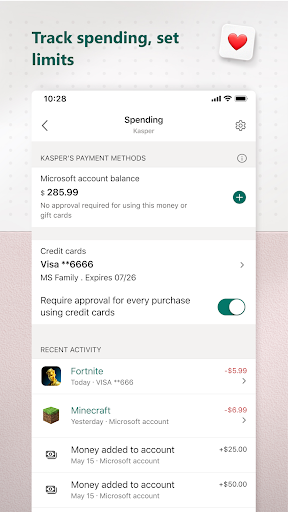
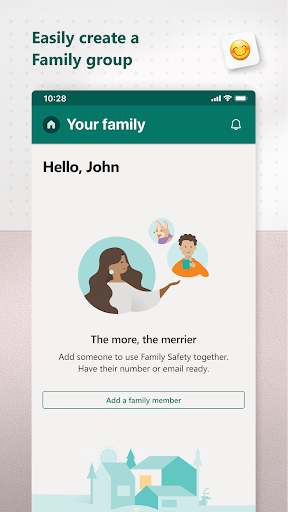
The Microsoft Family Safety app helps empower you and your family to create healthy habits and protect the ones you love. Get peace of mind that your family is staying safer while giving your kids independence to learn and grow. This app is designed for both parents and kids. For parents, it helps to create a safe space for their children to explore online. Set parental controls to filter inappropriate apps and games and set browsing to kid-friendly websites on Microsoft Edge.
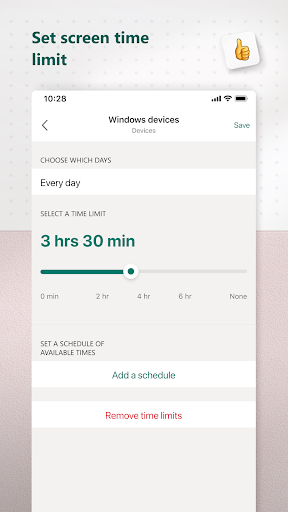
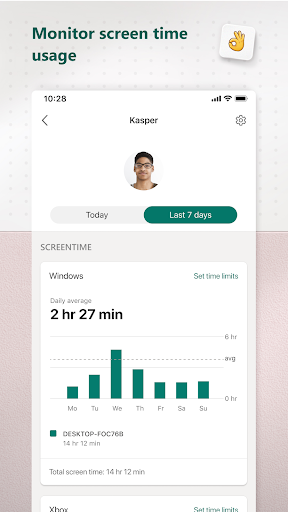
Help your kids balance their screen time activity. Set limits for specific apps and games on Android, Xbox, or Windows. Or use device management to set screen time limits across devices on Xbox and Windows. Use activity reporting to better understand your family's digital activity. View your kids' activity in a weekly email to help start a conversation about online activity. For kids, it ensures their safety in the digital world by adhering to parental controls and accessing age-appropriate content.
Microsoft Family Safety features: Activity reports Develop healthy digital habits Activity log of screen time and online usage Weekly email summary report of activity Screen time Find a balance Screen time app and game limits on Xbox, Windows, Android Screen time device limits on Xbox and Windows Get notified if your child requests more time Content filters Explore safely Web filters for kid-friendly browsing on Microsoft Edge Block inappropriate apps and games Privacy & Permissions Your privacy is important to us. We work around the clock to protect your data and information to help you keep your family safe. For example, we do not sell or share your.
Features
Location data with insurance companies or data brokers. We provide you with meaningful choices about how and why data is collected and used and give you the information you need to make the choices that are right for you and your family. With your child's consent, Microsoft Family Safety may collect interaction data using accessibility, app usage, and device admin service permissions. This allows us to: know when they are using an app, exit an app on their behalf, or block apps that are not allowed. Disclaimers This app is provided by either Microsoft or a third-party app publisher and is subject to a separate privacy statement and terms and conditions.
The interface is organized for quick access to the most frequently used functions, reducing the time needed to complete common tasks. Advanced options are available for users who want to customize their experience and optimize the application for their workflow. Data sync and backup features help users keep their information safe and accessible across multiple devices when needed. The application supports a wide range of file formats and integrates with popular services to extend its usefulness. Performance optimization ensures smooth operation even on older hardware, making it accessible to a broad user base. Comprehensive documentation and in-app guidance help new users get started quickly while power users can explore advanced capabilities.
Users can organize content, apply filters, and access key functions through an intuitive layout that minimizes learning curve. Cross-platform support and cloud integration extend the application's reach across different devices and ecosystems. Built-in tutorials and contextual help ensure that users can discover and master features at their own pace. The interface is organized for quick access to the most frequently used functions, reducing the time needed to complete common tasks. The interface is organized for quick access to the most frequently used functions, reducing the time needed to complete common tasks.
Pros
- User-friendly interface for smooth experience
- Comprehensive feature set for various needs
- Regular updates and maintenance
- Widely used and well-reviewed
- Good value for the functionality offered
Cons
- May have a learning curve for new users
- Some features may require subscription
- Performance may vary by device
- Interface design could be improved
- Support availability may be limited
Top Apps

Alien Food Invasion Premium
Enjoy the alien invasion without ads and without any pay-to-win purchases! br br Improve ...

Big Boss Idle Business Tycoon
BUILD, AUTOMATE, PROFIT - THE ULTIMATE IDLE BUSINESS TYCOON GAME br br Grow from $100 to ...

Christmas Magic
? Christmas Magic Watch Face for Wear OS ? br br Unwrap the joy of the season with our Ch...

Christmas Snow On/Off Watch
Collection https://play.google.com/store/apps/dev?id=5351976448109391253 br Pretty and cut...

Christmas Village
font color="#28c0fa" Perfect watch face for this Christmas season! /font br br b Teleg...

Code Blue CPR Timer
Code Blue CPR Timer was developed and extensively tested to provide crucial information in...

Coexisting Diseases & Surgery
A comprehensive medical disease app that contains the following: br br 1) Gives the descr...

Currency Converter Pro
No Ads. br br Currency Converter providing real time exchange rates for over 180+ currenc...
Similar Apps

Baby Tracker - Newborn Log
Designed by busy parents, for busy parents, Baby Tracker offers a simple, streamlined way ...

Contraction Timer & Counter 9m
*** Most downloaded Contraction Timer app in the world! Number 1 in the USA, UK, Australia...

Preggers: Pregnancy & Baby App
Embark on the journey of parenthood with Preggers, the must-have app trusted by over a mil...

Pregnancy App & Baby Tracker
BabyCenter is the go-to pregnancy tracker, parenting resource and family planning app for ...

Pregnancy Tracker & Baby App
Join the #1 Pregnancy & Baby Tracker App for expert guidance every week of your journe...

FamilyAlbum - Photo Sharing
The best way to safely share and organize your family’s photos and videos. Unlimited stora...

Huckleberry: Smart Baby Care
Huckleberry is your all-in-one parenting partner, proudly trusted by 5+ million families w...

Lil Planner: Visual Schedule
The easiest way to create visual schedules for your kids. More fun, less fussing! br br •...