Screenshots




Overview
Display and broadcast heart rate and power based on HR over Bluetooth Low Energy or Ant+ from your Wear OS watch to indoor cycling apps such as Zwift. Use your Wear OS watch as a heart rate monitor and cycling tracker while riding on a bike Connect your watch to bike computers or to indoor training apps.
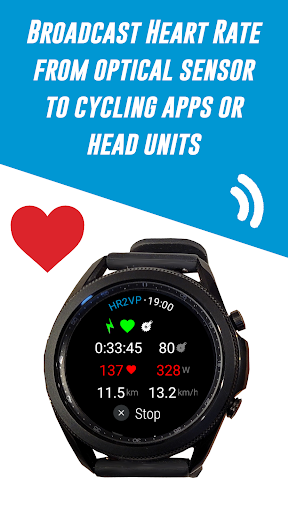
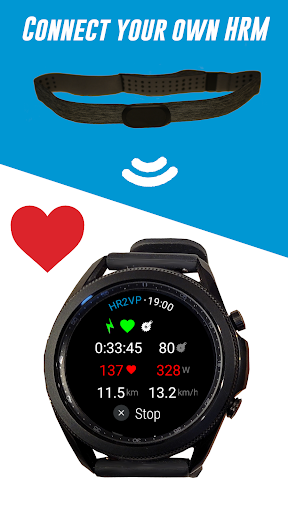
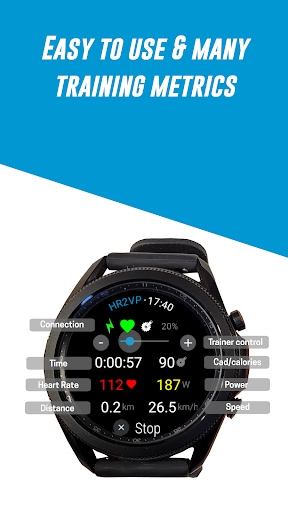
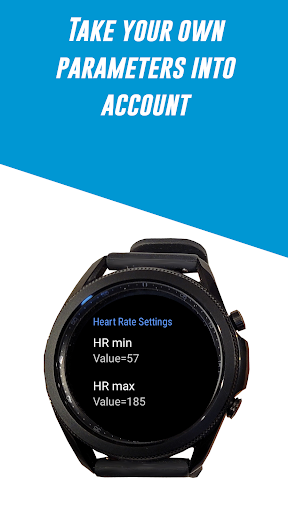
1/ Use your Wear OS watch as a BLE heart rate monitor HR2VP will measure your heart rate with the optical built-in sensor of the watch and broadcast HR over Bluetooth Low Energy as a heart rate monitor during your workouts 2/ Connect your watch to your Garmin Edge bike computer Download the HR2VP data field on the Connect IQ store and add it to one of your screen: Enable broadcasting to Garmin data field in the watch app's Settings Your phone will act as a bridge between your Wear OS watch and your bike GPS 3/ Connect your own heart rate monitor, power meter or cadence sensor to your watch Connect your own sensors and get more training metrics while riding indoor or outdoor Compatible with Bluetooth Smart power meters Cadence sensors Heart rate monitors Ftms bike trainer (use the rotating bezel for control) 4/ Add power to your rides Our advanced matching algorithm computes power based on heart rate, which is measured by the optical built-in watch sensor or by your own chest strap Your individual parameters such as FTP, resting heart rate, and max heart rate, are taken into account for improved accuracy See how many calories you have spent during your workouts and monitor your fitness.
Features
5/ Upload to Strava Pair your watch with Strava and automatically upload your rides (with power) in order to visualize them on a map 6/ Frequently Asked Questions: Is a phone app required? => No, HR2VP for watch can be used as a standalone app during your ride, exept if your want to connect with Ant+ or use the Garmin DF. Is my cycling head unit compatible? For other cycling computers such as Wahoo or Xoss, see next point about Ant+. How to connect to bike computers? => The best option is to use Ant+. If your phone is not Ant+ native, please use Garmin, Wahoo o.
The interface is organized for quick access to the most frequently used functions, reducing the time needed to complete common tasks. Advanced options are available for users who want to customize their experience and optimize the application for their workflow. Data sync and backup features help users keep their information safe and accessible across multiple devices when needed. The application supports a wide range of file formats and integrates with popular services to extend its usefulness. Performance optimization ensures smooth operation even on older hardware, making it accessible to a broad user base. Comprehensive documentation and in-app guidance help new users get started quickly while power users can explore advanced capabilities.
Users can organize content, apply filters, and access key functions through an intuitive layout that minimizes learning curve. Cross-platform support and cloud integration extend the application's reach across different devices and ecosystems. Built-in tutorials and contextual help ensure that users can discover and master features at their own pace. The interface is organized for quick access to the most frequently used functions, reducing the time needed to complete common tasks. The interface is organized for quick access to the most frequently used functions, reducing the time needed to complete common tasks.
Pros
- User-friendly interface for smooth experience
- Comprehensive feature set for various needs
- Regular updates and maintenance
- Widely used and well-reviewed
- Good value for the functionality offered
Cons
- May have a learning curve for new users
- Some features may require subscription
- Performance may vary by device
- Interface design could be improved
- Support availability may be limited
Top Apps

Alien Food Invasion Premium
Enjoy the alien invasion without ads and without any pay-to-win purchases! br br Improve ...

Big Boss Idle Business Tycoon
BUILD, AUTOMATE, PROFIT - THE ULTIMATE IDLE BUSINESS TYCOON GAME br br Grow from $100 to ...

Christmas Magic
? Christmas Magic Watch Face for Wear OS ? br br Unwrap the joy of the season with our Ch...

Christmas Snow On/Off Watch
Collection https://play.google.com/store/apps/dev?id=5351976448109391253 br Pretty and cut...

Christmas Village
font color="#28c0fa" Perfect watch face for this Christmas season! /font br br b Teleg...

Code Blue CPR Timer
Code Blue CPR Timer was developed and extensively tested to provide crucial information in...

Coexisting Diseases & Surgery
A comprehensive medical disease app that contains the following: br br 1) Gives the descr...

Currency Converter Pro
No Ads. br br Currency Converter providing real time exchange rates for over 180+ currenc...
Similar Apps

Little Bean - Cosmetic Checker
Eliminate toxic products from your beauty, skincare, and makeup routine with [ Little Bean...
Meditation Music Pro
This is the professional version of meditation music (https://play.google.com/store/apps/d...

Finch: Self-Care Pet
Meet your new self-care best friend! Finch is a self-care pet app that helps you feel prep...
FitNotes Supporter
If FitNotes has become an invaluable aid to your training and you would like to show your ...
Home Workout - No Equipment
Home Workouts provides daily workout routines for all your main muscle groups. In just a f...

Medbridge GO for Patients
Medbridge GO gets you moving! Powered by award-winning content and technology, Medbridge G...

Sobriety Counter -EasyQuit pro
"EasyQuit" is an app that will help you quit drinking immediately or by using a ...

Wendler log 531 Pro
5-3-1 log app to plan log and track your powerlifting and strength training Wendler 5 3 1 ...