Hearing Test Pro

4.50

Information

Category:

Medical

Price:

$ 10.99

Rank:

N/A

Rating:

4.50

Overview

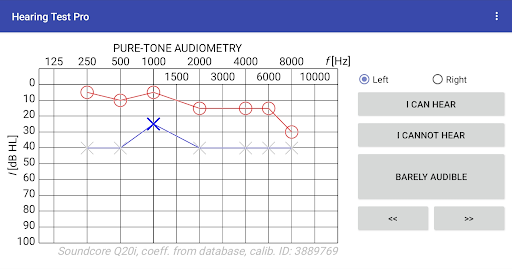
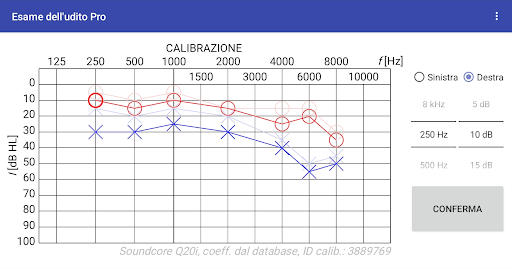
Hearing Test Pro is a comprehensive mobile solution designed for evaluating hearing capabilities through scientifically-backed methods. The app provides two primary testing mechanisms: pure-tone audiometry and the digits-in-noise test, both essential for assessing different aspects of auditory health. Pure-tone audiometry measures the faintest tones you can hear at various frequencies, offering insights into the degree of hearing loss. Meanwhile, the digits-in-noise test evaluates speech intelligibility by having users identify spoken numbers amidst background noise.

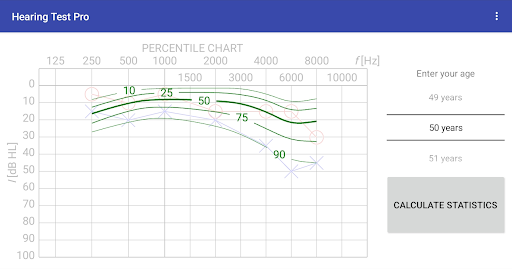
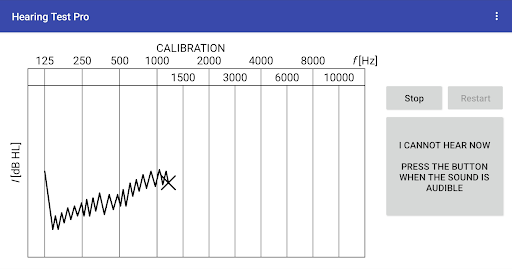
Designed with precision in mind, this app caters to individuals seeking professional-level hearing assessments from the comfort of their homes. It supports device calibration, ensuring accurate results whether using bundled headphones or other compatible devices. With additional features like high-frequency audiometry, age-related norm comparisons, and result documentation, Hearing Test Pro serves as an invaluable tool for monitoring auditory health over time.

Features

Hearing Test Pro stands out with its robust feature set tailored for thorough auditory evaluations. The app includes pure-tone audiometry, which leverages predefined calibration coefficients to ensure reliable measurements when using bundled headphones. Additionally, the digits-in-noise test assesses speech recognition abilities under noisy conditions, simulating real-world listening scenarios.

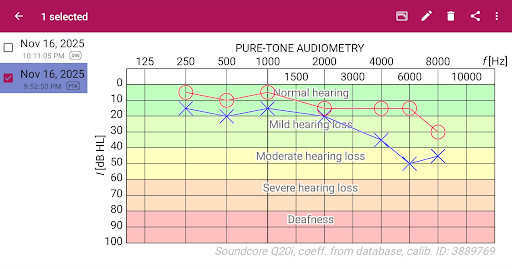
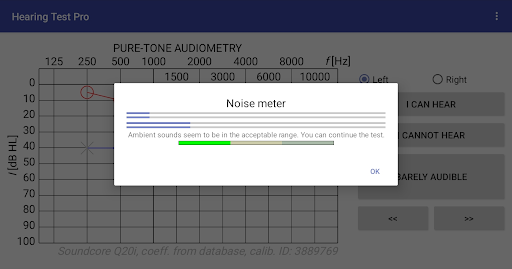
Beyond basic testing, the app offers advanced functionalities such as a built-in noise meter to monitor environmental sound levels during assessments. Users can also perform custom calibrations if predefined settings aren't available. For those requiring more detailed analyses, features like high-frequency audiometry, classification of hearing loss severity, and comparison against age-related benchmarks provide deeper insights. The Pro version further enhances usability with offline database access, cloud synchronization, and manual stimulus control during tests.

Medical content credibility & expert review

In the realm of medical applications like Hearing Test Pro it is crucial to ensure that all provided content and functionalities are credible and have undergone expert review. This app offers two primary hearing tests pure-tone audiometry and the digits-in-noise test both of which are recognized methods in audiological assessments. The inclusion of these scientifically-backed tests underscores the app's commitment to delivering reliable and accurate results. Furthermore the app provides additional features such as high-frequency audiometry classification of hearing loss and comparison with age-related norms which are essential tools for a comprehensive hearing evaluation. These features are designed based on established audiological principles ensuring that users receive information that aligns with professional standards. The app also allows for calibration adjustment and verification of calibration coefficients which are critical for maintaining the accuracy of test results over time. By incorporating these advanced features Hearing Test Pro not only enhances its functionality but also reinforces its reliability as a tool for both personal use and professional assessment. The availability of a Pro version with added benefits like local database storage synchronization across devices and manual stimulus control further demonstrates the app's dedication to providing a robust and credible solution for hearing assessment needs.

Teleconsultation quality

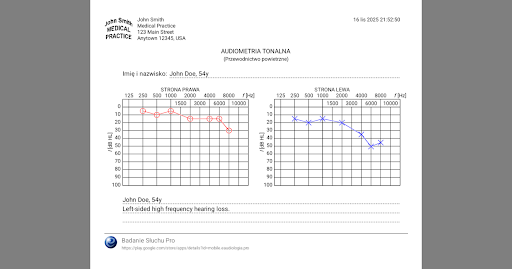
While Hearing Test Pro does not directly offer teleconsultation services its comprehensive suite of hearing assessment tools can significantly enhance the quality of remote consultations between patients and healthcare providers. The app's ability to conduct pure-tone audiometry and digits-in-noise tests provides essential data that can be shared with audiologists or other healthcare professionals during teleconsultations. This capability ensures that clinicians have access to accurate and detailed information about a patient's hearing status facilitating more informed decision-making and personalized treatment recommendations. Additionally the app's feature of comparing test results with age-related norms adds another layer of clinical insight which can be invaluable during remote consultations. The Pro version's ability to store test results locally or synchronize them across devices via cloud storage ensures that this critical information is readily accessible whenever needed thereby supporting seamless communication between patients and healthcare providers. Moreover the option to add notes and print test results allows users to maintain thorough documentation of their hearing assessments which can be easily shared with medical professionals during teleconsultations. By equipping users with these sophisticated tools Hearing Test Pro effectively bridges the gap between in-person clinical evaluations and remote healthcare delivery ensuring that patients receive high-quality care regardless of their location.

Props

Accurate testing

Comprehensive reports

User-friendly interface

Advanced calibration

Offline functionality

Cons

Premium features locked

Requires calibration

Limited free options

Device compatibility

Complex for beginners

Features and Functions

What is this app and what can I use it for?

A medical app for conducting hearing tests and evaluating auditory health.

How do I download and install this app on my device?

Download from Google Play Store and follow installation prompts on your device.

How do I get started after opening the app for the first time?

Follow the guided setup process and select desired test type.

What are the main features and capabilities of this app?

Pure-tone audiometry, digits-in-noise test, and customizable calibration options.

How can I customize my experience and adjust preferences?

Adjust preferences in settings menu for personalized experience.

How do I save or bookmark my favorite content for later access?

Save results locally or print them directly from the app interface.

How can I share content with friends or on social media?

Share results via email or export data for external sharing.

How do I access detailed information and explore more content?

Access detailed reports within the app and explore historical data.

What permissions does this app need and how do I manage them?

App requires mic access; manage permissions in device settings.

How do I check for updates and keep the app running smoothly?

Check Google Play Store for updates and enable auto-updates in settings.
Show more

User Reveiws

{{ comment.reviewer_name }}
{{ comment.review_date_formatted}}
{{ comment.review_content }}
{{ tab.name }}
{{ comment.reviewer_name }}
{{ comment.review_date_formatted}}
{{ comment.review_content }}
No reviews with this rating