
PPSSPP Gold - PSP emulator

4.60

Information

Category:

Action

Price:

$ 4.99

Rank:

52

Rating:

4.60

Overview

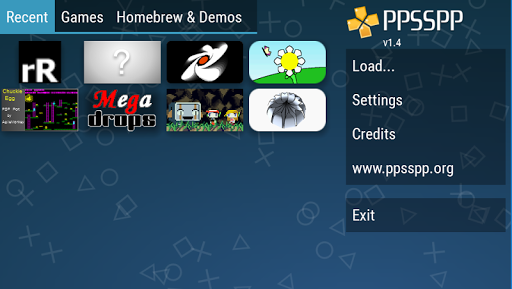
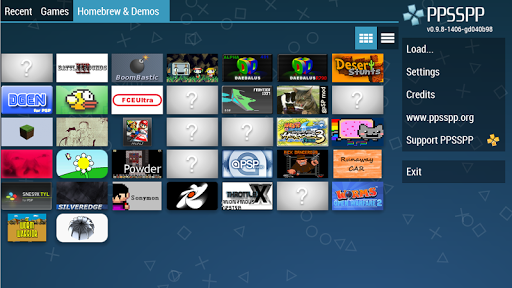
PPSSPP Gold is a premium PSP emulator for Android devices, allowing users to play PlayStation Portable games with enhanced high-definition graphics and additional features. This app stands out as the original and most reliable PSP emulator available, offering compatibility with a wide range of PSP games. While performance may vary depending on device specifications, the emulator provides an authentic gaming experience with support for custom controls and advanced graphical settings.

The emulator requires users to supply their own legally obtained PSP game files in .ISO or .CSO format, which can be placed in the designated folder on their device's storage. PPSSPP Gold represents the paid version that directly supports ongoing development and improvements, ensuring regular updates and enhancements while providing an ad-free experience.

Features

PPSSPP Gold offers an array of advanced features designed to enhance the classic PSP gaming experience. The emulator supports upscaling of games to HD resolutions, providing sharper visuals compared to the original console output. It includes customizable control layouts, enabling users to create personalized button configurations and even use external controllers for a more authentic feel.

Additional technical features include texture scaling, anisotropic filtering, and support for high-quality audio output. The emulator also allows saving and loading game states at any point, a feature not available in the original PSP. These capabilities, combined with active development and regular updates, make PPSSPP Gold a comprehensive solution for enjoying PSP games on modern Android devices.

Control responsiveness & latency

Control responsiveness and latency are crucial aspects of any action-oriented application especially in the case of an emulator like PPSSPP Gold which aims to recreate the experience of playing PlayStation Portable games on modern Android devices The emulator ensures that user inputs are registered with minimal delay creating a seamless interaction between the player and the game This is particularly important for action games where split-second decisions can determine success or failure PPSSPP Gold achieves excellent control responsiveness by optimizing its internal processes to reduce input lag It employs efficient rendering techniques and leverages the hardware capabilities of Android devices to ensure that every touch or button press is immediately reflected in the game world Moreover the emulator provides various customization options for controls allowing users to adjust the layout size and transparency of virtual buttons to suit their preferences This level of customization enhances the overall gaming experience making it more immersive and enjoyable For players who prefer physical controllers PPSSPP Gold supports a wide range of Bluetooth and USB gamepads ensuring that all actions are executed precisely as intended without any noticeable delay This attention to detail in handling user inputs elevates PPSSPP Gold above other emulators providing gamers with a platform where they can enjoy their favorite PSP titles with confidence and precision

Combat feedback tightness

Combat feedback tightness refers to how well an application conveys the results of combat actions to the user In the context of PPSSPP Gold this aspect is vital as it directly impacts the perceived quality and authenticity of the gaming experience The emulator excels in delivering tight combat feedback by accurately simulating the physics and mechanics of the original PSP games When engaging in combat scenarios players can expect immediate visual and auditory responses that correspond to their actions Whether it is the impact of a punch the recoil of a weapon or the explosion of a projectile PPSSPP Gold ensures that these events are rendered with high fidelity preserving the nuances of the original gameplay The emulator achieves this through meticulous emulation of the PSPs hardware including its graphics and sound processors This allows PPSSPP Gold to reproduce the intricate details of combat animations and sound effects with remarkable accuracy Furthermore the emulator offers enhancements such as increased resolution and improved texture filtering which elevate the visual clarity of combat scenes making them more vivid and engaging Players can also enable features like frame skipping and buffering optimization to maintain smooth performance during intense combat sequences ensuring that the feedback remains crisp and responsive Overall PPSSPP Golds commitment to delivering tight combat feedback enriches the action gaming experience providing users with a faithful and exhilarating reproduction of PSP classics

Props

High-definition upscaling

Customizable controls

Regular updates

Save state functionality

Wide game compatibility

Cons

No included games

Device performance varies

Requires manual setup

Paid version only

Legal file requirement

Features and Functions

What is this app and what can I use it for?

A premium PSP emulator for Android enhancing classic games

How do I download and install this app on my device?

Search PPSSPP Gold on Play Store and install from there

How do I get started after opening the app for the first time?

Place legal game files in /PSP/GAME folder on your device

What are the main features and capabilities of this app?

HD upscaling, save states, custom controls, texture scaling

How can I customize my experience and adjust preferences?

Adjust control layout and graphical settings in options

How do I save or bookmark my favorite content for later access?

Use save state feature to bookmark game progress anytime

How can I share content with friends or on social media?

Share screenshots via Android's standard sharing options

How do I access detailed information and explore more content?

Explore detailed game info through in-app statistics menu

What permissions does this app need and how do I manage them?

Needs storage access to read game files from your device

How do I check for updates and keep the app running smoothly?

Enable automatic updates in Google Play Store settings
Show more

User Reveiws

{{ comment.reviewer_name }}
{{ comment.review_date_formatted}}
{{ comment.review_content }}
{{ tab.name }}
{{ comment.reviewer_name }}
{{ comment.review_date_formatted}}
{{ comment.review_content }}
No reviews with this rating