Fun Drawing & Color :Learn Art

4.0

Information

Category:

Educational

Price:

$ 1.49

Rank:

N/A

Rating:

4.0

Overview

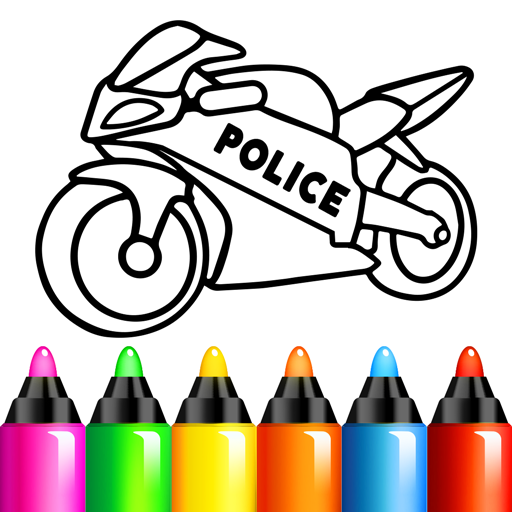
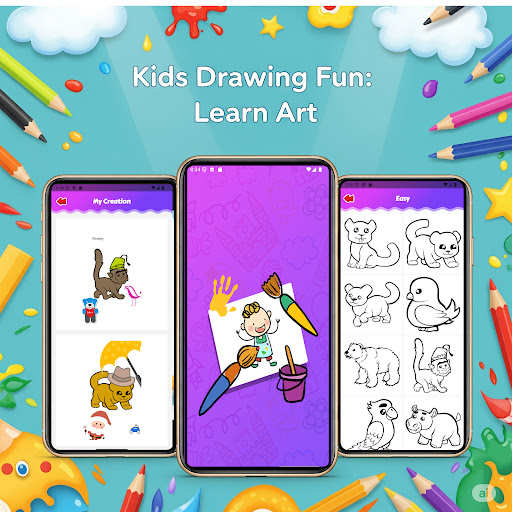
Fun Drawing & Color: Learn Art is an innovative educational app that brings the joy of art to users of all skill levels. Designed for both beginners and experienced artists, this app offers a complete package of creative tools and learning resources. The platform provides step-by-step drawing guides, making it easy to learn fundamental techniques while offering advanced features for more experienced users.

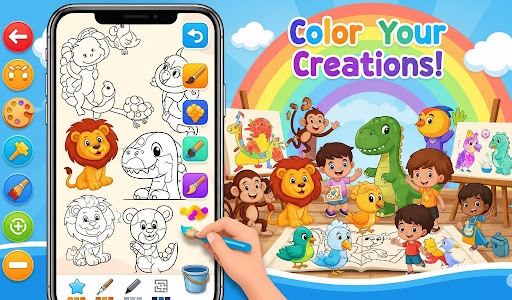
The app stands out with its rich selection of artistic tools, including various brushes, color palettes, text options, and decorative stickers. These features allow users to create vibrant, personalized artwork while enjoying an ad-free experience. Whether you're sketching simple shapes or working on detailed illustrations, Fun Drawing & Color ensures a seamless creative process across Android devices, including tablets and smartphones.

With its focus on accessibility and user-friendly design, this app is perfect for anyone looking to develop their artistic skills or simply express their creativity. By combining structured lessons with freeform drawing capabilities, Fun Drawing & Color delivers exceptional value for educational and recreational purposes alike.

Features

Fun Drawing & Color: Learn Art boasts an impressive array of features designed to enhance the creative process. One of its standout characteristics is the step-by-step drawing guide, which breaks down complex subjects like animals, vehicles, and characters into manageable steps using basic shapes. This feature makes learning approachable for beginners while still providing enough depth for advanced practice.

The app also includes a diverse set of customization tools, such as multiple brush types, pencil options, and a comprehensive color palette with fill functionality. Users can experiment with different artistic styles and add unique touches to their work through customizable text fonts and playful stickers. Additionally, practical editing tools like undo, redo, and eraser functions ensure that mistakes are easily corrected without disrupting the creative flow.

All artwork is automatically saved in a personal gallery, allowing users to revisit and refine their creations at any time. With compatibility across both phones and tablets, and a commitment to being completely ad-free, Fun Drawing & Color creates an uninterrupted environment where imagination can thrive.

Content authority & curriculum alignment

In the realm of educational applications like Fun Drawing & Color Learn Art content authority and curriculum alignment are crucial elements that determine the app's effectiveness as a learning tool. Content authority refers to the credibility and accuracy of the educational material provided within the app ensuring that users receive reliable information that aligns with established educational standards. This app achieves content authority by offering step-by-step drawing guides that are designed to teach fundamental art skills through structured lessons covering a wide array of subjects from animals to characters. These lessons are crafted not only to be engaging but also to progressively build on the user's drawing abilities ensuring that each stage of learning is supported by authoritative content that users can trust. Curriculum alignment goes hand-in-hand with content authority as it ensures that the app's offerings are in sync with educational expectations and goals. Fun Drawing & Color Learn Art accomplishes this by providing multiple skill levels ranging from beginner to advanced which cater to different stages of learning and development. The app includes features such as a variety of brush types pencil colors and color fill tools that support diverse artistic techniques and styles. By incorporating these elements the app aligns itself with an art curriculum that values creativity technical skill development and personal expression. Users benefit from this alignment as they can trust that their learning journey is comprehensive and well-rounded. The combination of content authority and curriculum alignment in Fun Drawing & Color Learn Art provides users with a robust platform for learning art. The app's carefully curated lessons and creative tools ensure that users of all ages can develop their skills in a structured yet flexible environment. With no ads or locked features learners can immerse themselves fully in their artistic exploration confident in the knowledge that the app delivers a credible and curriculum-aligned educational experience.

Gamification-learning integration

The concept of gamification-learning integration has revolutionized the way educational content is delivered making the process more engaging and enjoyable for learners. In Fun Drawing & Color Learn Art this integration serves as a bridge between traditional learning methods and interactive play creating an environment where users can learn art skills while having fun. Gamification involves incorporating game-like elements into non-game contexts and in this app it is manifested through various features that stimulate creativity and motivate users to continue their artistic journey. One of the key aspects of gamification in this app is the presence of playful components such as stickers and text styles with fun fonts. These elements allow users to decorate their drawings adding an extra layer of enjoyment and personalization to their artwork. By integrating these playful features the app taps into the intrinsic motivation of users encouraging them to experiment with different artistic expressions and enjoy the process of creation. Moreover the app offers a seamless and ad-free experience which enhances the focus on gamified learning without interruptions or distractions. The gamification-learning integration in Fun Drawing & Color Learn Art also extends to its structured approach to teaching art. The app provides step-by-step drawing guides that break down complex drawings into manageable steps using simple shapes. This method mirrors the level progression often found in games where users advance from one stage to the next building their skills incrementally. As users progress through the different skill levels from beginner to advanced they experience a sense of achievement akin to leveling up in a game which reinforces their motivation to continue learning and improving. Furthermore the app's compatibility with both tablets and smartphones ensures that the gamified learning experience is accessible across various devices enhancing the flexibility and convenience of learning art on-the-go. The inclusion of features such as erase undo and redo functions along with a personal gallery to save and revisit artwork adds to the interactive nature of the app mimicking the save-and-resume functionality found in many games. These features not only make the learning process more forgiving and less intimidating but also provide users with a sense of ownership and pride over their creations. In summary Fun Drawing & Color Learn Art successfully integrates gamification with learning by combining authoritative content and curriculum-aligned lessons with engaging and enjoyable game-like features. This fusion creates a compelling educational experience that motivates users to explore their creativity develop their skills and most importantly have fun while learning art.

Props

User-friendly interface

Wide range of tools

Step-by-step tutorials

No ads or subscriptions

Cross-device compatibility

Cons

Limited advanced features

Few sharing options

No cloud backup

Premium-only access

Basic social interaction
Features and Functions

What is this app and what can I use it for?

A creative drawing app with lessons and tools for all skill levels

How do I download and install this app on my device?

Search 'Fun Drawing & Color' on Google Play Store and tap install

How do I get started after opening the app for the first time?

Start with beginner lessons or explore free drawing tools

What are the main features and capabilities of this app?

Step-by-step guides, brushes, stickers, text tools, and color palettes

How can I customize my experience and adjust preferences?

Adjust brush sizes, colors, and tool preferences in settings

How do I save or bookmark my favorite content for later access?

Artwork saves automatically in your personal gallery

How can I share content with friends or on social media?

Share creations directly via social media or messaging apps

How do I access detailed information and explore more content?

Access tutorials and saved drawings from the main menu

What permissions does this app need and how do I manage them?

Requires storage access; manage in app settings

How do I check for updates and keep the app running smoothly?

Enable auto-updates in Google Play Store for latest version
Show more

User Reveiws

{{ comment.reviewer_name }}
{{ comment.review_date_formatted}}
{{ comment.review_content }}
{{ tab.name }}
{{ comment.reviewer_name }}
{{ comment.review_date_formatted}}
{{ comment.review_content }}
No reviews with this rating