Home Budget with Sync

3.80

Information

Category:

Finance

Price:

$ 5.99

Rank:

15

Rating:

3.80

Overview

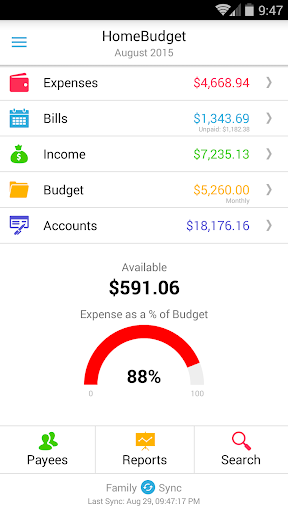
Home Budget with Sync is a comprehensive financial management application designed to help users track expenses, income, bills-due, and account balances across multiple platforms. Available on Android, iPhone/iPad, Windows, and Mac OS, this app offers instant data synchronization between devices, ensuring that your financial information is always up-to-date regardless of the platform you use. The app stands out with its integrated feature set, allowing seamless transitions from bill payments to expense tracking and balance adjustments.

One of the key features of Home Budget with Sync is Family Sync, which enables multiple devices within a household to exchange financial information automatically over the air. This advanced functionality supports collaborative budgeting among family members, making it easier to manage shared expenses and incomes. With support for budgeting, detailed reports, and analysis through charts and graphs, Home Budget with Sync provides users with valuable insights into their financial habits, helping them make informed decisions about spending and saving.

Features

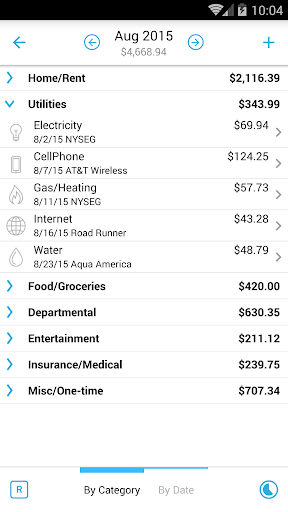
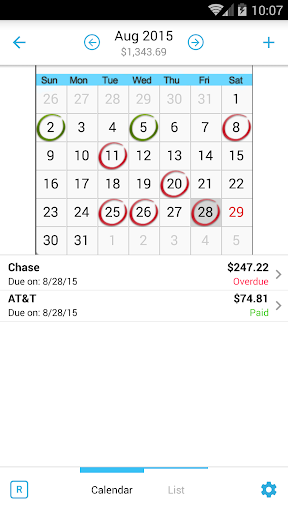
Home Budget with Sync boasts an extensive array of features tailored to meet diverse financial management needs. Users can create, edit, and delete expenses, income, and recurring bills, with the option to associate these entries with specific accounts and payees. The app's ability to attach photo images of receipts and allow on-screen resizing adds a layer of convenience and accuracy to expense tracking. Additionally, the calendar and list views for bills, along with reminders, ensure that users never miss a payment deadline.

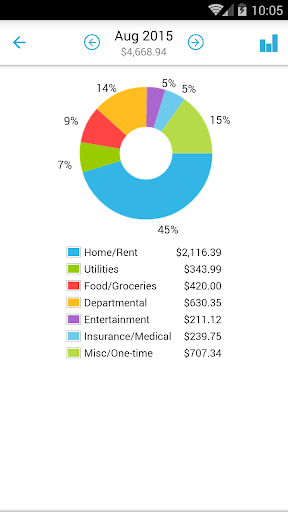
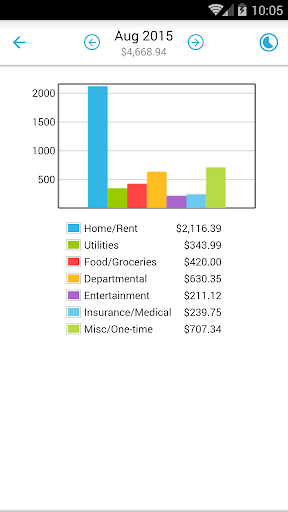
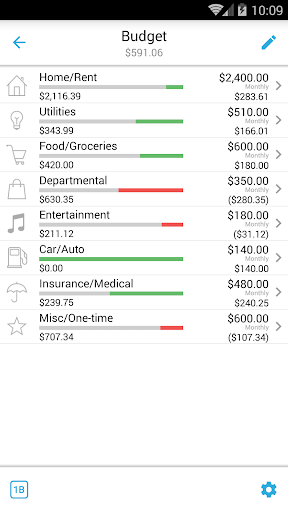
The app's category and budget management tools empower users to set budgets and track expenses at both category and sub-category levels. With support for various account types such as checking, savings, credit, debit, and cash, Home Budget with Sync allows precise tracking of account balances and transactions. The inclusion of trend charts for expenses, budgets, and income over the last six months, as well as pie/bar charts for expense breakdowns, provides visual representations of financial data. Furthermore, the ability to export data and reports via email or WiFi enhances accessibility and sharing capabilities.

Account and Fund Security

In the realm of financial applications like Home Budget with Sync security of accounts and funds is paramount to protect sensitive user data and ensure peace of mind. This application employs a robust set of features designed to safeguard personal financial information through various means. Firstly it offers password protection which acts as the first line of defense against unauthorized access. Only users with the correct credentials can gain entry into the app ensuring that all stored financial details remain confidential. Additionally the app provides backup and restore functionality for the complete application data including all receipts. This ensures that even if a device is lost or damaged users can easily retrieve their financial records without any loss of information. The app also supports the association of expenses and income entries with specific accounts such as checking savings credit debit and cash accounts allowing for accurate tracking of account balances. By integrating these features Home Budget with Sync not only secures user data but also enhances the overall management of finances. Users benefit from knowing that their expense tracking budgeting and bill payments are conducted within a secure environment. Furthermore the ability to sync data across multiple devices using Family Sync adds another layer of convenience without compromising on security. All transactions and updates made on one device are automatically reflected on others maintaining consistency and reliability in financial records. In summary Home Budget with Sync delivers comprehensive account and fund security by implementing stringent protective measures while simultaneously offering practical tools for efficient financial oversight.

Transaction experience

The transaction experience in financial management apps plays a crucial role in simplifying the process of handling expenses income and bill payments. Home Budget with Sync excels in providing an intuitive and seamless transaction experience that caters to both individual and household needs. One of its standout features is the integrated set of functionalities that allow a bill to transform into an expense upon payment thereby adjusting the account balance simultaneously. This interconnected system streamlines the entire transaction process eliminating the need for manual adjustments and reducing the chances of errors. Moreover the app supports the creation editing and deletion of expenses recurring expenses income and bills offering users flexibility and control over their financial activities. It includes options to associate accounts and payees with transactions enhancing the accuracy and detail of financial records. For instance users can attach photo images of receipts directly to expense entries providing visual documentation and easy reference. Another significant aspect is the automatic syncing capability across multiple devices facilitated by Family Sync. This feature enables households to exchange expense and income information effortlessly ensuring that everyone has access to up-to-date financial data regardless of the device used. With calendar views list displays and bill reminders users can stay on top of upcoming payments and deadlines preventing missed dues and late fees. Additionally the inclusion of trend charts pie bar graphs and exportable reports enriches the transaction experience by delivering insightful analyses of spending patterns and budget adherence. Overall Home Budget with Sync transforms routine financial tasks into a cohesive and efficient workflow empowering users to manage their money with confidence and ease.

Props

User-friendly interface

Comprehensive financial tracking

Instant cross-platform sync

Advanced budgeting tools

Family collaboration features

Cons

Separate purchase for each OS

Limited free version

Complex setup for beginners

Occasional sync issues

High cost for full features

Features and Functions

What is this app and what can I use it for?

A finance app for tracking expenses, income, and budgets across devices.

How do I download and install this app on my device?

Visit Google Play Store, search for the app, and tap Install.

How do I get started after opening the app for the first time?

Follow the on-screen instructions to set up your profile and preferences.

What are the main features and capabilities of this app?

Expense tracking, budgeting, bill reminders, and family sync features.

How can I customize my experience and adjust preferences?

Adjust settings in the Preferences menu to customize your experience.

How do I save or bookmark my favorite content for later access?

Use the Bookmark feature to save favorite content for later access.

How can I share content with friends or on social media?

Tap the Share button to post content on social media or send to friends.

How do I access detailed information and explore more content?

Navigate to the Explore section for detailed information and more content.

What permissions does this app need and how do I manage them?

The app requires basic permissions; manage them in device settings.

How do I check for updates and keep the app running smoothly?

Check for updates in the app store to keep the app running smoothly.
Show more

User Reveiws

{{ comment.reviewer_name }}
{{ comment.review_date_formatted}}
{{ comment.review_content }}
{{ tab.name }}
{{ comment.reviewer_name }}
{{ comment.review_date_formatted}}
{{ comment.review_content }}
No reviews with this rating