
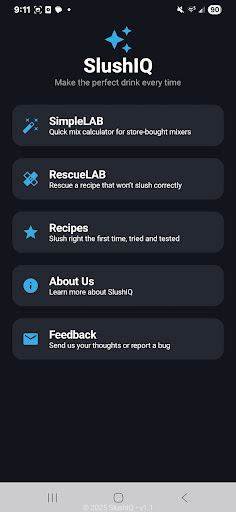
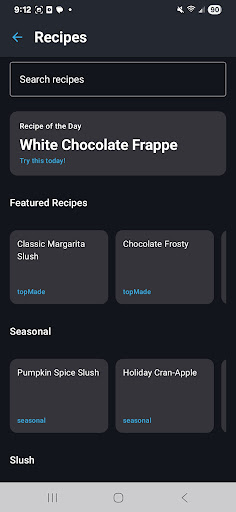
SlushIQ is a revolutionary app designed for slushie and frozen drink enthusiasts who want perfect consistency every time. The app provides precise tools to calculate Brix and ABV levels, ensuring your slushie mix achieves the ideal texture and flavor balance. Whether you're using popular home slush machines like Ninja SLUSHi or Iceman Slush-Ease, SlushIQ optimizes your drink-making experience.
The app features an extensive recipe library with tested formulas for cocktails, mocktails, and various frozen beverages. Additionally, its smart assistant, Brixley Chat, offers real-time help for fixing bad mixes and creating new recipes. With science-backed tools like RescueLAB and SimpleLAB, users can quickly adjust watery or icy mixes into perfectly balanced slushies.
SlushIQ is particularly useful for home entertainers and mixology hobbyists who want to impress guests with consistently excellent frozen drinks. By eliminating guesswork and reducing ingredient waste, this app ensures professional-quality slushies with minimal effort.
SlushIQ stands out with its comprehensive suite of specialized tools designed specifically for frozen drink enthusiasts. The app's flagship feature is its Frozen Drink Calculator, which provides live predictions for Brix, ABV, and freeze points, helping users achieve perfect consistency in every batch.
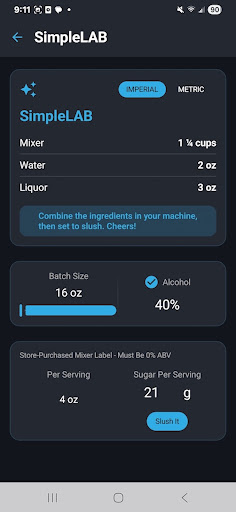
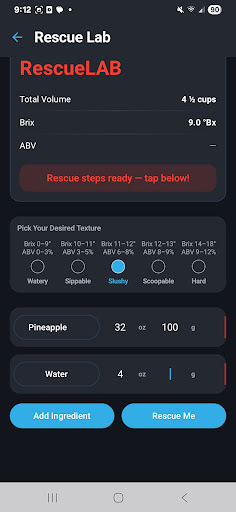
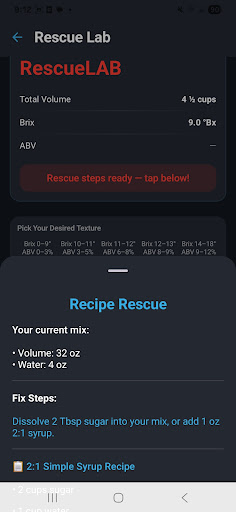
The app includes several innovative laboratories: RescueLAB instantly fixes problematic mixes that are too watery or icy, while SimpleLAB helps convert store-bought mixers into slushie-ready batches. The built-in Brixley Chat assistant serves as a virtual mixologist, offering recipe suggestions and troubleshooting advice. Users can also take advantage of batch scaling functionality to adjust recipes for any occasion, from intimate gatherings to large parties.
All these features work seamlessly across various home slush machines, making SlushIQ an indispensable tool for both casual users and serious frozen drink enthusiasts. The combination of scientific precision and practical usability sets this app apart in the food and drink category.
User-friendly interface
Extensive recipe library
Precise calculation tools
Real-time mix assistance
Versatile machine compatibility
Premium features locked
Occasional calculation delays
Limited free recipes
Device compatibility issues
Subscription pricing model

Save at the pump AND in store with deals on gas, snacks & drinks at Murphy USA.
 4.80
4.80
Easy and fast ordering, improved customization, and an enhanced guest experience
4.20
Get 20% Back at thousands of 4+ star restaurants when you pay using inKind
4.90
Find the perfect restaurant for any occasion on OpenTable.
4.60
KFC-US Mobile App
3.30
Order ahead & earn rewards
4.60
Rescue tasty unsold food from local stores for ½ price or less.
4.90
Quickly order, pay, reload your Starbucks Card and earn free drinks or food.
4.80
Get food, grocery, and retail essentials delivered fast with DoorDash.
4.70
Bringing a piece of Louisiana to your fingertips!
4.90
Wings for Delivery or Carryout
4.80
The fast and practical app to help you make the best cocktails at home!
4.60
Discover restaurants, reservations, food delivery, reviews & services near me
4.60
Order ahead, receive points with qualifying purchase & redeem available rewards.
4.50
Discover. Create. Plate.
4.40
Exclusive deals, mobile ordering & find your nearest BK® restaurant anytime
4.40
Your most rewarding experience is in the Cracker Barrel app.
4.20
Now it's easier than ever to order, pay and earn delicious rewards.
3.50
Order ahead. Earn Delicious Rewards.
3.20


User Reveiws