UK ETA

3.20

Information

Category:

Travel & Local

Price:

Free

Rank:

54

Rating:

3.20

Overview

The UK ETA app provides a streamlined digital solution for travelers needing an Electronic Travel Authorisation to enter the United Kingdom. This innovative application simplifies the process by allowing users to complete their ETA application directly from their Android device. With features like passport chip scanning and facial recognition, the app ensures a secure and efficient application process.

Designed specifically for travelers who meet the eligibility criteria, the app supports those with Android 12 and above devices. The entire application can be completed in just 10 minutes, making it an ideal choice for individuals seeking a quick and hassle-free way to obtain their travel authorization before visiting the UK.

Features

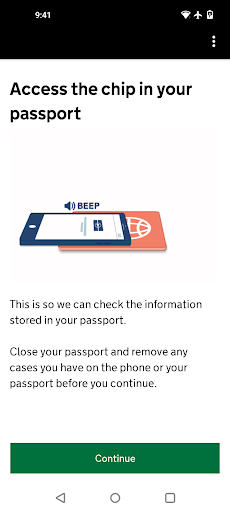
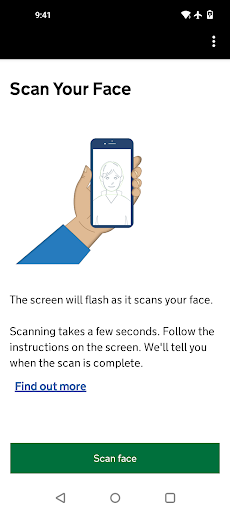
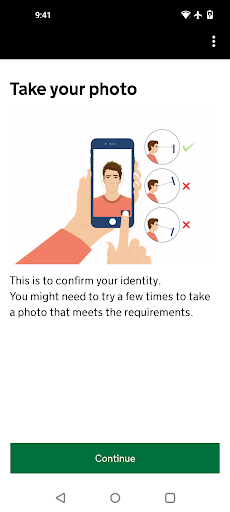
The UK ETA app offers several distinctive features that enhance the user experience. First, its advanced NFC technology enables users to scan their passport's chip, ensuring accurate data capture while maintaining security standards. Additionally, the facial recognition feature allows applicants to verify their identity seamlessly through a simple photo capture process.

Another key feature is the app's ability to link approved ETAs directly to the applicant's passport. This eliminates the need for physical documentation during travel. Moreover, the app prioritizes privacy and security, as no personal information is stored on the device after use. These capabilities make the UK ETA app a reliable tool for modern travelers.

Booking authenticity

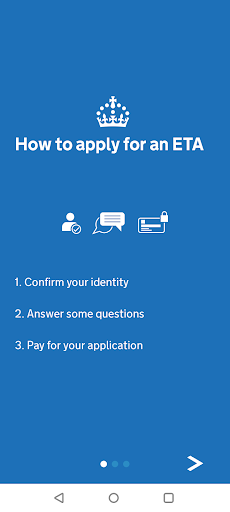
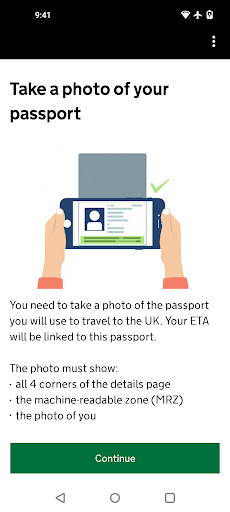
The UK ETA app provides a secure and reliable platform for travelers to apply for an electronic travel authorisation (ETA) before visiting the United Kingdom. Booking authenticity is of utmost importance as it ensures that the application process is legitimate and recognized by UK authorities. The app facilitates this by enabling users to submit their applications through a streamlined digital process directly from their mobile devices. To start, users are required to take a photo of their passport, scan the embedded chip using NFC technology, and capture a facial scan for identity verification. This multi-step verification not only simplifies the application procedure but also significantly reduces the chances of fraudulent applications. Once the application is submitted, users can expect a decision within 3 working days, although faster responses are possible. Importantly, the approved ETA is linked directly to the applicant's passport used during the application, ensuring that the authorization is valid and authentic. This seamless integration between the ETA approval and the traveler's identification documents underscores the booking authenticity provided by the app. For those planning to visit the UK, the assurance that their travel authorization is processed through official channels offers peace of mind and eliminates uncertainties associated with unauthorized or dubious third-party services.

Price transparency

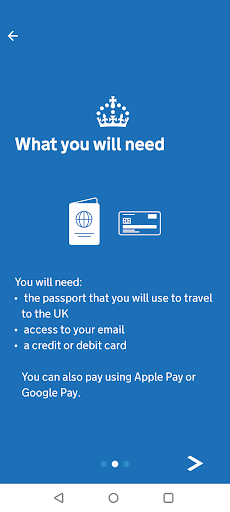
Price transparency in the context of the UK ETA app refers to the clear and upfront communication of all costs associated with applying for an electronic travel authorisation. When using the app to apply for an ETA, users are guided through a straightforward process that culminates in a payment step. Here, the app clearly outlines the fees involved, which can be settled using various payment methods including credit cards, debit cards, or Apple Pay. This transparent approach ensures that applicants are fully aware of the financial commitment required from the onset, eliminating any hidden charges or surprises during the application process. Furthermore, the app does not necessitate entering travel details, thus streamlining the procedure and focusing solely on the essential elements needed for ETA approval. By providing a concise and predictable cost structure, the UK ETA app empowers users to budget accordingly and make informed decisions regarding their travel plans. Additionally, the ability to apply using a mobile device running Android 12 and above, coupled with the necessity of having NFC capabilities for passport scanning, highlights the modern and accessible nature of this service. Overall, the emphasis on price transparency not only enhances user trust but also aligns with best practices in digital service delivery, making the entire ETA application experience both efficient and equitable.

Props

User-friendly interface

Fast application process

Secure data handling

Convenient mobile access

Direct passport linking

Cons

Requires Android 12+

Limited to NFC-enabled phones

No offline functionality

Dependent on internet access

Not suitable for all nationalities
Features and Functions

What is this app and what can I use it for?

The UK ETA app helps you apply for travel authorization to the UK quickly and securely.

How do I download and install this app on my device?

Search for 'UK ETA' on Google Play Store, tap Install, and open after downloading.

How do I get started after opening the app for the first time?

Start by taking a photo of your passport and follow the guided steps to complete your application.

What are the main features and capabilities of this app?

Key features include passport scanning, facial recognition, and secure payment processing.

How can I customize my experience and adjust preferences?

You cannot customize much, but ensure correct details during the application process.

How do I save or bookmark my favorite content for later access?

The app does not support bookmarking; save your confirmation email for future reference.

How can I share content with friends or on social media?

Share your approved ETA status via email or messaging apps using your confirmation details.

How do I access detailed information and explore more content?

Detailed guidance is available on the official UK government website linked in the app.

What permissions does this app need and how do I manage them?

The app requires NFC access and camera permissions to scan your passport and take photos.

How do I check for updates and keep the app running smoothly?

Enable automatic updates in Google Play Store settings to keep the app updated regularly.
Show more

User Reveiws

{{ comment.reviewer_name }}
{{ comment.review_date_formatted}}
{{ comment.review_content }}
{{ tab.name }}
{{ comment.reviewer_name }}
{{ comment.review_date_formatted}}
{{ comment.review_content }}
No reviews with this rating