BlueDriver OBD2 Scan Tool

3.90

Information

Category:

Auto & Vehicles

Price:

Free

Rank:

41

Rating:

3.90

Overview

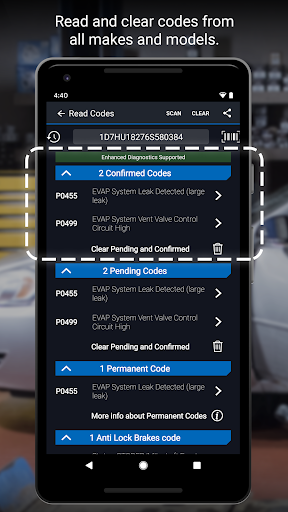
BlueDriver OBD2 Scan Tool transforms your mobile device into a professional-grade diagnostic tool for vehicles. This app, paired with the BlueDriver Bluetooth Sensor, allows users to read and clear trouble codes, generate detailed repair reports, and access advanced diagnostics without any cables or guesswork. Suitable for both professional mechanics and DIY enthusiasts, it provides comprehensive vehicle analysis including ABS, airbag, transmission systems, and more.

The application stands out through its extensive database of real-world fixes and model-specific repair reports. With features like Mode 6 test results, smog readiness checks, live data graphing, and multi-language support, BlueDriver ensures that users can make informed decisions about their vehicle maintenance. Its wireless functionality and global compatibility further enhance the user experience, making it an essential tool for modern automotive care.

Features

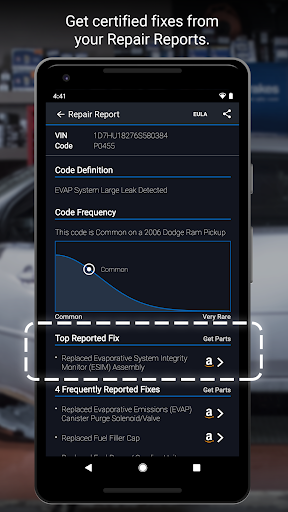
BlueDriver offers an impressive range of features designed to simplify vehicle diagnostics. The app provides wireless scanning capabilities via Bluetooth, allowing users to read and clear diagnostic trouble codes for various systems such as engine, ABS, airbag, and transmission. One standout feature is the ability to generate professional-grade Repair Reports specific to your vehicle's make, model, and year, which can be saved and shared easily.

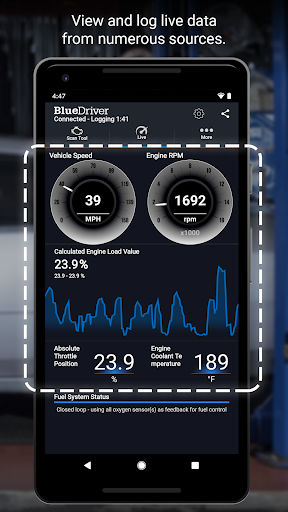
Advanced functionalities include accessing Mode 6 test results, checking smog readiness, viewing freeze frame data, and monitoring live parameters through interactive graphs. The app supports enhanced diagnostics for major car brands and offers likely fixes in plain language. With metric and imperial settings, global coverage, and no subscription requirements, BlueDriver delivers exceptional value while maintaining ease of use across different devices and platforms.

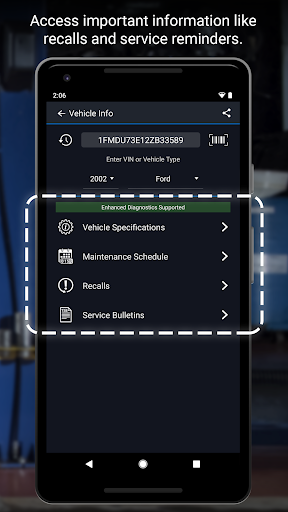
Detailed vehicle information

Accessing detailed vehicle information is crucial for effective diagnostics and repairs as it allows users to understand the specific conditions and requirements of their vehicles. The BlueDriver OBD2 Scan Tool app excels in providing comprehensive details about a vehicle's status by reading and clearing trouble codes including check engine ABS airbag transmission and more. This functionality empowers users to not only identify issues but also comprehend the underlying problems through clear easy-to-understand information. Additionally the app generates saves and shares professional-grade Repair Reports tailored to the exact vehicle and trouble code ensuring that users have access to precise data relevant to their situation. With enhanced diagnostics coverage spanning various manufacturers and models the app ensures compatibility with a wide range of vehicles. Users can view live data with multi-PID interactive graphing which offers real-time insights into vehicle performance metrics. Furthermore the ability to check smog readiness and freeze frame data adds another layer of detail aiding in thorough vehicle assessments. By offering likely fixes explained in plain language the app bridges the gap between complex automotive jargon and practical solutions making it accessible even for DIY enthusiasts. Overall the detailed vehicle information provided by BlueDriver enhances user confidence in diagnosing and addressing automotive issues effectively.

Price transparency

Price transparency is essential in the automotive diagnostics sector as it ensures users are fully aware of the costs associated with using diagnostic tools and services. The BlueDriver OBD2 Scan Tool app addresses this need by offering a free-to-install application that pairs seamlessly with the BlueDriver Sensor sold separately. This approach eliminates hidden fees or subscription requirements commonly found in similar diagnostic tools thereby providing users with upfront cost clarity. The app itself does not impose any recurring charges allowing users to utilize its full range of features without worrying about unexpected expenses. Moreover the availability of the BlueDriver Sensor both in-app and on the official website www.BlueDriver.com ensures that users can make informed purchasing decisions based on transparent pricing information. Additionally the appu2019s capability to preview a Repair Report without needing a sensor by simply entering the VIN and a trouble code further demonstrates its commitment to openness. This feature enables potential buyers to evaluate the toolu2019s value proposition before committing financially. By combining robust diagnostic functionalities with clear pricing structures BlueDriver fosters trust among its users who can confidently invest in the necessary hardware knowing exactly what they are paying for. Ultimately this transparency in pricing contributes significantly to customer satisfaction and loyalty as users appreciate the straightforward and honest business practices employed by the app developers.

Props

User-friendly interface

Comprehensive diagnostics

No subscription fees

Wireless functionality

Real-world fix database

Cons

Sensor sold separately

Limited free features

Device compatibility issues

Occasional connection problems

Requires account setup

Features and Functions

What is this app and what can I use it for?

A powerful OBD2 scan tool for vehicle diagnostics and repairs.

How do I download and install this app on my device?

Download from Google Play Store and install by following on-screen instructions.

How do I get started after opening the app for the first time?

Create a BlueDriver account and pair with the sensor to begin scanning.

What are the main features and capabilities of this app?

Read codes, generate reports, view live data, and access advanced diagnostics.

How can I customize my experience and adjust preferences?

Adjust units, language, and other preferences in the settings menu.

How do I save or bookmark my favorite content for later access?

Save reports directly within the app after generating them.

How can I share content with friends or on social media?

Share reports via email or export options available in the app.

How do I access detailed information and explore more content?

Access detailed information through interactive graphs and diagnostic menus.

What permissions does this app need and how do I manage them?

The app needs Bluetooth permissions to connect with the sensor.

How do I check for updates and keep the app running smoothly?

Check for updates in the app store or settings menu regularly.
Show more

User Reveiws

{{ comment.reviewer_name }}
{{ comment.review_date_formatted}}
{{ comment.review_content }}
{{ tab.name }}
{{ comment.reviewer_name }}
{{ comment.review_date_formatted}}
{{ comment.review_content }}
No reviews with this rating