
Microsoft Family Safety

3.90

Information

Category:

Parenting

Price:

Free

Rank:

6

Rating:

3.90

Overview

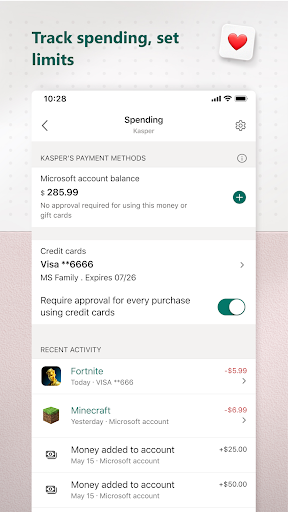
Microsoft Family Safety is a comprehensive parenting app designed to help families develop healthy digital habits while ensuring children's safety online. The app allows parents to set up parental controls, manage screen time, and filter inappropriate content across multiple devices including Android, Xbox, and Windows.

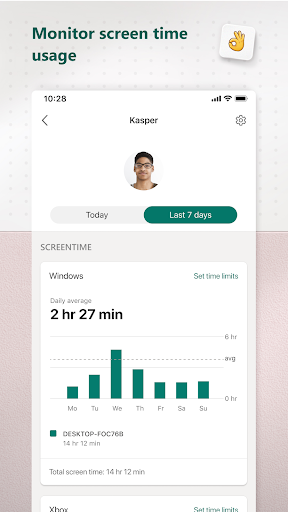
A key feature of the app is its activity reporting system, which provides parents with detailed insights into their children's digital activities through weekly email summaries. This helps facilitate meaningful conversations about responsible device usage. The app also enables kids to safely explore the digital world within the boundaries set by their parents, ensuring age-appropriate content consumption.

The app's value lies in its ability to balance protection and independence, giving parents peace of mind while allowing children to learn and grow in a safe digital environment. Whether it's setting app-specific time limits or enabling kid-friendly browsing, Microsoft Family Safety offers practical tools for modern families.

Features

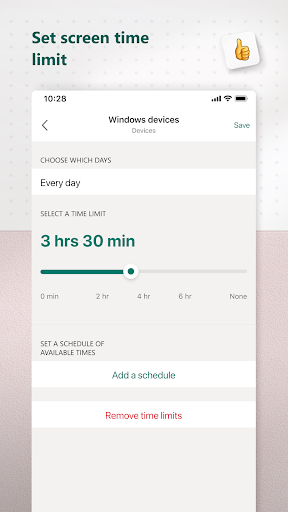
Microsoft Family Safety offers an impressive range of features tailored for both parents and children. For parents, the app provides robust parental controls that allow filtering of inappropriate apps, games, and websites specifically on Microsoft Edge. It also supports setting time limits on apps and games across Android, Xbox, and Windows platforms, helping manage overall screen time effectively.

One standout feature is the detailed activity reporting system. Parents receive weekly summaries of their children's screen time and app usage, empowering them to guide their kids' digital habits. Additionally, real-time notifications alert parents when children request more screen time, ensuring timely decision-making.

For children, the app ensures a safer online experience by enforcing parental controls and offering access to age-appropriate content. With privacy as a priority, Microsoft emphasizes data security and user consent, making this app a reliable choice for families seeking a balanced approach to digital safety.

Parenting content credibility & expert validation

In the realm of digital parenting tools Microsoft Family Safety stands out by providing content that is not only credible but also validated by experts in child safety and digital wellness. The importance of reliable information cannot be overstated when it comes to protecting children online. This app offers a comprehensive suite of features designed with the input of professionals who understand the nuances of internet safety and child psychology. By setting parental controls parents can filter out inappropriate apps and games ensuring that their children are only accessing age-appropriate content. Additionally the app promotes kid-friendly browsing on Microsoft Edge further safeguarding young users from potentially harmful web content. These measures are backed by research and align with best practices recommended by child development experts. For parents this means peace of mind knowing that the digital environment they've curated for their children is both secure and conducive to learning. Moreover the app's activity reporting feature provides insights into children's screen time and online activities which are crucial for fostering open dialogues about responsible internet use. With weekly email summaries parents can stay informed about their kids' digital habits and address any concerns proactively. This level of transparency and control empowers families to navigate the digital landscape safely while nurturing independence in children. In essence Microsoft Family Safety bridges the gap between technology and parenting expertise offering a tool that is as educational as it is protective.

Growth tracking accuracy

Microsoft Family Safety excels in providing accurate growth tracking mechanisms that are essential for monitoring children's development in the digital age. Understanding how children interact with technology is key to helping them build healthy digital habits. The app achieves this through detailed activity reports that log screen time and online usage offering an objective view of a child's digital footprint. These reports are meticulously compiled using advanced algorithms that track app usage gaming sessions and browsing patterns across multiple platforms including Android Xbox and Windows devices. Such cross-platform tracking ensures that parents receive a holistic view of their children's digital activities regardless of the device being used. The precision of these reports allows parents to identify trends such as excessive gaming or social media use which might indicate underlying issues requiring attention. Furthermore the app's ability to set specific time limits on apps and games enables parents to manage their children's exposure to digital media effectively. When children request additional screen time parents are promptly notified allowing for timely interventions. This responsive system helps maintain a balanced approach to digital consumption promoting healthier lifestyle choices. Importantly all data collection methods employed by Microsoft Family Safety adhere to strict privacy standards ensuring that sensitive information is handled responsibly. With explicit consent from children the app uses accessibility app usage and device admin service permissions to gather interaction data. This data is then used to enforce parental controls such as exiting unauthorized apps or blocking prohibited ones. By combining precise tracking capabilities with robust privacy protections Microsoft Family Safety delivers a solution that not only monitors growth accurately but also respects user autonomy making it an invaluable tool for modern families striving to balance technology use with personal development.

Props

Comprehensive parental controls

Multi-device compatibility

Weekly activity reports

Real-time notifications

Kid-friendly web filters

Cons

Limited to Microsoft ecosystem

Requires child consent

No iOS support

Premium features locked

Complex setup process

Features and Functions

What is this app and what can I use it for?

A parenting app for managing kids' screen time and online safety

How do I download and install this app on my device?

Download from Google Play Store and follow installation prompts

How do I get started after opening the app for the first time?

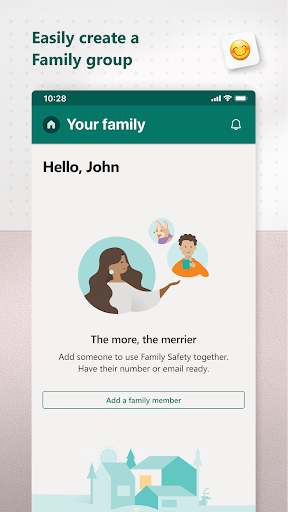
Sign in with a Microsoft account and set up family members

What are the main features and capabilities of this app?

Parental controls, activity reports, and screen time management

How can I customize my experience and adjust preferences?

Adjust settings via the app's preferences menu for each child

How do I save or bookmark my favorite content for later access?

Use activity reports to track and save important usage data

How can I share content with friends or on social media?

Share app insights via email or messaging apps directly

How do I access detailed information and explore more content?

Access detailed reports through the app's dashboard section

What permissions does this app need and how do I manage them?

App needs accessibility permissions; manage in settings

How do I check for updates and keep the app running smoothly?

Check Google Play Store or app settings for updates
Show more

User Reveiws

{{ comment.reviewer_name }}
{{ comment.review_date_formatted}}
{{ comment.review_content }}
{{ tab.name }}
{{ comment.reviewer_name }}
{{ comment.review_date_formatted}}
{{ comment.review_content }}
No reviews with this rating