
MySynchrony

4.60

Information

Category:

Finance

Price:

Free

Rank:

32

Rating:

4.60

Overview

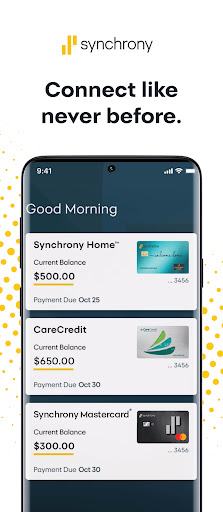
MySynchrony is a comprehensive financial management app designed for users who hold credit cards issued by Synchrony. This powerful tool allows you to securely manage all your Synchrony credit card accounts in one centralized location. With features like biometric authentication, payment scheduling, balance checking, and transaction history review, the app provides complete control over your financial activities.

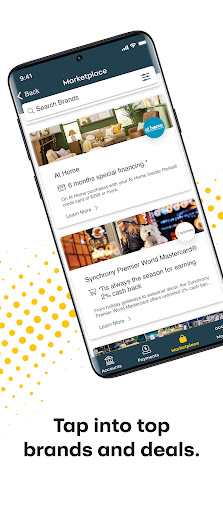
The app goes beyond basic account management by offering value-added services such as access to the Synchrony Marketplace for deals and offers, the Finance 101 blog for financial tips, and a 24/7 Knowledge Center for support. Whether you're at home or on the go, MySynchrony ensures you have instant access to your financial information while maintaining top-level security standards.

Features

MySynchrony stands out with its robust set of features tailored for credit card management. The app supports multiple authentication methods including biometric login, ensuring secure access to your sensitive financial data. Users can conveniently schedule payments, check balances, and review transaction histories across all their Synchrony-issued credit cards from a single interface.

Beyond core banking functions, the app provides access to valuable resources such as the Finance 101 blog and a comprehensive Knowledge Center. The integrated Synchrony Marketplace offers exclusive deals and savings opportunities from partner merchants nationwide. Additionally, users can customize their experience by managing statement delivery preferences and linking multiple bank accounts for bill payments.

Account and Fund Security

In the realm of financial applications like MySynchrony managing account and fund security is paramount to ensure user trust and safety. This mobile application provides a comprehensive suite of security features designed to protect users credit card accounts from unauthorized access and potential fraud. One of the standout security implementations in MySynchrony is the utilization of Biometric Authentication which allows users to log in securely using their unique physiological characteristics such as fingerprints or facial recognition. This method significantly enhances security by ensuring that only the authorized user can access sensitive financial information. Additionally the app enables users to securely add or delete multiple bank accounts providing an extra layer of control over which accounts are linked for bill payments. The ability to manage statement delivery preferences also contributes to account security by minimizing the risk of sensitive information being intercepted through traditional mail. Furthermore MySynchrony offers a 24/7 Knowledge Center where users can discover answers to common security concerns and access resources to better understand how to protect their accounts. These robust security measures not only safeguard user funds but also provide peace of mind knowing that their financial data is protected against modern cyber threats. By prioritizing account and fund security MySynchrony establishes itself as a reliable tool for managing credit card accounts securely and efficiently.

Transaction experience

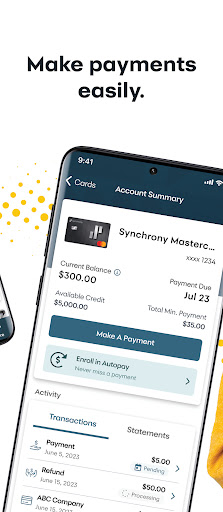
The transaction experience within financial applications plays a crucial role in user satisfaction and efficiency when managing credit card accounts. MySynchrony excels in delivering a seamless and intuitive transaction experience by offering a range of functionalities that cater to the diverse needs of its users. With this mobile app users can schedule and manage payments for their accounts with ease allowing them to stay on top of their financial obligations without hassle. The ability to check balance and credit limit anytime anywhere ensures that users have real-time insights into their spending capacity and can make informed financial decisions. Moreover reviewing transaction and payment history is straightforward enabling users to track their expenditures and identify any discrepancies promptly. This level of transparency not only empowers users with greater control over their finances but also aids in budgeting and financial planning. Additionally the app provides access to the Synchrony Marketplace where users can explore savings deals and offers from partner merchants nationwide enhancing the overall value proposition of using the app. By integrating these features MySynchrony transforms routine financial transactions into a streamlined and user-friendly experience. The emphasis on providing a smooth and efficient transaction process underscores the app commitment to improving user engagement and satisfaction making it an indispensable tool for anyone looking to manage their credit card accounts effectively.

Props

User-friendly interface

Secure biometric login

Comprehensive account management

Valuable financial resources

Exclusive marketplace offers

Cons

Limited to Synchrony cards

No PayPal integration

Separate app for savings

Occasional syncing issues

Marketplace availability varies

Features and Functions

What is this app and what can I use it for?

A finance app for managing Synchrony credit cards securely.

How do I download and install this app on my device?

Search 'MySynchrony' on Google Play Store and install it.

How do I get started after opening the app for the first time?

Register your account and enable biometric login.

What are the main features and capabilities of this app?

Manage payments, check balances, review transactions.

How can I customize my experience and adjust preferences?

Adjust notification settings in the app menu.

How do I save or bookmark my favorite content for later access?

Save favorite deals in the Synchrony Marketplace.

How can I share content with friends or on social media?

Share deals via social media links provided.

How do I access detailed information and explore more content?

Explore detailed info in the Knowledge Center.

What permissions does this app need and how do I manage them?

Grant necessary permissions during installation.

How do I check for updates and keep the app running smoothly?

Enable auto-updates in Google Play Store settings.
Show more

User Reveiws

{{ comment.reviewer_name }}
{{ comment.review_date_formatted}}
{{ comment.review_content }}
{{ tab.name }}
{{ comment.reviewer_name }}
{{ comment.review_date_formatted}}
{{ comment.review_content }}
No reviews with this rating