
PayByPhone

3.80

Information

Category:

Auto & Vehicles

Price:

Free

Rank:

13

Rating:

3.80

Overview

PayByPhone is a leading mobile parking payment solution that simplifies the parking experience for millions of drivers worldwide. With over 95 million users trusting the app, it offers an intuitive and smart way to manage parking payments across more than 1,300 locations in the UK, North America, France, Germany, and Switzerland.

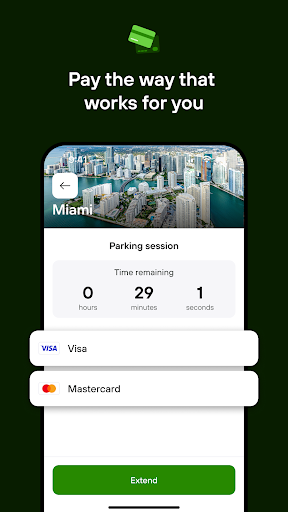
The app allows users to pay for parking seamlessly using their preferred payment methods directly from their phones. By entering or scanning a location code, choosing the duration, and paying via credit/debit card, Google Pay, Apple Pay, or PayPal, users can enjoy a quick and secure parking experience. Additionally, features like remote session management, SMS notifications, and emailed receipts make parking stress-free and efficient.

Features

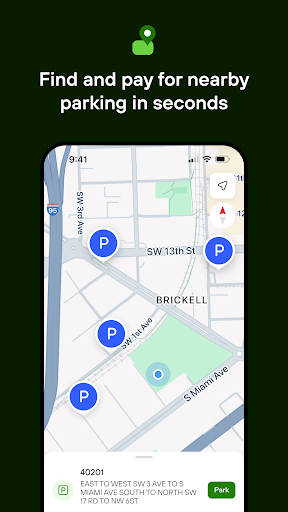
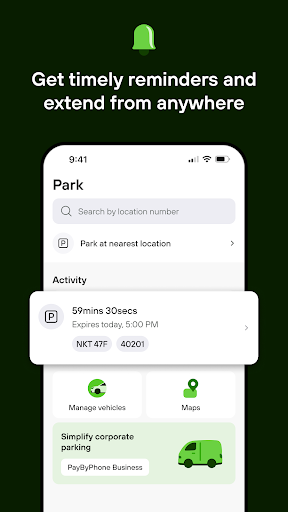
PayByPhone stands out with its comprehensive set of features designed to enhance user convenience. The app enables users to start and extend parking sessions remotely, ensuring they never have to worry about returning to their vehicle on time. The Today View widget provides a quick overview of active parking sessions, while Maps and Nearby functionalities help locate available parking spots effortlessly.

Users benefit from timely SMS or push notifications alerting them before their parking session expires, allowing them to extend their time if needed. The app also maintains a detailed parking history, making it easy to review past sessions. Additional features include pinning parking locations for easy vehicle retrieval and receiving emailed receipts for expense tracking, thus offering a complete parking management solution.

Detailed vehicle information

In the context of mobile parking solutions like PayByPhone detailed vehicle information refers to the comprehensive data related to a user's vehicle that is essential for efficient and accurate parking transactions. This feature is crucial as it ensures that users can easily manage their parking sessions with confidence knowing that all relevant vehicle details are accurately recorded and accessible within the app. PayByPhone allows users to input and store important vehicle information such as license plate numbers vehicle make and model which streamlines the parking process by pre-filling these details during transactions. This not only saves time but also reduces the risk of errors in entering license plate numbers manually each time a parking session is initiated. Additionally having detailed vehicle information readily available enhances the overall user experience by enabling features such as remote session extensions and easy retrieval of parked locations. Users benefit significantly from this functionality as it provides peace of mind knowing that their vehicle details are securely stored and utilized correctly for each parking session. The ability to review past parking sessions linked to specific vehicles also offers valuable insights into parking habits and expenses making it easier for users to manage their parking-related costs effectively. By ensuring that detailed vehicle information is both comprehensive and easily accessible PayByPhone delivers a seamless and reliable parking experience that meets the needs of modern drivers who demand convenience and accuracy in their daily commutes.

Price transparency

Price transparency in the realm of mobile parking applications like PayByPhone pertains to the clear and upfront presentation of all costs associated with parking transactions. This aspect is vital as it empowers users to make informed decisions regarding their parking choices without any hidden fees or unexpected charges. PayByPhone excels in providing price transparency by clearly displaying all costs including parking rates additional service fees if any and taxes before users confirm their transactions. This commitment to openness not only builds trust with users but also enhances their overall satisfaction with the service. The app further supports price transparency by offering multiple payment options such as credit/debit cards Google Pay Apple Pay and PayPal where available allowing users to choose the most cost-effective method for their transactions. Moreover PayByPhone enables users to review their parking history and associated costs which contributes to better financial planning and expense tracking. With emailed receipts provided for every transaction users have a reliable record of their expenditures which is particularly beneficial for business travelers and expense reporting purposes. By prioritizing price transparency PayByPhone ensures that users can enjoy a hassle-free parking experience with full visibility into their financial commitments thereby reinforcing the appu2019s reputation as a trusted and user-centric mobile parking solution.

Props

User-friendly interface

Wide geographic coverage

Multiple payment options

Remote session management

Timely notifications

Cons

Limited offline functionality

Occasional service fees

Dependent on network connectivity

Location-specific features

Premium feature costs

Features and Functions

What is this app and what can I use it for?

A mobile app for managing parking payments easily.

How do I download and install this app on my device?

Visit Google Play Store, search PayByPhone, and install.

How do I get started after opening the app for the first time?

Open the app, select your location, and start parking.

What are the main features and capabilities of this app?

Remote session management, timely alerts, and receipt tracking.

How can I customize my experience and adjust preferences?

Adjust notification settings and preferred payment methods.

How do I save or bookmark my favorite content for later access?

Pin your parking spot and save receipts automatically.

How can I share content with friends or on social media?

Share parking details via SMS or social media links.

How do I access detailed information and explore more content?

Use the app's map to find parking and view history.

What permissions does this app need and how do I manage them?

Needs location access; manage in phone settings.

How do I check for updates and keep the app running smoothly?

Enable auto-updates in Google Play Store settings.
Show more

User Reveiws

{{ comment.reviewer_name }}
{{ comment.review_date_formatted}}
{{ comment.review_content }}
{{ tab.name }}
{{ comment.reviewer_name }}
{{ comment.review_date_formatted}}
{{ comment.review_content }}
No reviews with this rating