
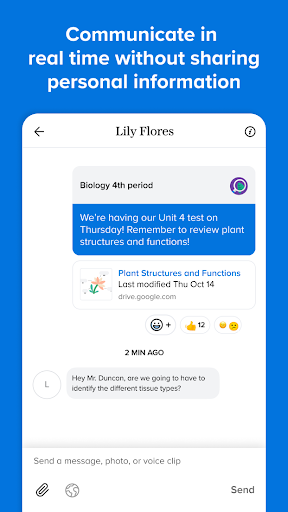

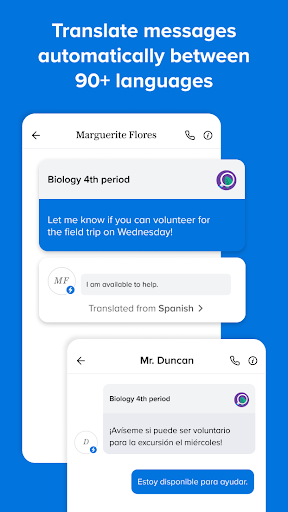
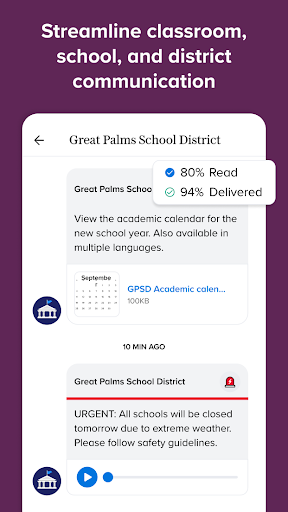
Remind is an essential communication tool designed specifically for the education sector, helping students, teachers, and parents stay connected in real-time. The platform supports instant messaging across all devices while ensuring user privacy through its secure system that keeps personal contact details confidential. One of its standout features is the ability to translate messages into over 90 languages, making it highly versatile for diverse educational environments.
In addition to basic messaging, Remind allows users to share various types of content including files, photos, and links from popular websites. This functionality enhances collaboration among educators, students, and families, enabling them to work together more effectively outside traditional classroom settings. With millions already utilizing this service, Remind proves invaluable for managing school-related communications efficiently.
Remind offers a comprehensive set of features tailored to meet the unique needs of educational communities. Its primary feature is real-time communication which can be accessed via any device, ensuring constant connectivity between teachers, students, and parents regardless of location. Another significant aspect is the privacy protection mechanism; users can communicate without revealing their private contact information, thus maintaining professional boundaries.
The app also includes robust multilingual support with automatic translation capabilities covering more than 90 languages. This ensures inclusivity and accessibility for non-native English speakers within the community. Furthermore, Remind facilitates resource sharing by allowing users to distribute files, images, and web content seamlessly. These combined functionalities make Remind not just a messaging app but a holistic solution for modern educational communication challenges.
Real-time messaging
Privacy protection
Multilingual support
Content sharing options
User-friendly interface
Limited advanced tools
No video conferencing
Occasional bugs
Basic free version
Ads in free tier

Universe simulator: Find & explore planets system, outer space, astronomy events
 4.60
4.60
Nighty Night Circus - Bedtime story for kids
4.10
Age-Related Child Developmental Milestones
4.80
Welcome to the Speak Navajo Language Application - Volume 1
4.50
Master the NRP with 700+ questions, rationales, and updated NREMT scenarios.
3.00
Monkey Preschool Lunchbox: 7 exciting educational games for your preschooler.
4.30
THE ESTABLISHED "GO TO" ARMY BOARD PREPARATION APP!
4.30
An aviator’s preparation, study and test tool for FAA Knowledge Exams.
3.80
The "Go To" app for Airmen studying for promotion to SSgt and TSgt
4.30
Experience the sky, planet earth and the solar system like never before
4.90
A fast and fun way to learn guitar - works with any guitar.
4.60
Study for your 608 certification.
4.50
Pass your FAA written with flying colors - Study Buddy can help.
4.30
A magical world of fun, building, and learning with Mickey Mouse and more!
4.20
Skelly is a fully poseable, anatomically correct reference skeleton for artists.
4.10
Learn to make peaceful contact with extraterrestrial civilizations
4.10
An animated storybook app to help ease your child through toilet training.
3.70
Hasbro's Classic Board Game - Make Cavity Sam better or get the buzzer!
3.50
Quiz App to help case managers studying for CCMC Certification, 200+ Questions
3.40


User Reveiws