Whirlpool Filter Challenge

4.70

Information

Category:

Entertainment

Price:

Free

Rank:

27

Rating:

4.70

Overview

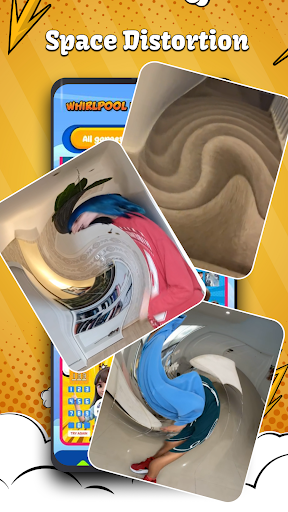
Whirlpool Filter Challenge offers a unique entertainment experience through its collection of viral filter challenges. The app allows users to transform their photos and videos with creative effects such as the Whirlpool Effect, which distorts visuals in a swirling manner, and Ranking Filters that engage users' decision-making skills.

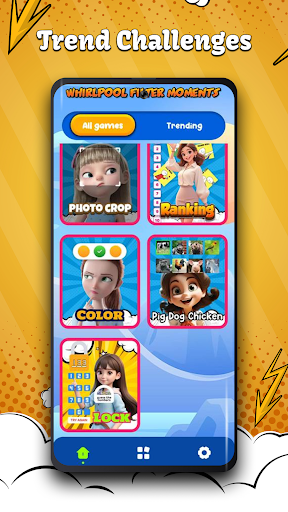
In addition to these features, the app includes Color Filters for completing specific tasks, animal-themed filters like Pig-Dog-Chicken for reflex testing, and Lock Filters that challenge logic by requiring codes to unlock. With the Photo Crop Challenge and access to trending videos, it provides an engaging platform for users seeking fun and creativity.

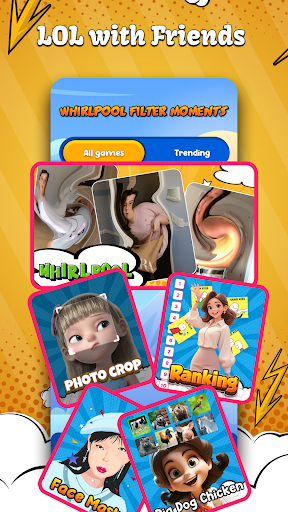
This app is perfect for those who enjoy interactive content on social media, allowing them to participate in popular challenges, impress friends with imaginative visual effects, and explore endless entertainment possibilities.

Features

Whirlpool Filter Challenge stands out with its diverse range of innovative photo and video filters. The Whirlpool Effect creates mesmerizing distortions, while Ranking Filters let users rank items based on various topics, offering both amusement and engagement.

The app also features Color Filters for task completion, playful animal sound challenges with Pig-Dog-Chicken Filters, and brain-teasing Lock Filters. Users can partake in the Photo Crop Challenge trend and browse through a curated selection of trending videos, ensuring they stay up-to-date with current social media crazes.

Each feature is designed to enhance user interaction, encourage sharing on social platforms, and provide hours of entertainment through creative expression and friendly competition among peers.

Content variety & freshness

In the realm of digital entertainment applications like Whirlpool Filter Challenge the importance of content variety and freshness cannot be overstated. This app excels in providing a diverse array of engaging filters and challenges that cater to different user preferences and moods. From the Whirlpool Effect which transforms objects into surreal forms to the Ranking Filter that tests users judgment skills the app offers an eclectic mix of experiences. The Color Filters provide a creative outlet for users who enjoy solving puzzles through color while the Pig Dog Chicken Filter adds an element of fun and reflex testing. Additionally the Lock Filter challenges users problem-solving abilities making each interaction with the app unique and stimulating. By regularly updating its content library with new trending videos and filters the app ensures that users always have something novel to explore. This commitment to variety and freshness not only keeps the user experience dynamic but also encourages repeated engagement as users look forward to discovering what is new. The constant influx of fresh content helps maintain user interest over time preventing the app from becoming predictable or monotonous. In essence the Whirlpool Filter Challenges dedication to offering a wide range of up-to-date interactive content significantly enhances its value proposition as an entertainment platform.

User engagement duration & retention

For entertainment apps such as Whirlpool Filter Challenge maintaining high levels of user engagement duration and retention is crucial for long-term success. The app achieves this by incorporating several features designed to captivate users attention and encourage them to return frequently. One key aspect is the inclusion of viral filter challenges that are inherently social and shareable prompting users to involve their friends and participate in collective laughter. The Whirlpool Effect and Ranking Filter exemplify this by transforming ordinary moments into extraordinary visual experiences and competitive ranking games respectively. These interactive elements not only entertain but also foster a sense of community among users who can compare results and challenge one another. Furthermore the app leverages trending topics and videos to keep its content relevant and appealing ensuring that users find value in returning to see what is currently popular. The Photo Crop Challenge and other trend-based filters tap into existing social media crazes driving traffic back to the app as users seek to participate in these phenomena. By combining these engaging features with regular updates that introduce new filters and challenges the app successfully creates a cycle of continuous discovery and interaction. This strategy effectively boosts both the duration of individual sessions and overall retention rates as users become invested in exploring all that the app has to offer. Ultimately the Whirlpool Filter Challenges focus on creating compelling shareable content leads to sustained user engagement and loyalty.

Props

User-friendly interface

Variety of creative filters

Engaging social features

Frequent updates with new challenges

Compatible with most devices

Cons

Some filters may be repetitive

Premium features require payment

Ads can disrupt experience

Occasional performance issues

Limited customization options

Features and Functions

What is this app and what can I use it for?

An app for creating viral filter challenges for fun and social sharing.

How do I download and install this app on my device?

Visit Google Play Store, search 'Whirlpool Filter', tap Install, and open after download.

How do I get started after opening the app for the first time?

Launch the app, select a filter challenge, follow on-screen instructions to start.

What are the main features and capabilities of this app?

Offers Whirlpool Effects, Ranking Filters, Color Tasks, Animal Challenges, Lock Puzzles.

How can I customize my experience and adjust preferences?

Adjust settings via menu options to personalize your challenge experience.

How do I save or bookmark my favorite content for later access?

Save favorites by tapping bookmark or save option within challenge view screen.

How can I share content with friends or on social media?

Share creations directly from the app using integrated social media buttons.

How do I access detailed information and explore more content?

Explore more content by browsing trending videos section within the app.

What permissions does this app need and how do I manage them?

Requires camera access; manage permissions in device settings if needed.

How do I check for updates and keep the app running smoothly?

Check updates in Play Store app under My apps & games section regularly.
Show more

User Reveiws

{{ comment.reviewer_name }}
{{ comment.review_date_formatted}}
{{ comment.review_content }}
{{ tab.name }}
{{ comment.reviewer_name }}
{{ comment.review_date_formatted}}
{{ comment.review_content }}
No reviews with this rating