
ETH Cloud Miner- Earn Ethereum

3.50

Information

Category:

Events

Price:

Free

Rank:

33

Rating:

3.50

Overview

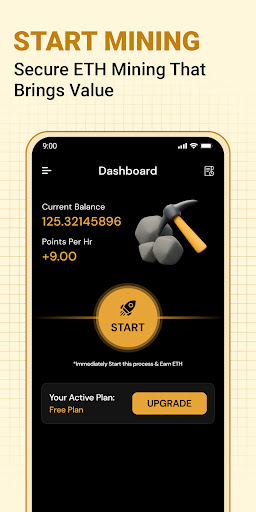
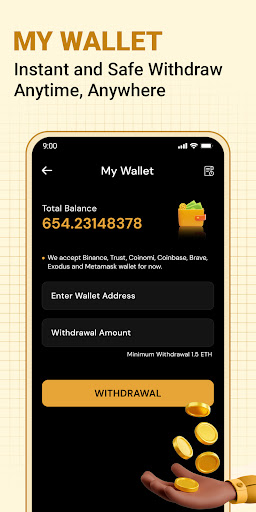
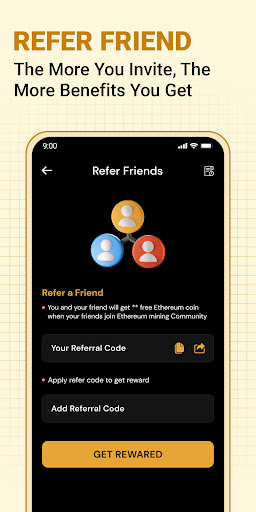
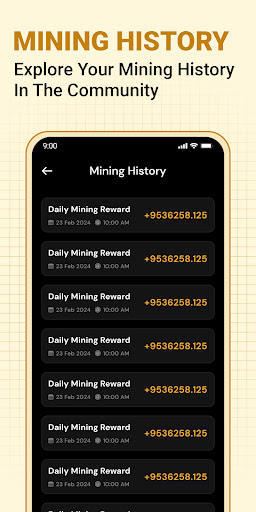
ETH Cloud Miner is a convenient monitoring tool for users engaged in cloud-based Ethereum mining. The app allows you to track essential mining statistics such as hashrate, uptime, and estimated daily rewards directly from your mobile device. It connects to third-party cloud mining services, providing real-time updates on your mining performance without utilizing your phone's CPU or GPU.

This application is particularly useful for both beginners and experienced crypto miners who want to stay informed about their mining activities while on the go. By offering an intuitive dashboard interface, ETH Cloud Miner ensures that users can easily access critical data related to their Ethereum mining operations. This makes it simpler to manage investments and optimize mining strategies effectively.

Features

One of the standout features of ETH Cloud Miner is its ability to display live mining information without any impact on your device’s resources. The app provides detailed insights into key metrics like hashrate, session data, and estimated earnings, all presented through an easy-to-navigate dashboard. Additionally, it supports integration with various cloud mining providers, allowing seamless synchronization of your account details.

Another notable feature is the app's lightweight design, ensuring smooth performance even on older devices. Users also benefit from the app's disclaimer and transparency regarding its non-affiliation with Ethereum.org, reinforcing trust and clarity. Overall, these features make ETH Cloud Miner a reliable choice for anyone looking to monitor their Ethereum mining activities efficiently.

Task creation & detail customization

Task creation and detail customization are essential features for any application that aims to help users manage their activities effectively. In the case of ETH Cloud Miner, this functionality allows users to set up and monitor their Ethereum mining tasks with precision and ease. The ability to create detailed tasks enables miners to keep track of various aspects of their mining operations, such as hashrate, uptime, and estimated daily rewards. This level of detail ensures that users can make informed decisions about their mining strategies and optimize their cloud-based resources accordingly. By providing comprehensive options for task setup, including setting thresholds for alerts on performance drops or hardware issues, ETH Cloud Miner empowers its users to maintain optimal mining efficiency. Furthermore, the customization aspect extends to how users can view and interact with their data, offering different visualization tools that cater to individual preferences and needs. As a result, whether a user is new to cryptocurrency mining or an experienced miner, they can tailor the app's interface to suit their level of expertise and personal workflow, enhancing both usability and productivity. The value derived from these capabilities is significant; it not only streamlines the process of managing complex mining operations but also contributes to a more engaging and personalized user experience within the app.

Reminder settings

Reminder settings play a crucial role in ensuring that users of ETH Cloud Miner stay informed about their Ethereum mining activities without having to constantly check the app manually. This feature allows individuals to configure notifications based on specific events or time intervals, which is particularly beneficial given the dynamic nature of cryptocurrency mining where conditions can change rapidly. For instance, users might want to be alerted when there's a drop in hashrate indicating potential issues with the mining hardware or service disruptions at the cloud provideru2019s end. They could also set reminders for routine checks on mining session data or updates regarding estimated earnings so they never miss out on important financial milestones related to their investment in cloud mining services. ETH Cloud Miner offers flexible reminder options that accommodate varying schedules and priorities, enabling users to define what kind of alerts they wish to receive and how frequently they should be notified. Whether itu2019s through push notifications directly to their mobile devices or emails sent periodically throughout the day, these customizable alerts ensure timely communication between the user and their ongoing mining projects. Moreover, by integrating seamlessly into daily routines via well-timed prompts, reminder settings contribute significantly towards maintaining consistent engagement with oneu2019s digital assets while minimizing distractions caused by unnecessary interruptions during non-critical periods. Ultimately, this thoughtful approach enhances overall satisfaction with using ETH Cloud Miner as it aligns perfectly with modern lifestyles characterized by busy schedules yet high expectations for staying connected digitally.

Props

User-friendly interface

Real-time mining stats

No device resource usage

Supports multiple providers

Lightweight and efficient

Cons

Limited to cloud mining

No direct mining capability

Third-party dependent

Premium features may cost extra

Requires existing account

Features and Functions

What is this app and what can I use it for?

A monitoring tool for cloud-based Ethereum mining stats

How do I download and install this app on my device?

Visit Google Play Store, search for ETH Cloud Miner, and tap install

How do I get started after opening the app for the first time?

Open the app, log in with your cloud mining credentials, and view your dashboard

What are the main features and capabilities of this app?

Live stats tracking, multi-provider support, resource-efficient monitoring

How can I customize my experience and adjust preferences?

Adjust notification settings and select preferred mining data views

How do I save or bookmark my favorite content for later access?

Save favorite reports by bookmarking specific dashboard views

How can I share content with friends or on social media?

Share mining stats via social media or messaging apps directly

How do I access detailed information and explore more content?

Access detailed analytics by tapping on specific data points

What permissions does this app need and how do I manage them?

Needs account login permission; manage in app settings

How do I check for updates and keep the app running smoothly?

Enable auto-updates in Google Play Store to keep the app current
Show more

User Reveiws

{{ comment.reviewer_name }}
{{ comment.review_date_formatted}}
{{ comment.review_content }}
{{ tab.name }}
{{ comment.reviewer_name }}
{{ comment.review_date_formatted}}
{{ comment.review_content }}
No reviews with this rating