GENKI Vocab for 3rd Ed.

2.80

Information

Category:

Education

Price:

$ 6.99

Rank:

20

Rating:

2.80

Overview

GENKI Vocab for 3rd Ed. is an educational app designed to help users learn over 1,200 essential Japanese words at their own pace. This official app complements the third edition of GENKI: An Integrated Course in Elementary Japanese, a globally recognized learning material with more than 2.5 million copies sold worldwide.

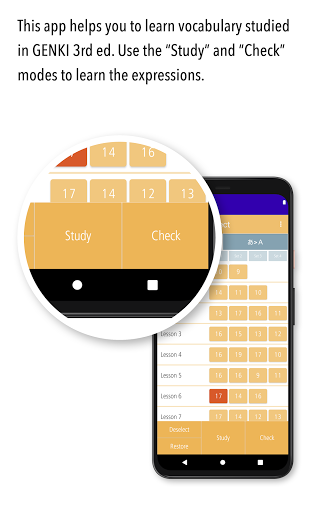
The app offers three main modes - Study, Check, and List - each crafted to enhance vocabulary acquisition through various interactive methods. With audio recordings by native speakers, fun illustrations, and bookmarking features, it ensures an engaging and efficient learning experience. The self-paced study approach allows learners to master important beginning-level vocabulary progressively.

Whether you are a beginner or looking to reinforce your existing knowledge, this app provides a structured yet flexible way to expand your Japanese vocabulary. Its comprehensive features make it suitable for anyone aiming to build a solid foundation in elementary Japanese.

Features

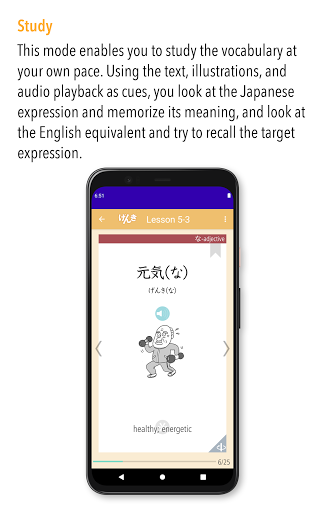
One of the standout features of GENKI Vocab for 3rd Ed. is its three distinct study modes: Study, Check, and List. In the Study mode, users can view words, meanings, and example sentences repeatedly. Native speaker audio recordings and fun illustrations further enhance retention and understanding.

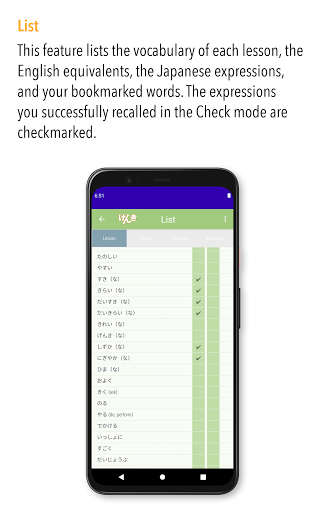
In the Check mode, learners can assess their mastery of the vocabulary. By sorting words into mastered and unmastered categories, users can focus on challenging words, making their study sessions more efficient. The List mode displays all covered vocabulary, allowing users to track progress and review effectively.

Additional functionalities include bookmarking favorite words, arranging lists in different orders, and automatic checkmarks for mastered words. These features collectively ensure a personalized and productive learning journey tailored to individual needs.

Content accuracy & authority

The GENKI Vocab for 3rd Ed. app provides a reliable and authoritative source for learning elementary Japanese vocabulary, ensuring that users receive accurate and trustworthy content. As an official app of the GENKI series, which has sold over 2.5 million copies globally, it offers more than 1,200 essential words curated specifically for beginners. The app's content is directly based on the third edition of GENKI An Integrated Course in Elementary Japanese, a widely recognized and respected resource in Japanese language education. Each word comes with meanings and example sentences, all recorded by native Japanese speakers to ensure correct pronunciation and usage. This guarantees that learners are exposed to authentic language patterns and vocabulary. Additionally, the app includes fun illustrations that help reinforce memory retention without compromising the accuracy of the content. The availability of three different list arrangements including lesson order, a-i-u-e-o order, and alphabetical order ensures systematic learning while allowing users to track their progress efficiently. Checkmarks placed next to mastered words provide a clear indication of advancement, further enhancing the reliability of the learning process. With its robust foundation in the acclaimed GENKI series and meticulous attention to linguistic detail, this app delivers both precision and authenticity in teaching Japanese vocabulary.

Personalized learning paths

GENKI Vocab for 3rd Ed. excels in offering personalized learning paths tailored to individual user needs, making the process of acquiring new vocabulary both efficient and engaging. One of the standout features is the app's ability to adapt to each learner's pace by enabling them to bookmark specific words they find challenging or particularly interesting. These bookmarked words are then compiled into a dedicated Bookmark list within the List mode, allowing users to focus on areas where they need the most improvement. Furthermore, the Check mode plays a crucial role in personalization by helping learners assess their mastery levels. Users can sort words into categories of mastered and unmastered, effectively removing already learned vocabulary from their study set. This targeted approach ensures that learners concentrate only on words that still require attention, streamlining the overall learning experience. The Study mode complements this personalization by providing repeated exposure to words, meanings, and example sentences, reinforcing memorization through repetition. Native speaker audio recordings and illustrative aids further enhance this adaptive learning environment. By combining these features, GENKI Vocab creates a customized learning journey that not only adapts to individual progress but also maximizes efficiency, enabling users to achieve proficiency in elementary Japanese vocabulary at their own speed and according to their unique learning preferences.

Props

User-friendly interface

Native speaker audio

Engaging illustrations

Efficient study methods

Comprehensive word list

Cons

OS version limited

No second edition support

Potential compatibility issues

Limited advanced vocabulary

Requires dedicated study time

Features and Functions

What is this app and what can I use it for?

An app for learning over 1200 Japanese words at your own pace

How do I download and install this app on my device?

Download from Google Play Store and install on compatible devices

How do I get started after opening the app for the first time?

Start by exploring Study Check and List modes for vocabulary practice

What are the main features and capabilities of this app?

Main features include Study Check modes and native speaker audio

How can I customize my experience and adjust preferences?

Customize by bookmarking words and arranging lists as preferred

How do I save or bookmark my favorite content for later access?

Bookmark words in Study mode to save them for later review

How can I share content with friends or on social media?

Share progress via social media directly from the app interface

How do I access detailed information and explore more content?

Access detailed information through the List mode's organized views

What permissions does this app need and how do I manage them?

App needs basic permissions managed in device settings

How do I check for updates and keep the app running smoothly?

Check for updates in the app store to keep functionality smooth
Show more

User Reveiws

{{ comment.reviewer_name }}
{{ comment.review_date_formatted}}
{{ comment.review_content }}
{{ tab.name }}
{{ comment.reviewer_name }}
{{ comment.review_date_formatted}}
{{ comment.review_content }}
No reviews with this rating