Step Counter - Pedometer & BMI

4.50

Information

Category:

Health & Fitness

Price:

Free

Rank:

51

Rating:

4.50

Overview

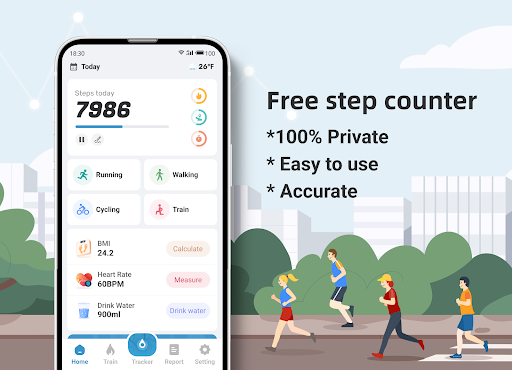
Step Counter - Pedometer & BMI is a comprehensive health and fitness application designed to track your daily steps, monitor BMI, and provide detailed activity reports. The app offers accurate step counting through your mobile device, eliminating the need for additional pedometer hardware.

Beyond basic step tracking, the app provides advanced features like GPS-based activity mapping, customizable training plans, and health metrics visualization. Whether you're a casual walker or dedicated fitness enthusiast, this app helps you maintain an active lifestyle while safeguarding your privacy with its 100% private data policy.

The combination of detailed performance reports, BMI tracking, and personalized training programs makes this app particularly valuable for users seeking to improve their overall fitness level while maintaining complete control over their personal data.

Features

Step Counter stands out with its robust feature set that includes real-time GPS tracking, allowing users to visualize their walking or running routes on detailed maps. The app's sensitivity adjustment feature ensures precise step counting tailored to individual walking patterns.

Training mode offers structured workout plans while recording essential metrics such as active time, distance traveled, and calories burned. The BMI calculator provides scientific health insights, helping users maintain optimal body weight. Additionally, the app generates comprehensive statistical reports across daily, weekly, and monthly periods.

What sets this app apart is its commitment to user privacy combined with practical features like adjustable sensitivity settings and offline functionality. These elements create a reliable fitness companion suitable for various user types, from beginners to experienced athletes.

Personalized planning

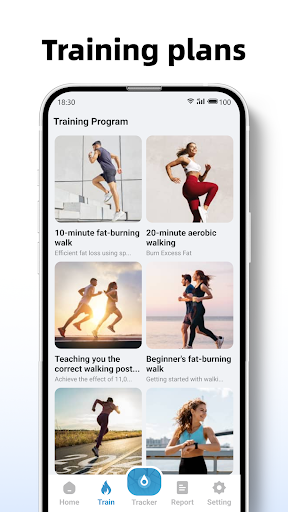
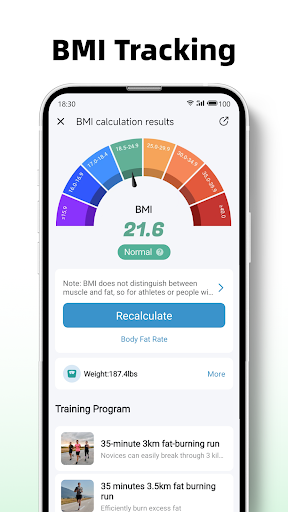
In the realm of health and fitness applications like Step Counter - Pedometer & BMI personalized planning plays a pivotal role in tailoring fitness regimes to individual needs. Personalized planning refers to the app's ability to analyze user data such as age weight height and activity level to generate customized workout plans that align with personal health goals. This feature is crucial because it ensures that users engage in exercises that are not only effective but also safe and achievable based on their current fitness levels. Step Counter achieves personalized planning through its training plans which offer structured guidance for activities such as 10-minute jogging sessions. These plans take into account the user's progress and adjust accordingly to provide an evolving challenge that promotes continuous improvement. Additionally the app calculates BMI providing another layer of personalization by helping users understand their body composition and how it relates to their overall health objectives. The benefits of this tailored approach are manifold; users receive a clear path to follow which increases motivation and adherence to their fitness routines. Moreover by having a plan that adapts to their progress users can avoid plateaus and maintain a steady pace of improvement. Ultimately personalized planning in Step Counter empowers users to take control of their health journey with a strategic and informed approach that maximizes results while minimizing the risk of injury or burnout.

Progress visualization

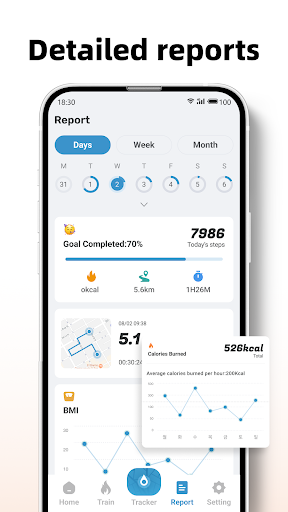
Progress visualization is an essential feature within health and fitness apps like Step Counter - Pedometer & BMI as it provides users with a tangible representation of their achievements and milestones. This feature involves displaying user data such as steps taken calories burned and distance traveled in an easily digestible format typically through graphs charts or other visual aids. The importance of progress visualization lies in its ability to motivate users by making their accomplishments visible and measurable thus reinforcing positive behaviors. Step Counter excels in progress visualization by offering detailed reports and graphs that cover daily weekly and monthly data. Users can access comprehensive insights into their activity patterns which allows them to identify trends set realistic goals and celebrate successes. For instance seeing a graph that shows an increase in daily steps over time can be incredibly rewarding and spur users on to maintain or even elevate their current activity levels. Furthermore the app tracks actions on a map giving a geographical context to the progress made during walks or runs. This spatial representation adds another dimension to the user's experience allowing them to retrace their routes and relive their physical endeavors. By providing these visual cues Step Counter enhances user engagement and retention as individuals are more likely to continue using an app that clearly demonstrates the value it adds to their lives. In essence progress visualization transforms abstract data points into meaningful stories of personal triumph fostering a deeper connection between the user and their health objectives.

Props

User-friendly interface

Accurate step tracking

Comprehensive reports

Private data handling

Customizable settings

Cons

Requires correct setup

Device limitations exist

Sensitivity adjustments needed

No advanced metrics

Basic free version

Features and Functions

What is this app and what can I use it for?

A free pedometer app tracking steps, offering BMI calculation and detailed activity reports

How do I download and install this app on my device?

Search Step Counter in Google Play Store, tap Install, and open after download completion

How do I get started after opening the app for the first time?

Grant necessary permissions, input personal details for accuracy, and start walking

What are the main features and capabilities of this app?

Step tracking, BMI calculation, GPS mapping, training plans, and detailed reports

How can I customize my experience and adjust preferences?

Adjust sensitivity settings, set preferred units, and customize notification preferences

How do I save or bookmark my favorite content for later access?

Use training mode to save specific workouts or mark favorite walking routes for future reference

How can I share content with friends or on social media?

Share your step count, BMI results, or training achievements directly through social media platforms

How do I access detailed information and explore more content?

Access historical data through the reports section showing daily, weekly, and monthly activity breakdowns

What permissions does this app need and how do I manage them?

Needs location access for mapping, motion sensors for step counting, manageable in phone settings

How do I check for updates and keep the app running smoothly?

Enable automatic updates in Google Play Store settings to receive latest version and bug fixes
Show more

User Reveiws

{{ comment.reviewer_name }}
{{ comment.review_date_formatted}}
{{ comment.review_content }}
{{ tab.name }}
{{ comment.reviewer_name }}
{{ comment.review_date_formatted}}
{{ comment.review_content }}
No reviews with this rating