
Videous lite-Made Easy

4.10

Information

Category:

Entertainment

Price:

Free

Rank:

39

Rating:

4.10

Overview

Videous lite is a streamlined video management and editing application tailored for users seeking efficient video processing. With its intuitive interface, the app offers practical functions that cater to both personal entertainment and professional creation needs.

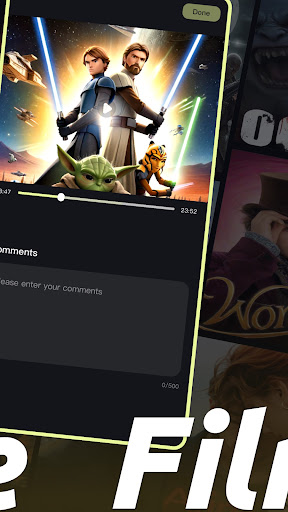
Upon opening Videous lite, users are greeted with a clear layout of their video library on the home page. Videos are arranged chronologically, each marked with length and size for easy management. The app provides quick video uploads, intuitive editing features, and comprehensive video management through tagging and organization tools.

Whether you're looking to upload, edit, or manage your video collection, Videous lite simplifies these processes, allowing users to focus on creativity and productivity. Its user-friendly design makes it accessible for all levels of users, enhancing both personal and professional video projects.

Features

Videous lite stands out with its array of features designed to enhance video processing. The app allows users to quickly upload local videos using the + button on the homepage, effortlessly expanding their video library.

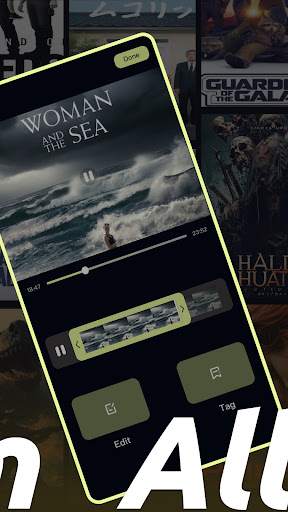
The editing functionality is particularly intuitive, enabling users to drag a progress bar for precise edits. This feature helps in crafting ideal clips swiftly. Additionally, the tag customization option aids in efficiently categorizing and retrieving videos, streamlining the management process.

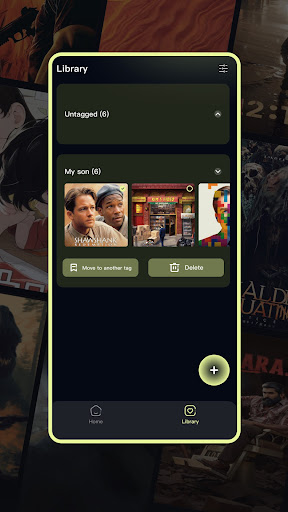
On the Library Page, users can view a list of all video tags and access relevant videos by clicking on them. This page also supports selecting, moving, and deleting videos, ensuring that users maintain a clean and organized video collection.

Content variety & freshness

In the realm of digital entertainment applications like Videous lite Made Easy content variety and freshness are crucial elements that determine user engagement and satisfaction. Content variety refers to the range of different video types formats and genres available within the application while freshness pertains to how regularly new content is added and how up-to-date the existing library remains. Videous lite addresses these aspects by offering a comprehensive video management system that allows users to upload edit and organize their personal video collections seamlessly. The app's intuitive interface enables users to quickly expand their video libraries through easy local video uploads using the + button on the homepage. This feature not only enhances content variety by encouraging users to add diverse videos but also ensures freshness as users can continuously update their collections with new footage. Furthermore the editing capabilities of Videous lite empower users to refine their videos creating unique clips that contribute to a dynamic and personalized content library. By allowing users to customize tags for efficient categorization and retrieval the app fosters an environment where content remains relevant and engaging. The ability to manage videos through selecting moving and deleting ensures that users can maintain a clean and organized video library which further enhances the perception of freshness. Overall Videous lite Made Easy excels in providing tools that promote both content variety and freshness ensuring that users have access to a vibrant and evolving collection of videos that cater to their personal entertainment and professional creation needs.

User engagement duration & retention

User engagement duration and retention are pivotal metrics for evaluating the success of entertainment applications such as Videous lite Made Easy. Engagement duration measures the amount of time users spend interacting with the app during each session while retention tracks how frequently users return to the application over time. Videous lite employs several strategies to enhance these metrics starting with its user-friendly design that simplifies video management and editing processes. The app's clear layout and chronological organization of videos on the homepage make it easy for users to navigate and manage their video libraries which encourages longer engagement sessions. Additionally the practical features such as the drag-and-drop editing function and tag customization options provide users with powerful tools to create and organize their ideal video clips efficiently. These features not only streamline the video editing process but also offer a sense of accomplishment and creativity that can significantly boost user satisfaction and encourage repeat usage. Moreover Videous lite's ability to display detailed information about each video including length and size helps users make informed decisions about their viewing and editing choices which can lead to more meaningful interactions with the content. The inclusion of administrative functions such as viewing comments and deleting videos further empowers users to take control of their video collections enhancing their overall experience. By focusing on delivering a seamless and enjoyable user experience Videous lite effectively increases user engagement duration and fosters long-term retention making it a valuable tool for both casual viewers and professional creators alike.

Props

User-friendly interface

Efficient video processing

Intuitive editing tools

Comprehensive management options

Quick video uploads

Cons

Limited advanced features

Basic video effects

Few customization options

Occasional bugs

Ads in free version

Features and Functions

What is this app and what can I use it for?

Videous lite is a video management and editing app for efficient processing and creativity.

How do I download and install this app on my device?

Download Videous lite from Google Play Store and install it on your device.

How do I get started after opening the app for the first time?

Open the app, explore the video library, and adjust settings to suit your preferences.

What are the main features and capabilities of this app?

Key features include video upload, editing, tagging, and comprehensive management tools.

How can I customize my experience and adjust preferences?

Customize your experience via the settings button to adjust app preferences.

How do I save or bookmark my favorite content for later access?

Save favorite videos by organizing them with tags for easy access later.

How can I share content with friends or on social media?

Share videos directly from the app to social media or with friends via links.

How do I access detailed information and explore more content?

Access detailed information by exploring video tags and library contents.

What permissions does this app need and how do I manage them?

The app requires storage and media permissions; manage them in device settings.

How do I check for updates and keep the app running smoothly?

Check for updates in the Google Play Store to keep the app running smoothly.
Show more

User Reveiws

{{ comment.reviewer_name }}
{{ comment.review_date_formatted}}
{{ comment.review_content }}
{{ tab.name }}
{{ comment.reviewer_name }}
{{ comment.review_date_formatted}}
{{ comment.review_content }}
No reviews with this rating