
Contraction Timer & Counter 9m

4.90

Information

Category:

Parenting

Price:

Free

Rank:

19

Rating:

4.90

Overview

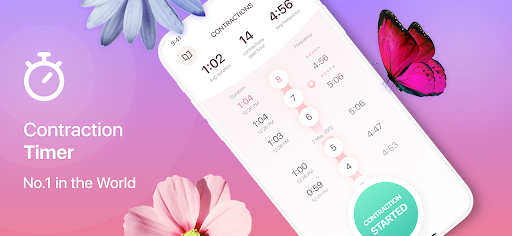
Contraction Timer & Counter 9m is a leading contraction tracking app designed specifically for expectant mothers. This app simplifies labor tracking by allowing users to time contractions with a single tap, providing critical information about contraction duration and frequency. Its intuitive design ensures ease of use during labor, making it the most downloaded contraction timer globally.

The app's primary function is to help determine when it's time to go to the hospital by analyzing contraction patterns. It also supports home birth planning by identifying labor stages in real-time. While the app provides standard indicators based on typical labor patterns, it emphasizes consulting healthcare providers for personalized medical advice. Thousands of women worldwide have successfully used this app during childbirth.

Features

Contraction Timer & Counter 9m offers several standout features that make it an essential tool for expectant mothers. The app uses a simple one-tap system to track the start and end of contractions, automatically calculating their duration and frequency. This feature eliminates manual calculations, ensuring accuracy even during stressful moments.

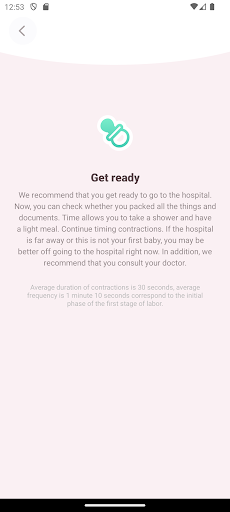
Another key feature is its notification system, which alerts users when their contraction patterns indicate it's time to head to the hospital. For those planning a home birth, the app provides real-time updates on labor stages. Additionally, the app encourages users to trust their instincts and seek medical attention if pain becomes unbearable, reinforcing safety as a priority. These features collectively create a reliable and supportive tool for childbirth preparation.

Parenting content credibility & expert validation

In the realm of parenting applications, content credibility and expert validation stand as pillars for ensuring users receive reliable and accurate information. Contraction Timer & Counter 9m positions itself not just as a tool but as a trusted companion during one of life's most critical momentsu2014childbirth. The app has been designed with input from childbirth experts to ensure that its recommendations align with standard medical practices. This is crucial because expecting mothers rely on such apps for guidance through labor, a process that varies greatly from person to person. By consulting with doctors and referencing established medical guidelines, the creators of this app have ensured that their contraction tracking algorithms and hospital timing suggestions are grounded in professional childbirth knowledge. However, it is commendable that the app also advises users to always consult with healthcare providers, reinforcing the message that while digital tools can offer support, they should not replace professional medical advice. This balanced approach enhances the appu2019s credibility among users who are looking for both convenience and reliability in their pregnancy journey. Furthermore, the developersu2019 openness to feedback via direct email communication adds another layer of trustworthiness, showing commitment to continuous improvement based on real user experiences and potential expert reviews.

Growth tracking accuracy

While primarily focused on contraction timing, Contraction Timer & Counter 9m also plays a significant role in growth tracking accuracy related to the progression of laboru2014a unique aspect compared to traditional growth tracking apps. For expecting mothers, understanding the patterns and stages of labor is akin to tracking developmental milestones; it provides reassurance and prepares them for what lies ahead. The app meticulously records each contractionu2019s start and end times, analyzing frequency and duration to predict labor stages accurately. This data-driven approach empowers mothers-to-be by providing clear insights into their labor progress without overwhelming them with complex medical jargon. The simplicity of tapping a button to log contractions belies the sophisticated algorithms working behind the scenes to deliver precise updates about labor advancement. Moreover, the appu2019s ability to notify users when it might be time to head to the hospital showcases its dedication to timely and actionable information delivery. Although every labor experience is unique, having an objective tool that offers consistent and accurate tracking can significantly alleviate anxiety associated with uncertainty. Additionally, the developersu2019 emphasis on listening to oneu2019s body underscores the importance of combining technological assistance with intuitive self-awareness. This holistic view ensures that users not only track their labor progress digitally but also remain attuned to their physical cues, ultimately leading to safer birth outcomes.

Props

User-friendly interface

Real-time labor tracking

Global popularity

Home birth support

Timely hospital notifications

Cons

Not a medical device

Limited to contractions

No advanced analytics

Relies on user input

Standard indicators only

Features and Functions

What is this app and what can I use it for?

A contraction timing app to track labor progress and hospital readiness

How do I download and install this app on my device?

Search 'Contraction Timer' on Google Play, tap Install, and open after download

How do I get started after opening the app for the first time?

Tap the Start button at the beginning of a contraction and Stop at the end

What are the main features and capabilities of this app?

Tracks contraction duration, frequency, and labor stage progression

How can I customize my experience and adjust preferences?

No customization available; follows standard labor indicators

How do I save or bookmark my favorite content for later access?

Data is saved automatically; no bookmarking feature included

How can I share content with friends or on social media?

Share contraction stats via email or messaging apps through the Share option

How do I access detailed information and explore more content?

Detailed contraction history is accessible in the app's main dashboard

What permissions does this app need and how do I manage them?

Requires basic permissions like notifications; manage in phone settings

How do I check for updates and keep the app running smoothly?

Enable auto-updates in Google Play Store to keep the app current
Show more

User Reveiws

{{ comment.reviewer_name }}
{{ comment.review_date_formatted}}
{{ comment.review_content }}
{{ tab.name }}
{{ comment.reviewer_name }}
{{ comment.review_date_formatted}}
{{ comment.review_content }}
No reviews with this rating