PlayStation Family

3.50

Information

Category:

Lifestyle

Price:

Free

Rank:

51

Rating:

3.50

Overview

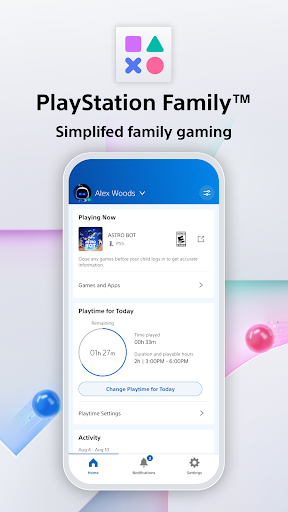
PlayStation Family is a comprehensive parenting tool designed to simplify family gaming management. This app provides parents with essential features to monitor and control their child's gaming activities effectively.

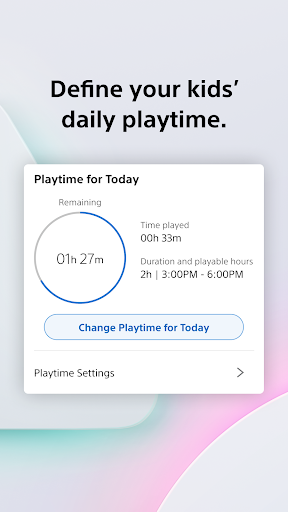
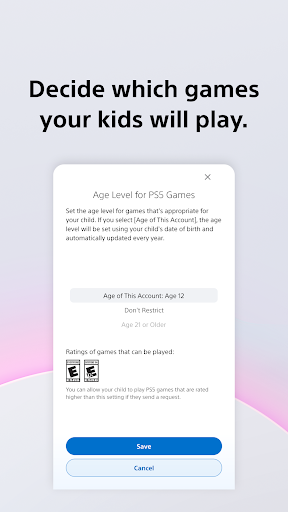
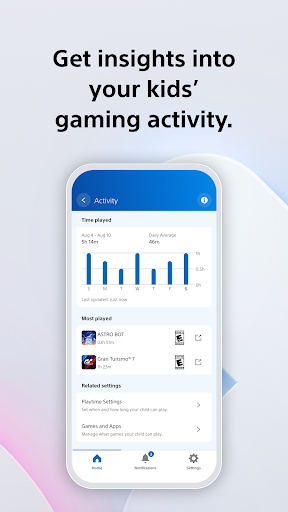
The app offers an intuitive activity report that gives real-time insights into your child's gaming habits, including online status and playtime hours. With customizable parental controls, you can define appropriate playtime schedules and set content restrictions based on age recommendations.

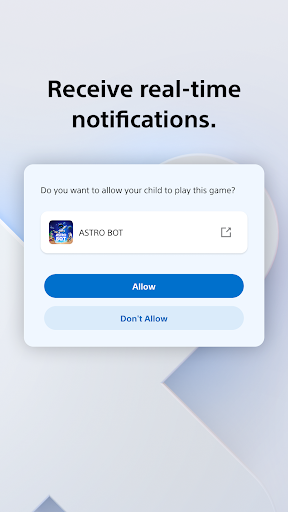
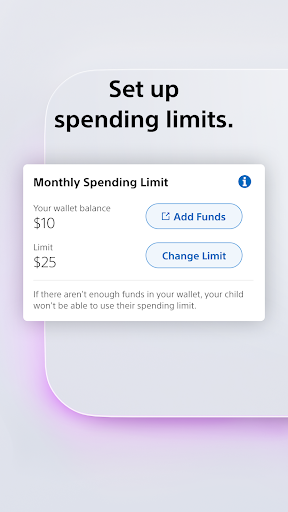
Parents can also manage social interactions, spending limits, and receive instant notifications for playtime extension requests. The PlayStation Family app ensures children engage in healthy gaming practices while maintaining a balanced lifestyle.

Features

PlayStation Family stands out with its robust set of features tailored for parental control. The app's easy setup process allows parents to create child accounts with recommended age-based restrictions, ensuring only suitable content is accessible.

A key feature is the customizable playtime management system. Parents can establish daily gaming schedules that align with family routines, whether it's study time, meals, or bedtime. The activity report provides detailed analytics of gaming patterns over the past week.

Real-time notifications enable instant responses to extra playtime requests directly from your mobile device. Additionally, the app lets you control social interactions and set monthly spending limits for PlayStation Store purchases, giving parents complete oversight of their child's gaming experience.

Lifestyle category coverage

The PlayStation Family app offers comprehensive coverage of essential lifestyle management features tailored specifically for family gaming scenarios. This application goes beyond basic parental controls by providing a holistic solution that addresses various aspects of children's gaming activities. The app's functionality spans multiple key areas including playtime management, social interaction controls, and spending limits, making it an all-inclusive tool for modern parenting in the digital age. By incorporating features such as customizable daily play schedules, real-time activity monitoring, and detailed weekly reports, the app ensures parents can effectively manage their children's gaming habits while maintaining a healthy balance with other important activities like homework and meals. The inclusion of instant notifications for additional playtime requests demonstrates the app's commitment to keeping parents constantly informed and in control. Furthermore, the ability to manage social interactions and online spending adds another layer of protection and control, allowing parents to create a safe and appropriate gaming environment for their children. These comprehensive lifestyle management tools make PlayStation Family an invaluable resource for parents seeking to maintain a healthy balance between gaming entertainment and family life.

Content authenticity & expert credibility

When it comes to managing children's gaming activities, content authenticity and expert credibility are paramount, and the PlayStation Family app excels in these areas. Developed by Sony Interactive Entertainment, a recognized leader in the gaming industry, this application brings years of expertise in creating safe and engaging gaming environments for all ages. The app's parental control recommendations are based on established age-rating systems and industry best practices, ensuring that the suggested settings are both appropriate and effective. The activity reports provided by the app draw from official PlayStation network data, guaranteeing accurate and reliable information about children's gaming habits. Moreover, the privacy settings and social interaction controls have been designed in consultation with child safety experts to provide optimal protection while still allowing for age-appropriate engagement with the gaming community. The spending management features reflect Sony's deep understanding of digital commerce and parental concerns about online transactions. Each aspect of the app has been carefully crafted using Sony's extensive experience in both gaming technology and family-oriented solutions, resulting in a tool that parents can trust to make informed decisions about their children's gaming activities. This combination of industry expertise and official partnerships ensures that all information and recommendations provided through the PlayStation Family app are both authentic and credible.

Props

User-friendly interface

Comprehensive activity reports

Real-time notifications

Customizable playtime controls

Age-based content filtering

Cons

Limited to PlayStation devices

Requires PSN account

Some features PS4/PS5 only

No cross-platform support

Dependent on internet connection

Features and Functions

What is this app and what can I use it for?

A parenting tool for managing children's PlayStation gaming activities

How do I download and install this app on my device?

Search 'PlayStation Family' on Google Play Store and install from there

How do I get started after opening the app for the first time?

Create parent account then add child accounts with basic settings

What are the main features and capabilities of this app?

Parental controls activity reports spending limits playtime management

How can I customize my experience and adjust preferences?

Adjust playtime settings content restrictions spending limits as needed

How do I save or bookmark my favorite content for later access?

Not applicable for this app type

How can I share content with friends or on social media?

Not applicable for this app type

How do I access detailed information and explore more content?

View detailed activity reports and manage settings through main menu

What permissions does this app need and how do I manage them?

Needs access to PSN account and device management permissions

How do I check for updates and keep the app running smoothly?

Check Google Play Store for updates and maintain PSN connection
Show more

User Reveiws

{{ comment.reviewer_name }}
{{ comment.review_date_formatted}}
{{ comment.review_content }}
{{ tab.name }}
{{ comment.reviewer_name }}
{{ comment.review_date_formatted}}
{{ comment.review_content }}
No reviews with this rating