Roborock

4.60

Information

Category:

Lifestyle

Price:

Free

Rank:

34

Rating:

4.60

Overview

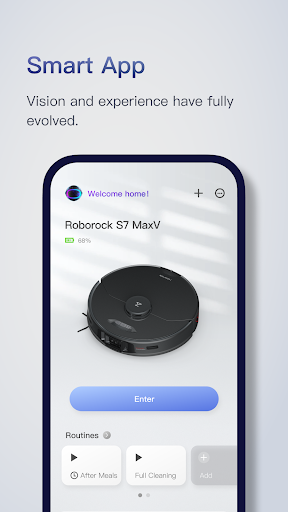
Roborock is a cutting-edge home cleaning solution that combines advanced hardware with intelligent software. The app provides complete control over your Roborock robot, allowing you to manage everything from cleaning schedules to suction strength. With features like Precision LIDAR navigation and VibraRise mopping technology, it ensures efficient and thorough cleaning.

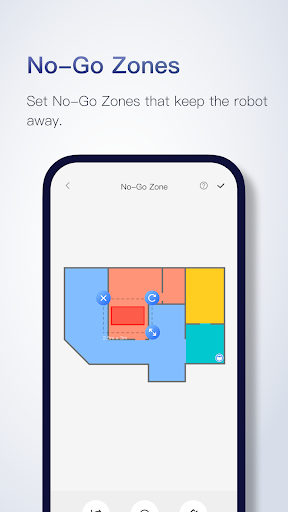
The application's smart mapping system creates detailed floorplans after the first use, enabling customized room-by-room cleaning settings. You can set advanced schedules, create no-go zones, and even manage multi-level homes with up to four saved maps. This makes Roborock ideal for maintaining cleanliness in dynamic home environments without constant user intervention.

Features

Roborock stands out with its array of innovative features designed for optimal home cleaning. The app supports seriously smart mapping that automatically divides rooms and allows for tailored cleaning preferences per area. Advanced scheduling lets you program cleaning routines down to specific times and days, targeting different areas as needed.

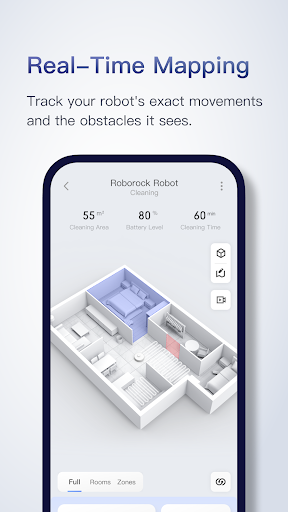
Customizable cleaning options include adjustable suction power and water flow settings for various floor types. The zone cleaning feature enables focused cleaning in up to five designated areas, each cleanable up to three times per session. Real-time viewing provides a live map of your robot's progress, showing exactly where it has cleaned and what obstacles it encountered along the way.

Lifestyle category coverage

The Roborock app demonstrates exceptional lifestyle category coverage by addressing various aspects of home cleaning and maintenance through advanced technological features. This application goes beyond basic cleaning functionalities to offer users a comprehensive solution for maintaining their living spaces. The app includes cutting-edge software and hardware integrations such as PreciSense for efficient navigation, Sensient for safer movement, OpticEye for accurate motion control, ReactiveAI for object recognition, and VibraRise for effective mopping. These features collectively ensure that users can manage different cleaning scenarios with precision and ease. Moreover the app provides seriously smart mapping after its first run around the home which unlocks a world of customizations tailored to individual preferences and needs. Advanced scheduling allows users to set multiple cleaning routines hitting different rooms at various times thus catering to dynamic lifestyles. Customizable cleaning options let users tailor suction power water usage and noise levels according to specific room requirements enhancing comfort and convenience. Zone cleaning and no-go zones further augment this coverage by enabling targeted cleaning efforts while avoiding sensitive areas respectively. Multi-level mapping supports homes with multiple floors ensuring that each level receives personalized attention without manual intervention. Real-time viewing adds another layer of engagement allowing users to monitor their robot's progress and make informed decisions about ongoing or future cleaning tasks. Overall the Roborock app's extensive lifestyle category coverage empowers users to maintain cleaner healthier homes effortlessly adapting to diverse household environments and personal schedules.

Content authenticity & expert credibility

Content authenticity and expert credibility are paramount in the Roborock app ensuring that users receive reliable information and guidance throughout their cleaning experience. The app leverages advanced technologies like Precision LIDAR navigation sensor matrices vision-based motion control artificial intelligence and sonic vibration mopping all of which have been meticulously developed and tested by experts in robotics and home automation. Each feature from PreciSense to ReactiveAI is backed by rigorous research and development processes guaranteeing that they perform as advertised under various real-world conditions. Furthermore the app provides seriously smart mapping capabilities that accurately represent users' floorplans and automatically divide rooms into manageable sections. This level of detail reflects a deep understanding of spatial dynamics and user needs reinforcing the credibility of the content presented within the app. Advanced scheduling options not only demonstrate an awareness of daily routines but also showcase expertise in time management and resource allocation. Customizable cleaning settings including zone cleaning no-go zones and multi-level mapping further underscore the app's commitment to delivering authentic and trustworthy content. By allowing users to fine-tune every aspect of their cleaning regimenu2014from suction strength to mopping intensityu2014the Roborock app establishes itself as a credible source of information on home maintenance practices. Additionally real-time viewing capabilities provide transparent insights into the robot's operations fostering trust between users and the technology they rely on. With dedicated customer service channels available globally including phone support and email assistance users can rest assured knowing that any questions or concerns will be addressed promptly by knowledgeable professionals further enhancing the overall perception of content authenticity and expert credibility within the Roborock ecosystem.

Props

Advanced navigation system

Customizable cleaning schedules

Multi-level mapping support

Real-time cleaning tracking

Efficient mopping technology

Cons

Limited hardware compatibility

Feature support varies by model

No physical controls available

Requires stable internet connection

Premium price point

Features and Functions

What is this app and what can I use it for?

A smart home cleaning app controlling Roborock robots with scheduling and customization

How do I download and install this app on my device?

Search 'Roborock' on Google Play Store, tap Install, and follow prompts

How do I get started after opening the app for the first time?

Open the app, add your robot device, and customize initial settings

What are the main features and capabilities of this app?

Smart mapping, scheduling, zone cleaning, and real-time tracking

How can I customize my experience and adjust preferences?

Adjust cleaning modes, suction strength, and water flow in settings

How do I save or bookmark my favorite content for later access?

Use the app to save preferred cleaning zones and schedules

How can I share content with friends or on social media?

Share cleaning reports or schedules via social media links

How do I access detailed information and explore more content?

Access detailed cleaning history and robot performance stats

What permissions does this app need and how do I manage them?

Needs location and storage permissions managed in settings

How do I check for updates and keep the app running smoothly?

Enable auto-updates in Google Play Store or check manually
Show more

User Reveiws

{{ comment.reviewer_name }}
{{ comment.review_date_formatted}}
{{ comment.review_content }}
{{ tab.name }}
{{ comment.reviewer_name }}
{{ comment.review_date_formatted}}
{{ comment.review_content }}
No reviews with this rating