Equalizer & Bass Booster Pro

4.50

Information

Category:

Music & Audio

Price:

$ 2.49

Rank:

53

Rating:

4.50

Overview

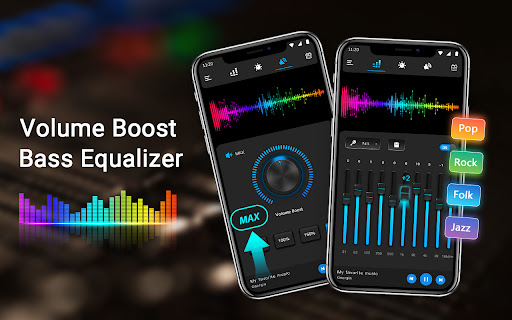
Equalizer & Bass Booster Pro is a premium audio enhancement application designed to elevate the sound quality of Android devices. This app offers a comprehensive suite of audio tools including a five-band equalizer, bass boost, and virtualizer effects that work together to deliver an unparalleled audio experience.

The app's intuitive interface allows users to fine-tune their listening experience with 22 customizable presets or create their own. It also features a live stereo VU meter, media volume control, and music playback controls. Whether you're listening to music, watching videos, or using the FM radio, Equalizer & Bass Booster Pro ensures optimal sound performance.

Ideal for audiophiles and casual listeners alike, this app is perfect for enhancing your audio experience on Android devices. Use it with headphones for the best results and enjoy studio-quality sound wherever you go.

Features

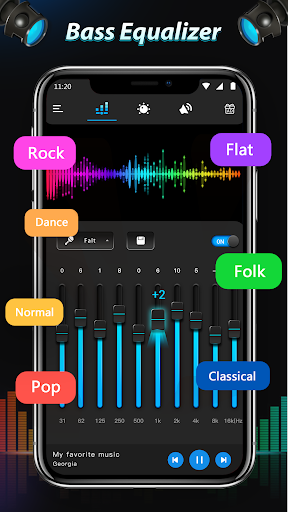
Equalizer & Bass Booster Pro stands out with its advanced audio processing capabilities. The app's core feature is its five-band equalizer that allows precise frequency adjustments, enabling users to customize their sound profile according to personal preferences or specific audio content.

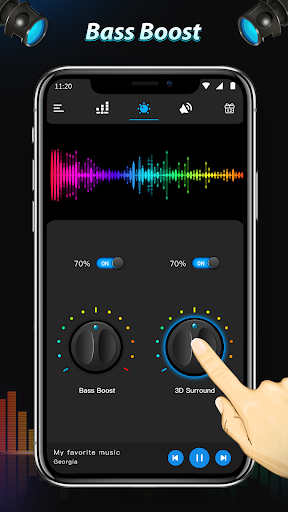
Beyond basic equalization, the app includes powerful bass boost and virtualizer effects that add depth and dimension to audio playback. The notification bar integration provides quick access to essential controls, while the stereo VU meter offers real-time visual feedback of audio levels.

What sets this app apart is its compatibility with most music players, video players, and even FM radio applications. The ability to save custom presets and control music playback directly from the app makes it an indispensable tool for optimizing your device's audio performance across different media types.

Music library size & copyright authenticity

The Equalizer & Bass Booster Pro application focuses on enhancing the audio experience rather than providing a built-in music library. However, it works seamlessly with most music players allowing users to enjoy an enriched sound quality across their entire personal music collection. The app's strength lies in its ability to transform the listening experience by offering advanced equalization options and bass enhancement which can be tailored to any genre or personal preference. Although it doesn't directly manage a music library or verify copyright authenticity of tracks, it empowers users to rediscover their existing legally-acquired music collections by significantly improving how music sounds on their Android devices. This approach ensures that users remain compliant with copyright laws while enjoying superior audio quality. The app includes 22 Equalizer presets designed to optimize different types of audio content from classical music to modern electronic beats. Users can also create and save their own custom presets ensuring that their unique musical tastes are perfectly catered for. By focusing on sound enhancement rather than music distribution, Equalizer & Bass Booster Pro maintains a clear distinction between audio processing and content management thereby avoiding any potential copyright complications.

Audio quality options

Equalizer & Bass Booster Pro stands out in its comprehensive approach to audio quality enhancement through various sophisticated features. At the core of its functionality is a five-band Equalizer that allows precise control over different frequency ranges enabling users to fine-tune their audio experience according to their preferences and the specific requirements of different music genres. The application goes beyond basic equalization by incorporating a powerful Bass Boost effect that adds depth and richness to low-frequency sounds making it particularly appealing for genres like hip-hop electronic dance music and rock where bass presence is crucial. Additionally the Virtualizer effect creates an immersive three-dimensional sound stage that enhances spatial perception especially noticeable when using headphones. These features combined with media volume control and a stereo LED VU meter provide users with unprecedented control over their audio output. The app's ability to work with most music and video players including radio FM ensures consistent high-quality sound across various media consumption scenarios. Furthermore the inclusion of 22 professionally designed Equalizer presets offers quick access to optimized settings for different audio types while still allowing advanced users to create and save their own custom configurations. This combination of professional-grade audio processing tools makes Equalizer & Bass Booster Pro an essential application for anyone seeking to maximize their Android device's audio potential regardless of whether they're listening to music watching videos or enjoying radio broadcasts.

Props

Advanced equalizer settings

Real-time audio enhancement

Wide app compatibility

Customizable presets

Intuitive user interface

Cons

Premium price point

May drain battery faster

Complex for beginners

Limited free version

Occasional stability issues

Features and Functions

What is this app and what can I use it for?

An audio enhancement app for Android devices offering equalizer and bass boost features

How do I download and install this app on my device?

Search for Equalizer & Bass Booster Pro in Google Play Store and tap Install

How do I get started after opening the app for the first time?

Open the app adjust equalizer settings and select a preset or create your own

What are the main features and capabilities of this app?

Five-band EQ bass boost virtualizer 22 presets and music controls

How can I customize my experience and adjust preferences?

Adjust EQ settings create custom presets and modify effect levels

How do I save or bookmark my favorite content for later access?

Save custom presets through the app's preset management feature

How can I share content with friends or on social media?

Share audio experiences by recommending the app to friends

How do I access detailed information and explore more content?

Explore detailed settings through the app's main interface and options menu

What permissions does this app need and how do I manage them?

Requires audio modification permissions managed through device settings

How do I check for updates and keep the app running smoothly?

Check for updates in Google Play Store and maintain device storage
Show more

User Reveiws

{{ comment.reviewer_name }}
{{ comment.review_date_formatted}}
{{ comment.review_content }}
{{ tab.name }}
{{ comment.reviewer_name }}
{{ comment.review_date_formatted}}
{{ comment.review_content }}
No reviews with this rating