FitCloudPro

3.70

Information

Category:

Health & Fitness

Price:

Free

Rank:

40

Rating:

3.70

Overview

FitCloudPro is a comprehensive health and fitness application designed to seamlessly connect your Kumi smartwatch with your mobile device. This app not only manages your smartwatch but also enhances its functionality, providing users with greater control over their wearable technology.

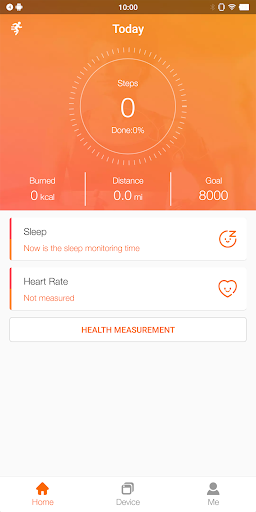
The app supports various models of Kumi smartwatches and offers features such as health data monitoring (steps, calories, sleep, heart rate, blood oxygen), rich message reminders (calls, SMS, social media), customizable watch faces, and additional functions like sedentary reminders and brightness settings. FitCloudPro is ideal for individuals looking to optimize their smartwatch experience while tracking their wellness journey.

Features

FitCloudPro boasts an array of features that cater to both health enthusiasts and tech-savvy individuals. One of the standout functionalities is the ability to monitor and record essential health metrics including steps taken, calories burned, sleep patterns, heart rate, and blood oxygen levels.

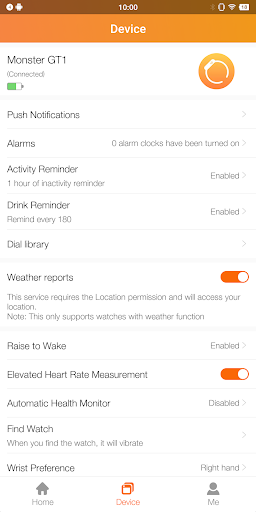
Beyond health tracking, the app provides robust notification systems for calls, messages, and social media platforms like Facebook and Twitter. Users can also enjoy practical features such as the ability to customize watch faces, set reminders for staying active and hydrated, adjust settings for brightness and vibration, and enable do-not-disturb modes. These diverse capabilities ensure a personalized and efficient user experience.

Personalized planning

Personalized planning in the context of a health and fitness application like FitCloudPro refers to the ability of the app to create tailored health and fitness plans for users based on their individual data and goals. This feature is crucial as it allows users to receive recommendations and plans that are specifically suited to their unique needs rather than generic advice that may not be as effective. FitCloudPro achieves personalized planning by leveraging the health data it collects from the connected smartwatch such as steps taken calories burned sleep patterns heart rate and blood oxygen levels. By analyzing this data the app can identify trends and patterns specific to the user's lifestyle and health status. For instance if the app detects a user's sedentary behavior through prolonged periods of inactivity it can suggest personalized reminders to move or exercise. The benefits of personalized planning are manifold. Users can experience more effective workouts as the plans adapt to their progress and feedback. They can also enjoy improved health outcomes as the app provides timely interventions based on real-time data. Moreover personalized planning enhances user engagement as individuals are more likely to stick with a program that feels bespoke and relevant to them. In summary FitCloudPro's personalized planning empowers users to take control of their health journey with actionable insights and customized strategies that evolve with their changing needs.

Progress visualization

Progress visualization is an essential feature within health and fitness applications offering users a clear and engaging way to track their achievements and monitor their ongoing health journey. In FitCloudPro this feature manifests through detailed charts and graphs that display various health metrics over time such as step counts calorie expenditure sleep quality heart rate fluctuations and blood oxygen levels. The importance of progress visualization lies in its ability to transform raw data into understandable and actionable insights. FitCloudPro employs sophisticated algorithms to process the data collected from the Kumi smartwatches presenting it in visually appealing formats that allow users to easily grasp their performance trends and areas needing improvement. For example users can view weekly or monthly summaries of their activity levels which motivates them to maintain or increase their physical efforts. Additionally visual cues such as color coding or milestone markers celebrate significant accomplishments reinforcing positive behaviors. The advantages of progress visualization extend beyond mere data representation. It fosters a sense of accomplishment and accountability as users can see tangible evidence of their hard work paying off. This visibility encourages continued adherence to fitness routines and promotes long-term lifestyle changes. Furthermore the ability to visualize progress helps users set realistic goals and adjust their strategies accordingly ensuring continuous improvement. Overall FitCloudPro's progress visualization feature not only enhances user experience but also plays a pivotal role in sustaining motivation and driving successful health outcomes.

Props

User-friendly interface

Comprehensive health tracking

Versatile smartwatch support

Customizable watch faces

Rich notification system

Cons

Limited to Kumi smartwatches

Requires multiple permissions

No medical certification

Potential battery drain

Dependent on smartphone connection

Features and Functions

What is this app and what can I use it for?

FitCloudPro connects and manages Kumi smartwatches with advanced health and notification features.

How do I download and install this app on my device?

Search 'FitCloudPro' on Google Play Store, tap Install, and open after download.

How do I get started after opening the app for the first time?

Follow the in-app setup guide to pair your smartwatch and personalize settings.

What are the main features and capabilities of this app?

Key features include health tracking, notifications, customizable dials, and reminders.

How can I customize my experience and adjust preferences?

Adjust preferences in Settings to customize notifications, reminders, and display options.

How do I save or bookmark my favorite content for later access?

Save favorite watch faces or health stats via the designated Save or Bookmark options.

How can I share content with friends or on social media?

Use integrated sharing options to post achievements or data on social media platforms.

How do I access detailed information and explore more content?

Access detailed health reports and explore more features within the app's main menu.

What permissions does this app need and how do I manage them?

The app requires location, Bluetooth, contacts permissions for full functionality.

How do I check for updates and keep the app running smoothly?

Enable automatic updates in Google Play Store settings to keep the app current.
Show more

User Reveiws

{{ comment.reviewer_name }}
{{ comment.review_date_formatted}}
{{ comment.review_content }}
{{ tab.name }}
{{ comment.reviewer_name }}
{{ comment.review_date_formatted}}
{{ comment.review_content }}
No reviews with this rating