Glory Fit

3.60

Information

Category:

Health & Fitness

Price:

Free

Rank:

29

Rating:

3.60

Overview

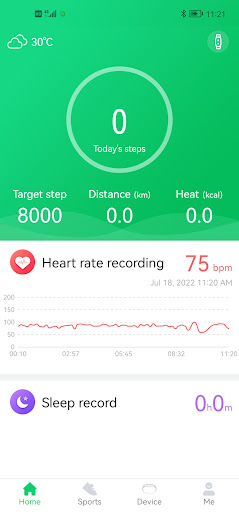
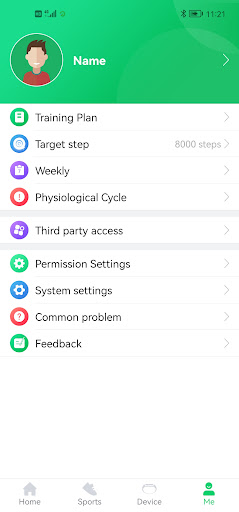
GloryFit is a comprehensive health and fitness application designed to work seamlessly with the Q18 smartwatch. This app excels in tracking various aspects of your daily activity, including step counting, sleep monitoring, and heart rate tracking. By integrating advanced health metrics with practical lifestyle features, GloryFit provides users with a holistic view of their wellness journey.

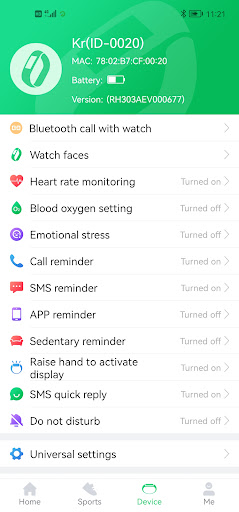
In addition to its core fitness tracking capabilities, GloryFit offers essential notification features such as SMS alerts, call reminders, and quick reply functions. These features ensure that you stay connected while maintaining an active lifestyle. Whether you're monitoring your nightly sleep patterns or staying on top of important messages, GloryFit serves as a vital tool for managing both health and communication needs.

Features

GloryFit stands out with its diverse range of features tailored for health-conscious individuals. The app's primary strength lies in its ability to accurately track multiple health metrics through the Q18 smartwatch. Users can monitor their daily steps, analyze sleep quality, and keep tabs on their heart rate throughout various activities.

Beyond basic health tracking, GloryFit incorporates several smart notification features. These include SMS and call reminders, allowing users to stay informed without constantly checking their phones. The app also supports message quick replies and third-party app notifications, enhancing convenience without compromising the wearable experience. Such comprehensive functionality makes GloryFit a versatile companion for both fitness enthusiasts and busy professionals.

Personalized planning

Personalized planning in health and fitness applications refers to the ability of an app to create tailored exercise and wellness plans based on individual user data and goals. For GloryFit, this functionality is crucial as it allows users to receive customized recommendations that align with their specific health objectives. The app collects data from the Q18 smartwatch including step counts sleep patterns and heart rate metrics to generate insights into the user's daily activity levels. By analyzing these inputs GloryFit can suggest personalized workout routines optimal sleep schedules and even heart rate zones for effective training. This level of personalization ensures that users are not just following generic advice but are engaging in activities that are most beneficial for their unique circumstances. The advantages of personalized planning in GloryFit extend beyond mere customization. Users gain a deeper understanding of how different aspects of their lifestyle interact with their fitness goals. For instance by correlating sleep quality with exercise performance or monitoring heart rate trends over time individuals can make informed decisions about their health regimen. Furthermore the app's capacity to adapt its recommendations based on ongoing data means that as a useru2019s fitness level or goals evolve so too does the guidance provided by GloryFit. This dynamic approach fosters a more engaging and effective fitness journey ensuring that users remain motivated and see tangible results.

Progress visualization

Progress visualization is a critical component of any health and fitness application as it provides users with a clear and tangible representation of their achievements and areas for improvement. In GloryFit this feature takes the form of detailed charts and graphs that display various metrics collected from the Q18 smartwatch such as daily steps taken hours slept and average heart rate. These visual tools are essential because they transform raw data into understandable insights allowing users to track their progress over time easily. For example a line graph might illustrate how a user's step count has increased weekly while a bar chart could highlight improvements in sleep duration or consistency. GloryFit enhances the value of progress visualization by integrating milestone reminders and achievement badges which serve as motivational triggers. When users reach significant milestones such as walking a certain number of steps per day for a month or maintaining a target heart rate during workouts they are rewarded with virtual badges or notifications celebrating these accomplishments. This gamification aspect not only makes tracking progress more enjoyable but also encourages continued engagement with the app and smartwatch. Additionally GloryFit offers advanced features like trend analysis where users can view long-term patterns in their health data identifying correlations between different metrics such as improved sleep quality leading to better exercise performance. Such insights empower users to make data-driven decisions about their lifestyle choices ultimately leading to more sustainable health outcomes. Overall the combination of clear visual representations meaningful milestones and insightful trend analyses makes GloryFit's progress visualization a powerful tool for anyone looking to improve their overall well-being.

Props

User-friendly interface

Comprehensive health tracking

Real-time notifications

Customizable watch faces

Long battery life

Cons

Limited device compatibility

Occasional syncing issues

No advanced analytics

Basic social features

Premium feature costs

Features and Functions

What is this app and what can I use it for?

GloryFit tracks fitness metrics and notifications via Q18 smartwatch

How do I download and install this app on my device?

Download GloryFit from Google Play Store and follow installation prompts

How do I get started after opening the app for the first time?

Pair your Q18 smartwatch and grant necessary permissions in settings

What are the main features and capabilities of this app?

Tracks steps, sleep, heart rate, and offers smart notifications

How can I customize my experience and adjust preferences?

Adjust notification preferences and health tracking settings

How do I save or bookmark my favorite content for later access?

Save favorite workouts or health data in dedicated sections

How can I share content with friends or on social media?

Share fitness achievements directly through connected apps

How do I access detailed information and explore more content?

Access detailed health reports within the app's main dashboard

What permissions does this app need and how do I manage them?

Requires accessibility permissions for full notification support

How do I check for updates and keep the app running smoothly?

Enable automatic updates in Google Play Store settings
Show more

User Reveiws

{{ comment.reviewer_name }}
{{ comment.review_date_formatted}}
{{ comment.review_content }}
{{ tab.name }}
{{ comment.reviewer_name }}
{{ comment.review_date_formatted}}
{{ comment.review_content }}
No reviews with this rating