
Gametime

4.80

Information

Category:

Events

Price:

Free

Rank:

6

Rating:

4.80

Overview

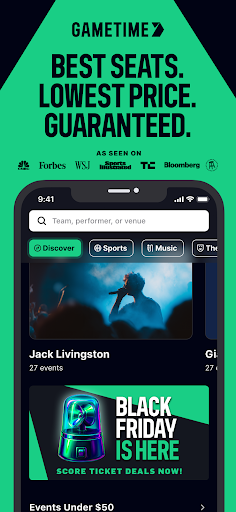
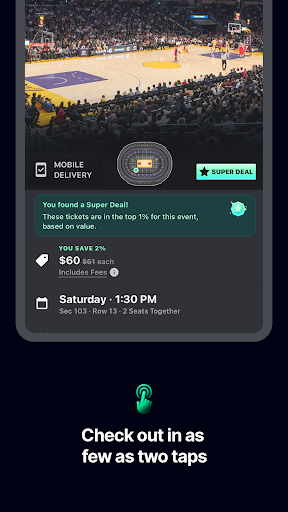
Gametime is a leading mobile application designed to help users secure tickets for live events at optimal prices. The app specializes in offering deals for sports games, concerts, festivals, comedy shows, and theatrical performances. With its unique feature of decreasing ticket prices as the event time approaches, Gametime ensures users can access tickets even up to 90 minutes after an event begins. The app's intuitive interface allows users to view panoramic seat views, compare prices across seating sections, and complete purchases through a streamlined two-click checkout process.

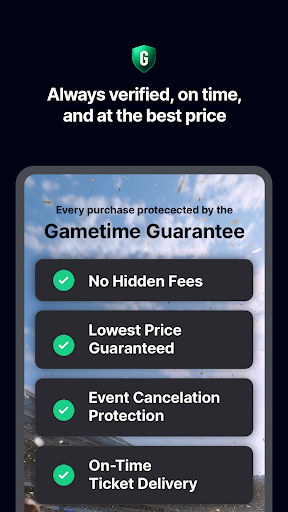
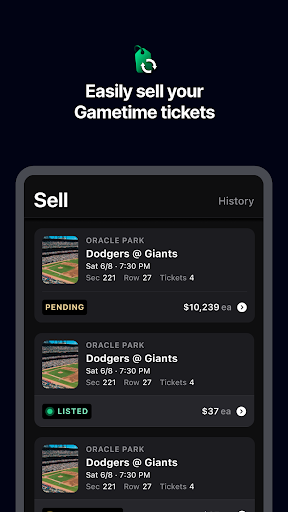
One of Gametime's standout offerings is its Ticket Coverage service, which provides comprehensive protection and benefits such as a lowest price guarantee, lightning-fast refunds for canceled events, and job loss protection. Additionally, the app promotes eco-friendly practices by delivering tickets digitally, eliminating the need for paper tickets. Users can also easily list their own tickets for sale, manage listings, and receive payments via PayPal. Whether you're looking to attend a major sporting event or a top concert, Gametime delivers a seamless and enjoyable ticket-buying experience.

Features

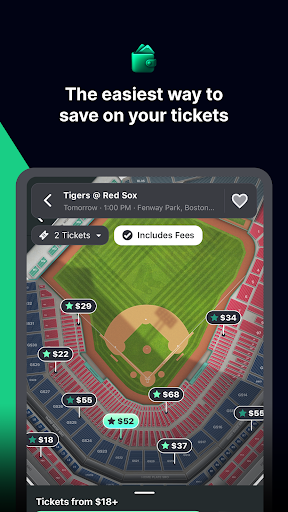
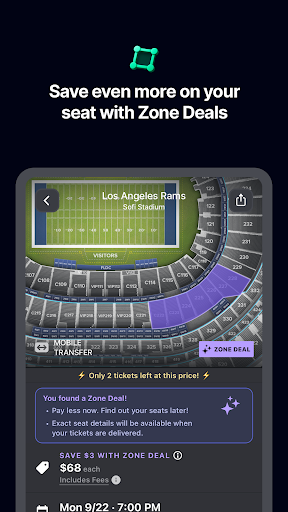
Gametime stands out with its robust set of features tailored to enhance the ticket-buying experience. One of its key functionalities is the dynamic pricing model, where ticket prices decrease as the event start time approaches, allowing users to capitalize on last-minute deals. The app also offers Special Zone Deals that provide additional discounts, ensuring users get the best possible prices. Gametime's user-friendly interface includes detailed venue maps and panoramic seat views, enabling users to make informed decisions about their seating choices.

The app's commitment to customer satisfaction is evident through its Ticket Coverage policy, which guarantees the lowest prices and offers quick refunds for canceled events. Gametime further simplifies the purchasing process with its two-click checkout system and ensures convenience with mobile ticket delivery. For those looking to sell tickets, the app provides an easy-to-use platform to list, price, and manage tickets, along with timely text notifications for sales updates. These features collectively ensure a seamless, transparent, and efficient ticket-buying and selling experience.

Task creation & detail customization

Task creation and detail customization in the context of event ticketing refers to the ability of users to not only find and purchase tickets but also tailor their entire experience around attending an event This feature is crucial as it allows users to manage various aspects of their attendance such as selecting specific seats choosing the right time to buy tickets based on price trends and customizing their overall event plan Gametime excels in this area by providing a comprehensive platform where users can create a personalized plan for attending events The app offers detailed venue maps that allow users to compare seat locations and prices effectively Users can take panoramic photos showing the exact view from any section which helps them make informed decisions about their seating choices Moreover Gametime provides special zone deals that offer additional discounts enabling users to save more while customizing their event experience The apps resale market feature allows users to buy tickets even after the event has started up to 90 minutes into it This flexibility ensures that users can customize their plans according to their schedules and preferences The value proposition here is significant as it empowers users to design their event attendance strategy with precision By offering features like mobile ticket delivery and easy sharing options Gametime makes it convenient for users to distribute tickets among friends without the hassle of printing This level of customization enhances user satisfaction by ensuring they get the best possible experience tailored to their needs Additionally the inclusion of Gametime Ticket Coverage free with all purchases adds another layer of customization by providing benefits such as lowest price guarantees lightning refunds and job loss protection These features collectively contribute to a highly customizable and secure event planning process making Gametime a preferred choice for users seeking flexibility and control over their event attendance

Reminder settings

Reminder settings in event applications play a vital role in ensuring users do not miss out on their planned activities By setting up timely reminders users can stay informed about upcoming events and manage their schedules effectively Gametime incorporates reminder functionalities that enhance the overall user experience by keeping attendees wellinformed and prepared for their chosen events The application allows users to set reminders for various stages of the ticket purchasing process For instance users can receive alerts when ticket prices drop closer to the event time enabling them to take advantage of cost savings The ability to buy tickets up to 90 minutes after the start of an event further emphasizes the importance of timely reminders ensuring users are aware of this unique opportunity Additionally Gametime provides updates through text notifications when tickets listed for sale are sold giving sellers peace of mind and timely information This feature is particularly beneficial for users who actively engage in reselling tickets The reminder system extends beyond just ticket purchases Gametime keeps users informed about the events themselves sending reminders about event times and venues This ensures that attendees arrive on time and fully prepared for the experience ahead Furthermore the integration of mobile ticket delivery and sharing capabilities means that users can quickly access and distribute tickets when reminded enhancing convenience and reducing lastminute stress The environmental friendliness of the platform is also supported by these digital reminders which eliminate the need for physical tickets Overall the reminder settings in Gametime provide substantial value by keeping users engaged and informed throughout the entire event lifecycle From purchasing tickets at optimal times to arriving at events punctually these reminders help users maximize their enjoyment and investment in live entertainment experiences

Props

User-friendly interface

Dynamic pricing model

Comprehensive Ticket Coverage

Mobile ticket delivery

Panoramic seat views

Cons

Resale market only

Limited event categories

No physical ticket option

Restricted seller control

Service fees apply

Features and Functions

What is this app and what can I use it for?

Gametime is an app for buying and selling tickets to live events like sports, concerts, and theater shows.

How do I download and install this app on my device?

Download Gametime from Google Play Store and install it by following the on-screen instructions.

How do I get started after opening the app for the first time?

After opening Gametime, browse events, select your desired one, and follow the prompts to purchase tickets.

What are the main features and capabilities of this app?

Key features include dynamic pricing, panoramic seat views, mobile ticket delivery, and easy ticket selling options.

How can I customize my experience and adjust preferences?

Customize your experience by setting preferences for event types, seat locations, and price ranges within the app settings.

How do I save or bookmark my favorite content for later access?

Save favorite events by tapping the heart icon, which adds them to your favorites for quick access later.

How can I share content with friends or on social media?

Share event details or tickets with friends via social media or messaging apps directly from the Gametime interface.

How do I access detailed information and explore more content?

Access detailed event information by tapping on specific events to view descriptions, seat maps, and pricing details.

What permissions does this app need and how do I manage them?

Gametime requires location and payment permissions; manage these in your device settings under app permissions.

How do I check for updates and keep the app running smoothly?

Check for updates in the Google Play Store and keep Gametime running smoothly by clearing cache regularly.
Show more

User Reveiws

{{ comment.reviewer_name }}
{{ comment.review_date_formatted}}
{{ comment.review_content }}
{{ tab.name }}
{{ comment.reviewer_name }}
{{ comment.review_date_formatted}}
{{ comment.review_content }}
No reviews with this rating