
Hobnob

4.60

Information

Category:

Events

Price:

Free

Rank:

20

Rating:

4.60

Overview

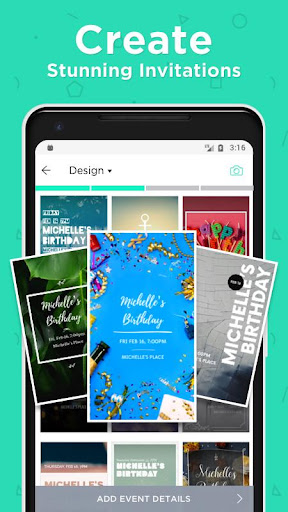
Hobnob is a premier invitation card maker that allows users to create stunning, personalized invitations in seconds for any event type. Whether you're planning a wedding, birthday party, baby shower, or corporate event, Hobnob offers professionally designed templates that are fully customizable with unique background images, videos, fonts, and colors.

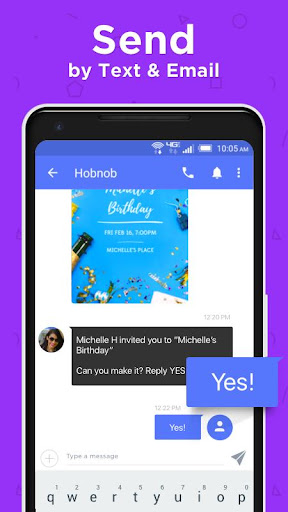
The app stands out by not only simplifying the invitation creation process but also by handling all aspects of event management. It delivers digital invitations via text, email, or social media, tracks RSVPs, sends reminders, and provides event directions. This comprehensive approach saves users significant time and effort while ensuring maximum attendance and seamless event hosting.

Features

Hobnob's feature set is designed to cater to both design novices and those seeking professional-quality invitations. The app includes an extensive library of templates suitable for various events, from holiday parties to milestone celebrations like weddings and graduations. Users can customize every detail, including text positioning, color schemes, and multimedia elements, without needing any design expertise.

A key highlight is its integrated event management system. Once invitations are crafted, Hobnob automates the delivery process through texts, emails, or social media shares. It then tracks guest responses via a custom event website, eliminating the need for guests to download an app. Automatic RSVP reminders and event reminders with directions further enhance convenience, making Hobnob an all-in-one solution for creating and managing successful events.

Task creation & detail customization

Creating and customizing tasks within an event planning application like Hobnob is crucial for ensuring that every aspect of the event is meticulously organized. This functionality allows users to define specific tasks related to their events, such as sending out invitations, tracking RSVPs, and managing guest lists. In Hobnob, this feature is implemented through a user-friendly interface where users can easily create tasks by selecting from pre-defined templates or customizing their own. The app provides professionally designed templates for various event types including weddings, birthday parties, and corporate events, allowing users to tailor each invitation with custom background images, videos, fonts, colors, and text positioning. This level of customization ensures that each invitation reflects the unique theme and style of the event. Users benefit significantly from this feature as it saves them considerable time and effort in designing and sending out invitations. By automating the process of adjusting design elements to fit event details, Hobnob enables users to focus more on the content and less on the design mechanics. Additionally, the ability to customize every detail means that even those without any design skills can produce invitations that look professionally crafted, impressing their guests and enhancing the overall event experience.

Reminder settings

Reminder settings in an event management app like Hobnob play a vital role in ensuring that both hosts and guests stay informed and engaged throughout the event planning process. This feature typically includes multiple types of reminders such as RSVP deadlines, upcoming event notifications, and day-before reminders with event directions. In Hobnob, reminder settings are seamlessly integrated into the event creation process. Once a user creates an invitation, they can set automatic RSVP reminders that prompt guests to respond by a certain date. These reminders are sent via text message or email, ensuring that guests receive timely notifications regardless of whether they have the app installed. Furthermore, a day before the event, guests automatically receive a reminder containing all necessary details including directions to the venue. This comprehensive reminder system not only helps increase event attendance by keeping guests well-informed but also reduces the administrative burden on hosts who would otherwise need to manually track and remind guests about important dates and details. The value of this feature lies in its ability to streamline communication between hosts and guests, making event planning more efficient and stress-free. By leveraging automated reminders, Hobnob ensures that no important detail is overlooked, ultimately contributing to the success of each event.

Props

User-friendly interface

Wide template selection

Comprehensive event tools

Time-saving automation

Free to use

Cons

Limited advanced features

No offline functionality

Premium upgrades needed

Occasional bugs

Guest access limitations

Features and Functions

What is this app and what can I use it for?

Hobnob is an invitation card maker for creating personalized event invites.

How do I download and install this app on my device?

Download Hobnob from Google Play Store on your Android device.

How do I get started after opening the app for the first time?

Choose a template, customize it, and send your first invite via the app.

What are the main features and capabilities of this app?

Main features include customizable templates, RSVP tracking, and reminders.

How can I customize my experience and adjust preferences?

Adjust preferences like fonts, colors, and layout in the customization menu.

How do I save or bookmark my favorite content for later access?

Save favorite templates directly within the app's design section.

How can I share content with friends or on social media?

Share invites via text, email, or social media platforms easily.

How do I access detailed information and explore more content?

Access detailed info about events and templates in the app's help section.

What permissions does this app need and how do I manage them?

The app needs permissions for notifications and media access; manage in settings.

How do I check for updates and keep the app running smoothly?

Check for updates in the Google Play Store to keep Hobnob running smoothly.
Show more

User Reveiws

{{ comment.reviewer_name }}
{{ comment.review_date_formatted}}
{{ comment.review_content }}
{{ tab.name }}
{{ comment.reviewer_name }}
{{ comment.review_date_formatted}}
{{ comment.review_content }}
No reviews with this rating