
O'Reilly Pro

3.20

Information

Category:

Auto & Vehicles

Price:

Free

Rank:

15

Rating:

3.20

Overview

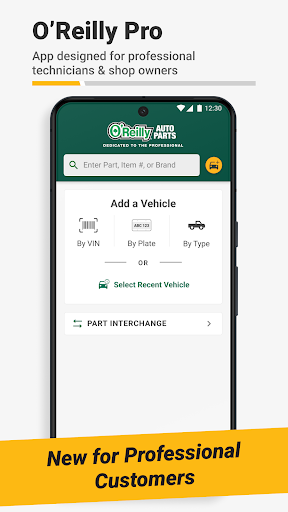
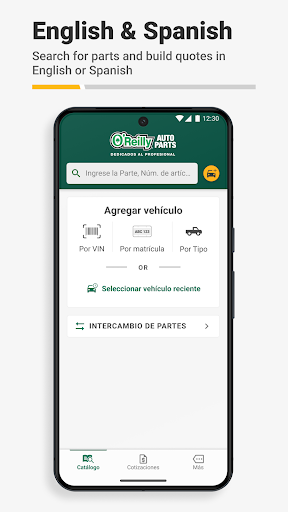
O'Reilly Pro is a comprehensive mobile solution tailored for automotive repair professionals, streamlining parts management and vehicle service operations. The app offers efficient tools like VIN scanning and license plate decoding, enabling quick vehicle identification and parts ordering.

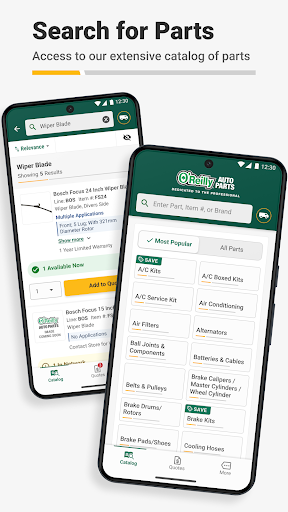
With real-time inventory access and an intuitive catalog lookup, users can effortlessly find and order the right parts. Its interchange feature allows cross-referencing of part numbers from OEMs and other brands. Additionally, professionals can send quotes directly to customers via text or email, enhancing communication and service efficiency.

Designed for both individual mechanics and auto repair shop owners, O'Reilly Pro optimizes workflow by providing essential features that save time and improve accuracy. The app's bilingual support in English and Spanish further extends its usability, making it an indispensable tool for automotive professionals.

Features

O'Reilly Pro stands out with its robust feature set designed specifically for automotive professionals. The app's VIN scanner and license plate decoder simplify vehicle identification, while the comprehensive parts catalog ensures accurate and fast ordering.

One of the key highlights is the interchange functionality, allowing users to cross-reference part numbers from various sources, ensuring the correct part is selected every time. Orders can be placed for delivery or pickup, with real-time tracking available through the order history feature.

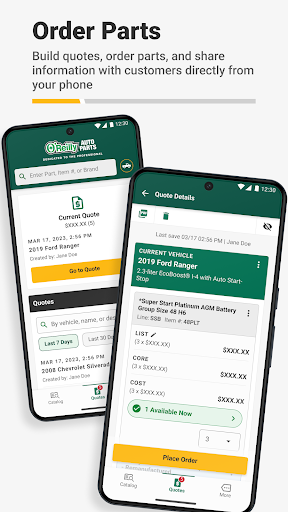
Additionally, the app facilitates professional communication by enabling users to send quotes directly to customers via text or email. With dedicated support available, O'Reilly Pro ensures that help is always at hand, making it an essential tool for efficient and reliable automotive service management.

Detailed vehicle information

The O'Reilly Pro app provides comprehensive tools for identifying and managing detailed vehicle information making it an essential resource for automotive professionals Vehicle identification is made simple and efficient through the app's VIN scanner and license plate decoder tools These features allow users to quickly decode important vehicle details such as make model year and engine specifications This functionality not only saves time but also ensures accuracy in parts selection and service recommendations The app maintains a robust database of vehicle information that is regularly updated to include the latest models and specifications This extensive database enables mechanics and service writers to access precise technical details about various vehicles directly from their mobile devices Furthermore the decoded vehicle information seamlessly integrates with other app functions such as parts lookup and ordering This integration allows users to immediately apply the decoded data to practical tasks like checking part compatibility or creating repair estimates The app's ability to sync this information across devices including desktop computers enhances workflow efficiency and record-keeping capabilities By providing detailed and accurate vehicle information the O'Reilly Pro app helps automotive professionals make informed decisions streamline their operations and ultimately deliver better service to their customers

Price transparency

Price transparency is a crucial feature of the O'Reilly Pro app designed to support automotive professionals in making informed purchasing decisions The app provides clear and accessible pricing information for all listed parts and products through its comprehensive catalog system Users can easily view current prices for parts across different locations including local stores regional hubs and distribution centers This visibility into pricing helps businesses optimize their procurement strategies and manage costs effectively The app also displays delivery times and availability information alongside pricing details enabling users to make well-rounded decisions that consider both cost and urgency Furthermore the O'Reilly Pro app maintains real-time inventory updates ensuring that displayed prices correspond to actual product availability This real-time information prevents situations where users might order parts based on outdated pricing only to find those items unavailable or subject to price changes The app's interchange feature adds another layer of price transparency by allowing users to cross-reference part numbers from original equipment manufacturers and other brands This capability helps identify equivalent parts that might offer better pricing without compromising quality Additionally the app supports price comparison between different fulfillment options such as store pickup or delivery Users can factor in these variables when calculating total costs helping them choose the most economical option for each situation By maintaining clear consistent and up-to-date pricing information the O'Reilly Pro app empowers automotive professionals to manage their budgets effectively while ensuring timely access to necessary parts

Props

User-friendly interface

Real-time inventory access

Efficient vehicle identification

Comprehensive parts catalog

Bilingual support

Cons

Limited to automotive field

Requires account setup

Occasional syncing issues

Location-dependent features

Premium feature costs

Features and Functions

What is this app and what can I use it for?

A tool for automotive pros to manage parts and services efficiently

How do I download and install this app on my device?

Search 'O'Reilly Pro' on Google Play, tap Install, and open after download

How do I get started after opening the app for the first time?

Log in or sign up, then explore main features like parts lookup and VIN scan

What are the main features and capabilities of this app?

VIN scanning, parts ordering, quote sending, and bilingual support

How can I customize my experience and adjust preferences?

Adjust language and notification settings in the More tab

How do I save or bookmark my favorite content for later access?

Use the Save option in parts lookup to bookmark items for later

How can I share content with friends or on social media?

Send quotes or parts info via text or email directly from the app

How do I access detailed information and explore more content?

Access detailed catalogs and track orders in the Order History section

What permissions does this app need and how do I manage them?

Needs location and account access; manage in phone settings

How do I check for updates and keep the app running smoothly?

Enable auto-updates in Google Play Store or check for updates manually
Show more

User Reveiws

{{ comment.reviewer_name }}
{{ comment.review_date_formatted}}
{{ comment.review_content }}
{{ tab.name }}
{{ comment.reviewer_name }}
{{ comment.review_date_formatted}}
{{ comment.review_content }}
No reviews with this rating