

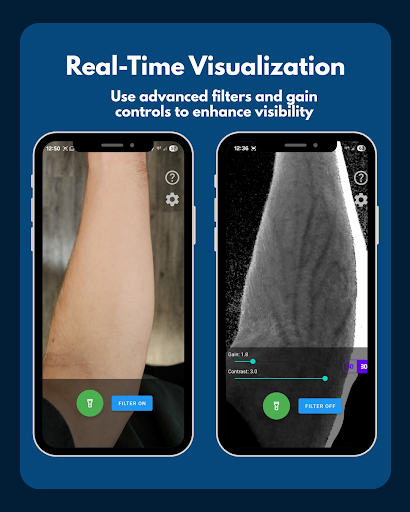
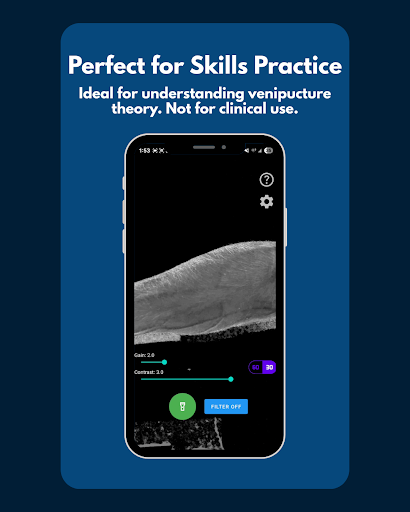
VeinFinder is an innovative educational tool designed to assist medical students and educators in mastering venous anatomy. This application utilizes advanced GPU-accelerated image processing to enhance vein visibility through a device's camera, offering an accessible solution for practical learning without the need for additional hardware.
The app is particularly beneficial for those preparing for anatomy exams or training modules where understanding venous structures is crucial. With features like instant comparison between enhanced and raw views, precision control over image settings, and integrated flashlight management, VeinFinder ensures optimal visualization across various conditions. Its privacy-focused design guarantees that all processing occurs locally on the device, making it a secure choice for academic use.
VeinFinder stands out with its sophisticated feature set tailored for medical education. The app's core functionality lies in its ability to process images in real-time using GPU acceleration, which significantly enhances vein visibility. Users can toggle the enhancement filter on and off to compare views instantly, providing a dynamic learning experience.
Additional features include adjustable gain and contrast settings, allowing users to fine-tune the display for different skin tones and lighting environments. The built-in flashlight control ensures consistent performance even in low-light conditions. Furthermore, VeinFinder maintains user privacy by processing all data locally on the device, never transmitting or storing sensitive information externally.
These capabilities make VeinFinder an invaluable resource for both students and educators seeking to bridge the gap between theoretical knowledge and practical application in venous anatomy studies.
Enhances learning efficiency
Real-time vein visualization
Privacy-focused design
User-friendly interface
Cost-effective solution
Performance varies by device
Not suitable for clinical use
Limited to educational purposes
Dependent on lighting conditions
Requires careful positioning

Ignite curiosity, spark learning: All babybus videos &games
 4.30
4.30
Your guide to thousands of satellites and spacecraft in orbit around Earth!
3.90
Explore myths and gods across cultures with in-depth insights and stories.
5.00
Gain new skills in 10 minutes
4.70
Explore numbers the Starfall way!
4.00
A collection of favorite stories from Daniel Tiger's Neighborhood
2.00
Your best partner for learning Japanese words. Based on a best-selling textbook.
2.80
Learn to pass DMV permit tests. Driver license practice test 2025.
4.60
Cool math games & learn to read activities- loved by kids, approved by teachers.
4.50
An interactive enhancement of the Sesame Street classic.
4.50
The Fighter Verses Bible memory system helps you memorize God's Word.
4.50
Pass your FAA written with flying colors - Study Buddy can help.
4.30
Monkey Preschool Lunchbox: 7 exciting educational games for your preschooler.
4.30
An aviator’s preparation, study and test tool for FAA Knowledge Exams.
4.30
Bebefinn and Baby Shark educational, animated videos & games for kids
3.40
Snap a dog photo to identify its breed instantly. Fast, accurate and easy to use
3.40
Master the NRP with 700+ questions, rationales, and updated NREMT scenarios.
3.00
The official CCM Glossary app, including 700+ terms and definitions.
2.90
Test prep for Indiana students
4.1


User Reveiws