Workday

4.30

Information

Category:

Business

Price:

Free

Rank:

12

Rating:

4.30

Overview

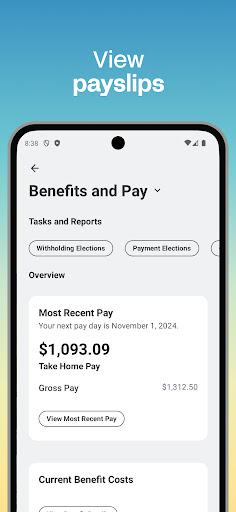
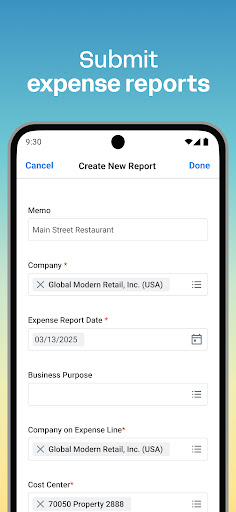
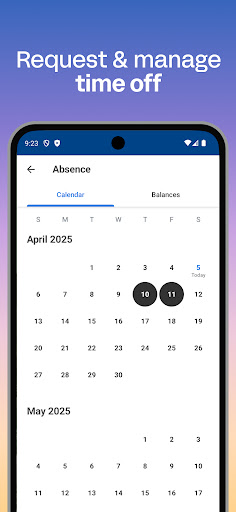
Workday is a comprehensive business management application designed to enhance workplace productivity through its all-in-one platform. The app provides users with instant access to a wide array of Workday tasks, including time tracking, expense submissions, and team communication. It's an indispensable tool for both employees and managers, offering features like push notifications for important tasks, viewing payslips, requesting time off, and even learning new skills via training videos.

For managers, Workday offers additional HR functionalities such as approving employee requests, managing payroll, conducting performance reviews, and accessing interactive reports and dashboards. Its intuitive design ensures that users can easily navigate through their tasks, while the app's focus on security means that your data remains protected with biometric authentication and cloud storage solutions.

Features

Workday stands out with its extensive feature set tailored for both regular employees and managerial staff. Users can submit timesheets and expenses, view payslips, request time off, and connect with teammates effortlessly. For those in leadership roles, the app provides tools to approve employee requests, adjust roles, manage payroll, and conduct performance evaluations.

The app's interface is designed for simplicity and ease of use, organizing all necessary functions intuitively. With flexible personalization options, users can quickly access the tools and insights most relevant to them. Security is also a top priority, employing biometric authentication and cloud-based data storage to ensure that user information remains safe and up-to-date, even if their device is lost or stolen.

Collaborative work features

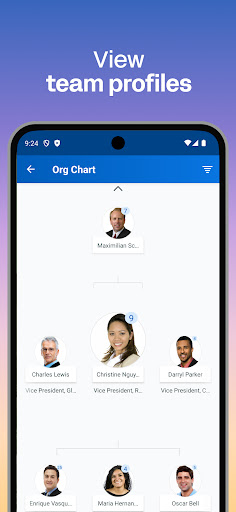
Collaboration in the modern workplace is essential for productivity and efficiency and Workday excels in providing tools that facilitate seamless teamwork. The app allows users to connect with teammates instantly which fosters a collaborative environment where communication barriers are minimized. Through its integrated platform users can easily share information request feedback and collaborate on tasks without switching between multiple applications. One of the standout features is the ability for managers to approve employee requests with just a tap streamlining workflows and reducing bottlenecks in decision-making processes. Additionally the app provides access to interactive reports and dashboards which enable teams to analyze data collectively make informed decisions and track progress toward shared goals. This collaborative functionality extends beyond simple task management as it incorporates elements of social interaction such as learning about teammates through detailed profiles. These profiles not only list professional qualifications but also offer insights into individual strengths and interests promoting stronger interpersonal connections within teams. Furthermore the inclusion of training videos ensures that employees can continuously develop new skills together enhancing overall team capabilities. By centralizing these collaborative features in one intuitive interface Workday significantly boosts workplace synergy allowing organizations to achieve higher levels of performance while maintaining flexibility and adaptability in their operations.

Task management

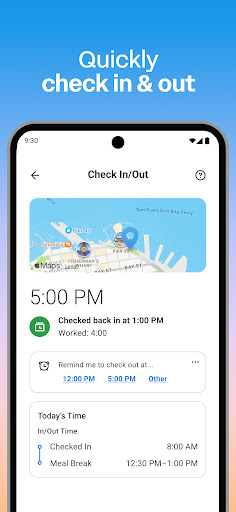
Effective task management is crucial for maintaining productivity and ensuring timely completion of work responsibilities and Workday offers an extensive suite of tools designed to optimize this process. At its core the app provides users with instant access to nearly all their Workday tasks ranging from checking in to work and submitting timesheets to requesting time off and viewing payslips. This comprehensive task management system ensures that employees can efficiently handle their daily responsibilities without needing to navigate through multiple platforms or interfaces. Push notification reminders play a vital role in this ecosystem by alerting users to important deadlines and pending actions thereby preventing oversight and enhancing accountability. For managers the app goes a step further by offering advanced functionalities such as adjusting employee roles managing payroll and requesting compensation changes all of which contribute to more streamlined administrative processes. The hours tracker feature allows both employees and managers to monitor time spent on various activities providing valuable insights into workload distribution and resource allocation. Moreover the ability to browse interactive reports and dashboards adds another layer of sophistication to task management enabling users to visualize data trends identify potential issues and make proactive adjustments to their workflows. By consolidating these diverse task management capabilities into a single mobile solution Workday empowers users to take control of their work lives with unprecedented ease and precision ultimately leading to improved organizational efficiency and employee satisfaction.

Props

User-friendly interface

Comprehensive task management

Advanced security measures

Real-time updates and notifications

Customizable user experience

Cons

Limited offline functionality

Occasional syncing issues

Requires constant internet connection

Some features are manager-specific

Premium features may require subscription

Features and Functions

What is this app and what can I use it for?

Workday is a business app for managing tasks like time tracking and payroll securely.

How do I download and install this app on my device?

Download Workday from Google Play Store and install it on your Android device.

How do I get started after opening the app for the first time?

Upon first opening Workday, log in with your credentials and follow the setup guide.

What are the main features and capabilities of this app?

Key features include time tracking, payroll management, and secure data handling.

How can I customize my experience and adjust preferences?

Customize your Workday experience by adjusting settings in the preferences menu.

How do I save or bookmark my favorite content for later access?

Save favorite content by bookmarking key pages within the app's interface.

How can I share content with friends or on social media?

Share content by using the app's built-in sharing options to social media platforms.

How do I access detailed information and explore more content?

Access detailed info by exploring various sections and reports available in the app.

What permissions does this app need and how do I manage them?

Workday needs permissions for data access; manage these in your device settings.

How do I check for updates and keep the app running smoothly?

Check for updates in the app store to ensure smooth operation and new features.
Show more

User Reveiws

{{ comment.reviewer_name }}
{{ comment.review_date_formatted}}
{{ comment.review_content }}
{{ tab.name }}
{{ comment.reviewer_name }}
{{ comment.review_date_formatted}}
{{ comment.review_content }}
No reviews with this rating