PDF Pro-View PDF

3.60

Information

Category:

Business

Price:

Free

Rank:

27

Rating:

3.60

Overview

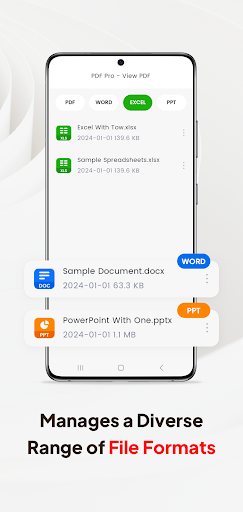
PDF Pro-View PDF is a comprehensive business application designed to streamline PDF management for professionals and casual users alike. This app offers instant access to PDF files with its one-click reading feature, ensuring no waiting time when accessing important documents. The sleek and intuitive interface makes document navigation effortless while supporting multiple file formats including Doc, PPT, and Excel.

Beyond basic viewing, the app provides complete file accessibility by organizing all your PDFs in one place, eliminating the need to search through various directories. Its standout feature is the seamless sharing capability that allows users to distribute files easily. Whether you're working on a project or reviewing documents on the go, PDF Pro-View PDF ensures all your files are readily accessible, enhancing productivity and convenience.

Features

PDF Pro-View PDF stands out with its robust set of features tailored for efficient document handling. The Instant PDF Access function lets users open and read their files with just a single click, significantly reducing load times. Additionally, the Complete File Accessibility tool consolidates all PDF files into one organized location, simplifying file management.

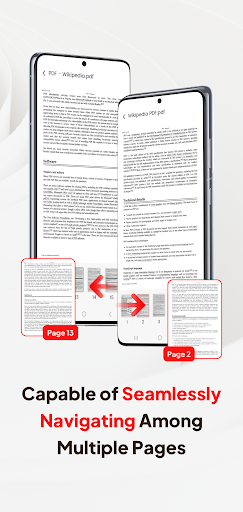
The app's Multiple Document Compatibility is another highlight, allowing users to work not only with PDFs but also with other formats like Doc, PPT, and Excel. Smooth Page Navigation enhances the reading experience by enabling quick page flips, making it easier to browse through lengthy documents. These features collectively ensure that users can manage, view, and share their documents efficiently, providing significant value for anyone dealing with digital paperwork.

Collaborative work features

In the realm of business applications like PDF Pro-View PDF the importance of collaborative work features cannot be overstated. These features are essential for teams that need to share review and edit PDF documents efficiently. PDF Pro-View PDF offers a streamlined approach to collaboration by providing users with the ability to access all their PDF files in one place and share them effortlessly with colleagues. This eliminates the cumbersome process of searching through multiple directories and ensures that everyone involved in a project has immediate access to the necessary documents. The app supports not only PDFs but also various other document types such as Doc PPT and Excel which broadens its utility in a collaborative environment. With quick page navigation users can swiftly move through documents making it easier to find specific sections or details during team discussions. Additionally the seamless sharing functionality allows for real-time collaboration where team members can provide feedback or make edits without delay. This level of accessibility and ease of use significantly enhances productivity as team members can focus on the content rather than the logistics of document management. By integrating these collaborative work features PDF Pro-View PDF ensures that businesses can maintain a smooth workflow even when working with complex documents across different locations.

Task management

Task management is a critical component of any business application particularly for tools like PDF Pro-View PDF which aim to streamline document handling processes. Effective task management within an application allows users to organize prioritize and track their document-related activities ensuring that nothing falls through the cracks. PDF Pro-View PDF excels in this area by offering instant PDF access which eliminates waiting time and enables users to start reading their PDF files with just one click. This feature is particularly beneficial for task management as it allows users to quickly respond to urgent document reviews or approvals. The app's complete file accessibility further enhances task management by neatly organizing all PDF files in one place making it easy to locate and manage documents associated with specific tasks. Moreover the support for multiple document types including Doc PPT and Excel means that users can handle various file formats within a single application simplifying their task list. The smooth page navigation feature aids in efficient task completion by allowing users to rapidly flip through pages which is especially useful when reviewing lengthy documents or comparing different sections. Overall PDF Pro-View PDF's robust task management capabilities ensure that users can maintain an organized and efficient workflow ultimately leading to improved productivity and better document control.

Props

User-friendly interface

Instant PDF loading

Multi-format support

Seamless file sharing

Efficient organization

Cons

Permission requirements

Limited offline use

Advanced features locked

Occasional bugs

Ads in free version

Features and Functions

What is this app and what can I use it for?

A reliable PDF reader for viewing, managing, and sharing PDF files

How do I download and install this app on my device?

Visit Google Play Store, search for PDF Pro-View PDF, and tap Install

How do I get started after opening the app for the first time?

Open the app, grant necessary permissions, and access your PDF files

What are the main features and capabilities of this app?

Instant PDF access, file organization, multi-format support, smooth navigation

How can I customize my experience and adjust preferences?

Adjust settings via the app menu to customize your reading experience

How do I save or bookmark my favorite content for later access?

Use the bookmark feature to save favorite pages or sections for later

How can I share content with friends or on social media?

Tap the share button to send files via email or social media platforms

How do I access detailed information and explore more content?

Navigate using the table of contents or search bar for detailed info

What permissions does this app need and how do I manage them?

The app needs storage permissions to access and manage your files

How do I check for updates and keep the app running smoothly?

Enable auto-updates in Google Play Store to keep the app current
Show more

User Reveiws

{{ comment.reviewer_name }}
{{ comment.review_date_formatted}}
{{ comment.review_content }}
{{ tab.name }}
{{ comment.reviewer_name }}
{{ comment.review_date_formatted}}
{{ comment.review_content }}
No reviews with this rating