Google Voice

4.20

Information

Category:

Communication

Price:

Free

Rank:

16

Rating:

4.20

Overview

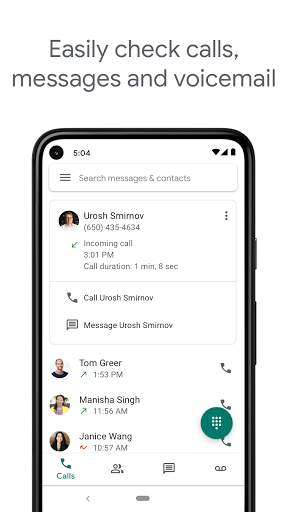
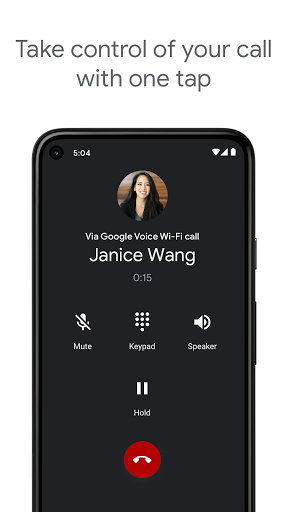
Google Voice is a communication app that provides users with a dedicated phone number for calling, text messaging, and voicemail services. The app seamlessly syncs across multiple devices including smartphones and computers, allowing users to stay connected regardless of location. With features like spam filtering, personalized call settings, and voicemail transcription, it offers a comprehensive communication solution.

The app's standout feature is its cross-device synchronization capability, enabling users to manage their communications from anywhere - whether at home, in the office, or on the go. It also provides cost-saving benefits for international calls and stores all communication history securely, making it easily searchable. This makes Google Voice an ideal tool for professionals and individuals seeking an integrated communication platform.

Features

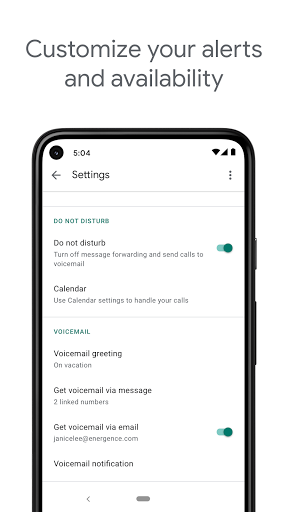
Google Voice stands out with its robust set of communication features tailored for both personal and professional use. One of its key capabilities is automatic spam filtering and number blocking, which empowers users to control unwanted communications effectively. Additionally, personalized settings allow users to forward calls, texts, and voicemails based on their preferences, ensuring maximum flexibility.

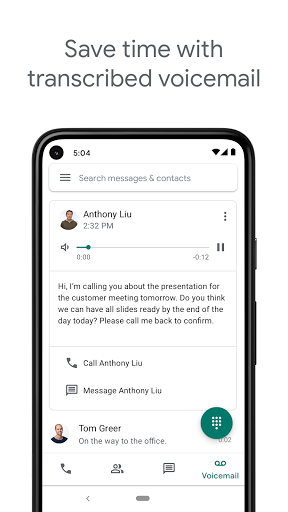
Another notable feature is the advanced voicemail transcription service. Users can read transcriptions directly within the app or have them sent to their email, providing a convenient way to manage messages. Furthermore, the app supports sending and receiving individual and group SMS messages across all synced devices, enhancing accessibility and convenience. These features collectively make Google Voice a powerful tool for efficient communication management.

Real-time messaging speed & reliability

Real-time messaging speed and reliability are crucial factors in ensuring seamless communication experiences for users of messaging applications like Google Voice Messaging speed refers to how quickly messages are delivered from the sender to the recipient while reliability ensures that messages are consistently delivered without fail Google Voice excels in both these aspects by leveraging Google's robust infrastructure and advanced technologies The application is designed to sync across multiple devices meaning whether you're on your smartphone tablet or computer your messages are always up-to-date and accessible This cross-device synchronization enhances the real-time experience as users can switch between devices without missing a beat Furthermore Google Voice incorporates features such as spam filtering and personalized settings which contribute to a reliable messaging environment By automatically filtering out spam and allowing users to block unwanted numbers the app minimizes distractions and ensures that important messages are prioritized Additionally personalized settings for forwarding calls text messages and voicemail give users control over their communication preferences enhancing the overall reliability Users benefit greatly from this high level of messaging performance as it allows them to stay connected efficiently manage their time and maintain uninterrupted communication with contacts Whether it's for personal use or business purposes the assurance that messages will be delivered promptly and reliably is invaluable Moreover Google Voice stores and backs up calls text messages and voicemails making it easy for users to search their history and retrieve past communications This backup feature not only adds an extra layer of reliability but also provides peace of mind knowing that important information is securely stored Overall Google Voice's commitment to delivering fast and dependable messaging services makes it a standout choice for users seeking a comprehensive communication solution

Media sharing support

Media sharing support in communication applications like Google Voice plays a vital role in facilitating richer and more engaging interactions among users Media sharing encompasses the ability to send and receive various types of media files including images videos and audio clips within the messaging platform Google Voice offers robust media sharing capabilities that enhance the overall user experience One notable feature is the ability to send and receive individual and group SMS messages from all your devices This functionality extends to media sharing allowing users to seamlessly share media files with one or multiple recipients regardless of the device they are using Whether you're at home in the office or on the go you can easily distribute media content to your contacts fostering collaboration and social connections Moreover Google Voice leverages Google's powerful infrastructure to ensure that media files are transmitted quickly and reliably This means users can expect minimal delays when sending or receiving media and can trust that their files will reach the intended recipients without issues Another advantage of Google Voice's media sharing support is its integration with other Google services For instance voicemail transcriptions provided by Google Voice allow users to read their voicemails directly in the app or have them sent to their email This transcription service can also extend to media captions providing users with additional context for shared audio or video files The benefits of comprehensive media sharing support are manifold Users can effortlessly share memorable moments with friends and family collaborate on projects by exchanging relevant media files and even conduct business transactions that require visual documentation The convenience of accessing these features across different devices further amplifies the value proposition as it eliminates the constraints of being tied to a single device In summary Google Voice's media sharing support empowers users to communicate more effectively by enabling the exchange of diverse media content in a fast reliable and versatile manner

Props

User-friendly interface

Effective spam filter

Voice mail transcription

Cross-device syncing

Cost-effective international calls

Cons

Limited to US users

No support for all markets

Possible carrier charges

Requires internet connection

Access number usage fees

Features and Functions

What is this app and what can I use it for?

Google Voice is a communication app providing a dedicated phone number for calls, texts, and voicemail

How do I download and install this app on my device?

Download Google Voice from Google Play Store and install by following installation prompts

How do I get started after opening the app for the first time?

Sign in with your Google Account and set up your new Google Voice number

What are the main features and capabilities of this app?

Key features include spam filtering, voicemail transcription, and cross-device syncing

How can I customize my experience and adjust preferences?

Customize settings via the appu2019s preferences menu to adjust call forwarding and notifications

How do I save or bookmark my favorite content for later access?

Save messages by keeping them in your appu2019s inbox or exporting important ones via email

How can I share content with friends or on social media?

Share messages by forwarding them to other contacts or copying message content manually

How do I access detailed information and explore more content?

Access detailed info through the appu2019s search function or review full conversation threads

What permissions does this app need and how do I manage them?

The app needs basic permissions like storage and contacts; manage these in phone settings

How do I check for updates and keep the app running smoothly?

Check for updates in the Google Play Store and enable auto-update for smooth operation
Show more

User Reveiws

{{ comment.reviewer_name }}
{{ comment.review_date_formatted}}
{{ comment.review_content }}
{{ tab.name }}
{{ comment.reviewer_name }}
{{ comment.review_date_formatted}}
{{ comment.review_content }}
No reviews with this rating