iReal Pro

4.70

Information

Category:

Music & Audio

Price:

$ 19.99

Rank:

7

Rating:

4.70

Overview

iReal Pro is a comprehensive music practice tool designed for musicians of all skill levels. This app simulates a realistic band accompaniment, allowing users to practice with high-quality piano, guitar, bass, and drum sounds. It also features an extensive library of chord charts that can be edited, printed, and shared, making it an essential resource for both practice and performance.

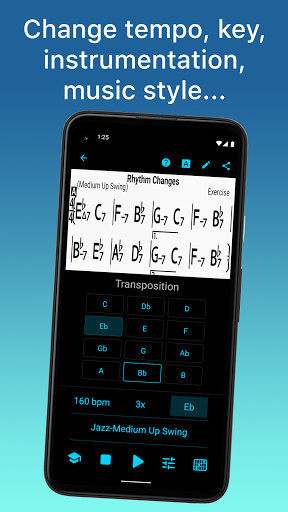
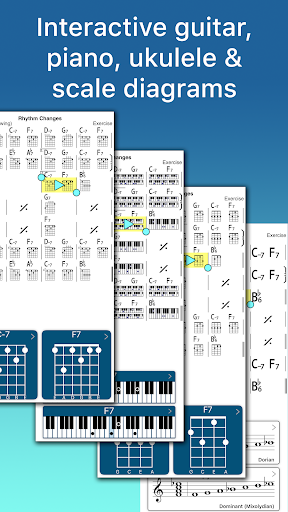
One of the standout features is its versatility - users can choose from 51 included accompaniment styles or purchase additional ones. The app supports transposition to any key, offers scale recommendations for improvisation, and includes chord diagrams for guitar, piano, and ukulele. iReal Pro is used by top music schools worldwide, providing a professional-grade practice tool in a portable format.

Features

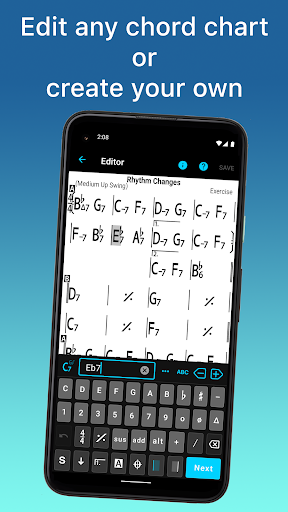
iReal Pro offers an impressive array of features that cater to various musical needs. Users can create and edit unlimited custom chord charts using the built-in editor, with support for multiple editable playlists. The app's accompaniment feature includes various instrument sounds and allows tempo adjustment and looping for focused practice sessions.

Advanced practice tools include automatic tempo increase, key transposition during playback, and horn-friendly global transposition settings. Musicians can record their practice sessions and export them as WAV, AAC, or MIDI files. The app also supports MusicXML and PDF export for sheet music, making it compatible with other music software and easy to share with fellow musicians or students.

Music library size & copyright authenticity

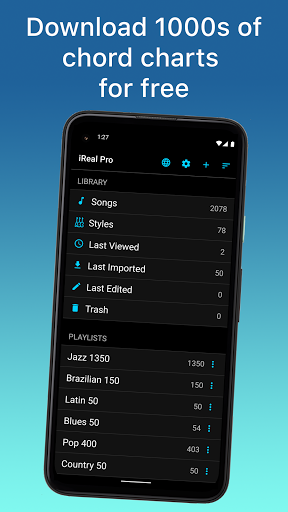
The size and variety of a music library within an application are crucial factors that determine the breadth of content available to users. For iReal Pro, the extensive music library comprises thousands of songs that can be downloaded directly from forums in just a few simple steps. This vast repository ensures that musicians of all levels have access to a wide array of musical pieces for practice and performance. The app not only allows users to download existing songs but also provides tools to edit these songs or create entirely new compositions using the built-in Editor. Each user-created or edited song can be played back by the app's Player feature, ensuring that personal creations are performed with the same high-quality accompaniment as the pre-existing tracks. Furthermore, iReal Pro places a strong emphasis on copyright authenticity. While the app facilitates sharing and collaboration among users through exporting charts as PDF and MusicXML, it encourages responsible use of copyrighted material. Users are empowered to create multiple editable playlists and share individual charts or whole playlists with fellow iReal Pro users via email and dedicated forums. This ecosystem fosters a respectful approach towards intellectual property while promoting creativity and learning. By providing such a comprehensive and authentic music library, iReal Pro supports musicians in honing their skills and expanding their repertoires responsibly.

Audio quality options

Audio quality is paramount when evaluating applications designed for music creation and playback. iReal Pro excels in this domain by offering a range of audio quality options that cater to discerning musicians. The app simulates a realistic-sounding band complete with piano or guitar, bass, and drum accompaniments for any downloaded or user-created chord chart. Users can personalize each style with various sounds including acoustic and electric pianos, Fender Rhodes, acoustic and electric guitars, basses, drums, vibraphone, organ, and more. This diversity in sound selection ensures that musicians can tailor their practice sessions to closely match the desired feel and texture of their performances. Moreover, iReal Pro enables users to record themselves playing or singing along with the accompaniment, capturing their progress with clarity and fidelity. When exporting audio, users have the option to save files in formats such as WAV, AAC, and MIDI, allowing for flexibility in post-production and sharing. These export options preserve the integrity of the original recordings, making them suitable for both casual listening and professional use. The inclusion of advanced practice settings like automatic tempo increase and key transposition further enhances the audio experience by enabling dynamic adjustments during practice sessions. With its robust set of audio features, iReal Pro delivers a versatile and high-quality auditory environment that empowers musicians to refine their craft effectively.

Props

User-friendly interface

High-quality sound library

Extensive style options

Professional practice tools

Excellent educational value

Cons

Additional styles cost extra

Steep learning curve

Occasional audio glitches

Limited free content

Subscription model

Features and Functions

What is this app and what can I use it for?

A versatile music practice app with virtual band accompaniment

How do I download and install this app on my device?

Search 'iReal Pro' on Google Play Store and install from there

How do I get started after opening the app for the first time?

Download sample songs and explore basic accompaniment features

What are the main features and capabilities of this app?

Virtual band, chord charts, transposition, recording capabilities

How can I customize my experience and adjust preferences?

Adjust tempo, key, and instrument sounds in settings menu

How do I save or bookmark my favorite content for later access?

Create personalized playlists for quick access to favorite songs

How can I share content with friends or on social media?

Export charts as PDF or share links via email and social media

How do I access detailed information and explore more content?

Use the built-in editor to view detailed song information

What permissions does this app need and how do I manage them?

Needs microphone and storage permissions for recording and saving

How do I check for updates and keep the app running smoothly?

Check Google Play Store regularly for updates and enable auto-update
Show more

User Reveiws

{{ comment.reviewer_name }}
{{ comment.review_date_formatted}}
{{ comment.review_content }}
{{ tab.name }}
{{ comment.reviewer_name }}
{{ comment.review_date_formatted}}
{{ comment.review_content }}
No reviews with this rating