
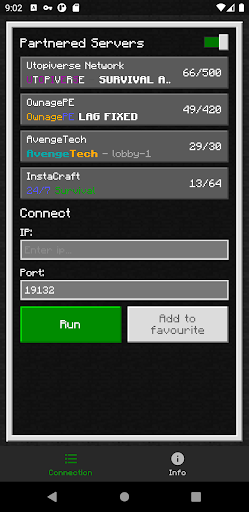

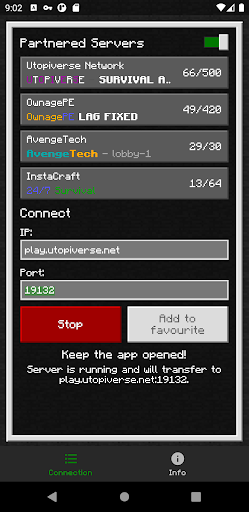
BedrockTogether (Pro) is a specialized networking tool designed to simplify server connections for Minecraft Bedrock Edition players. This ad-free version allows any Bedrock Edition server to appear as a LAN server on Xbox or PlayStation clients, enabling straightforward connections without DNS rerouting.
The app facilitates seamless access to multiplayer servers by allowing users to input server details and connect via the game's LAN tab. While it currently doesn't support Realms or Nintendo Switch compatibility, it provides an effective solution for cross-platform play among supported devices.
This tool is particularly valuable for Minecraft enthusiasts who frequently engage in multiplayer sessions across different platforms. By streamlining the connection process, it enhances the gaming experience while maintaining network security within local area networks.
BedrockTogether (Pro) offers several distinctive features that enhance multiplayer connectivity. The application's primary function is its ability to transform any Bedrock Edition server into a recognizable LAN server for supported gaming consoles. This eliminates complex network configurations typically required for cross-platform play.
The app implements a straightforward operational flow where users simply enter server IP and port information, initiate the connection through the app, then access the server via their gaming console's Friends tab. Its innovative approach to network bridging maintains system security while enabling seamless multiplayer experiences.
Additional features include comprehensive troubleshooting guidelines and active community support through Discord and Telegram channels. These resources help users resolve connection issues and report bugs effectively, ensuring continuous improvement of the application's functionality.
Seamless LAN integration
User-friendly interface
Effective network bridging
Active community support
Ad-free experience
No Nintendo Switch support
Limited to LAN networks
Third-party application
Manual server entry
Realms not supported

This app unlocks the Pro features of the Central for DayZ app
 3.60
3.60
Optimize your WiFi network, turn your phone into Wifi Analyzer
4.70
ADB support Android 4.X-Android 13(Support wireless pair mode).No root required!
4.70
VESC Tool can monitor and configure VESC-compatible devices over BLE and Wifi
4.20
Excellent scientific calculator with symbolic algebra, integrals, derivatives
4.80
Connect wirelessly to your computer to watch movies, browse the web, play games
5.00
The Ultimate Flex Drivers Utility App - Convenient Tapping & Block Filters
4.70
Protect your device with antivirus, storage cleanup, and system monitoring
4.70
Fast VPN USA for any country. Super secure VPN for calls, streaming, games, TV.
4.40
Best leveling tool for your Android device. Hang paintings like a pro.
4.90
Easily install aab(Android App Bundle) files on your Android device with our app
4.80
Extremely fast, secure, and protects your privacy
4.80
Learn the vast amount of system information about device and monitor it's state
4.70
Connect instantly to a fast, encrypted VPN with one tap
4.60
HD Camera captures every special moment.
4.60
Play your X-Box games remotely in 1080p with any controller and zero latency
4.60
Universal TV remote control all TVs, Roku, LG, Samsung, Fire, Vizio, Sony, TCL.
4.40
Just one-tap to easy translate in any language after calls within seconds.
4.20
Create your own live wallpaper or check out thousands already made presets
3.90


User Reveiws