


SimplyWise Cost Estimator

4.70

Information

Category:

Business

Price:

Free

Rank:

46

Rating:

4.70

Overview

SimplyWise Cost Estimator is a cutting-edge construction cost estimation tool designed to streamline the planning of home repair and renovation projects. This app leverages advanced AI technology to deliver precise cost estimates for both labor and materials within just six seconds. Whether you're a homeowner planning small repairs or a contractor handling large-scale renovations, SimplyWise provides reliable financial insights that help in making informed decisions.

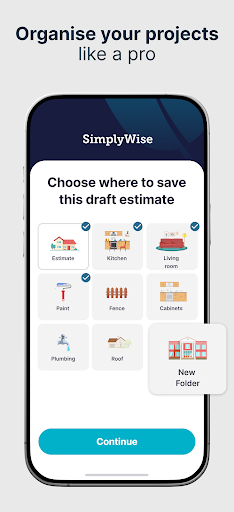
The app goes beyond basic estimation by offering integrated receipt scanning and document management features. Users can create custom folders to organize project expenses and generate detailed financial reports. These capabilities ensure users stay within budget while maximizing potential tax benefits. With its user-friendly interface and accurate estimation engine, SimplyWise revolutionizes how construction costs are calculated and managed.

Features

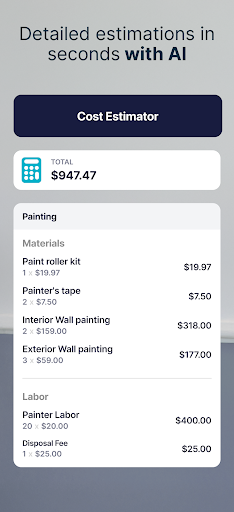
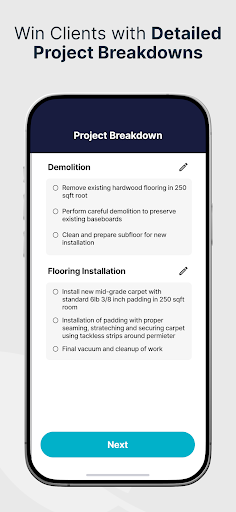
SimplyWise Cost Estimator stands out with its comprehensive feature set tailored for construction professionals and homeowners alike. The core functionality begins with its AI-powered photo estimation system, where users simply take a picture of their project space and describe the work needed. The app then generates detailed material and labor cost breakdowns, which can be easily adjusted and exported as professional PDF estimates.

Beyond estimation, the app includes a robust document management system powered by OCR technology. This allows users to scan receipts and organize them into customizable folders. The system automatically categorizes expenses and generates itemized financial reports, helping users track project costs and optimize tax deductions. Additional features include real-time estimate adjustments, client sharing capabilities, and a project tracking system that updates costs as projects progress.

Collaborative work features

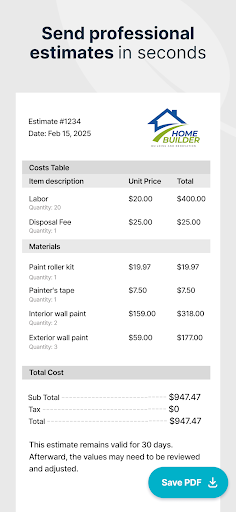
In the realm of business applications like SimplyWise Cost Estimator collaboration is a pivotal function that enhances team productivity and project coherence. Collaborative work features refer to the tools and systems within an application that allow multiple users to interact share data and work together on projects in real-time or asynchronously. For construction and home repair projects these features are indispensable as they enable seamless communication between homeowners contractors and other stakeholders ensuring everyone is aligned with the project goals and budget constraints. The SimplyWise app facilitates this through its intuitive interface where users can take photos describe their projects and receive detailed estimates. This process is further enhanced by AI which revises and flags important details before sharing with clients. Additionally the app allows for easy sharing of final estimates in PDF format making it convenient for all parties involved to review and approve the documents. These collaborative capabilities ensure that every member of the project team has access to accurate up-to-date information which is crucial for making informed decisions avoiding unexpected expenses and staying within budget. By integrating advanced receipt and document scanning OCR the app also helps manage project expenses effectively creating custom folders for organized financial tracking and providing itemized reports that aid in maximizing tax returns. Such comprehensive collaborative features not only streamline project management but also foster trust and transparency among all participants ultimately leading to more successful project outcomes.

Task management

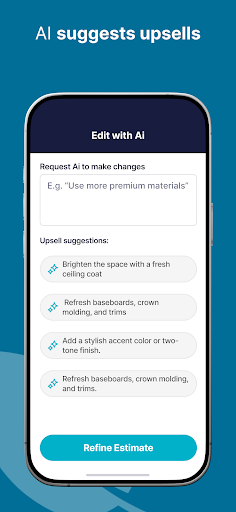
Task management is a critical component of any business application particularly for tools designed to handle complex processes such as construction cost estimation. In the context of the SimplyWise Cost Estimator task management involves organizing tracking and prioritizing tasks associated with renovation and home repair projects to ensure timely completion and adherence to budgetary constraints. The app excels in this area by offering a structured workflow that guides users from initial project conception to final cost estimation. Users begin by capturing images and describing their projects which initiates the estimation process. Once the AI generates an estimate users can review and adjust the details ensuring accuracy and completeness. This iterative process allows for precise control over each aspect of the project from material costs to labor expenses. Moreover the ability to save projects and update them as work progresses provides continuous oversight and adaptability essential for managing evolving project requirements. The inclusion of AI-driven insights and automated revisions further enhances task management by flagging potential issues and suggesting improvements before estimates are finalized and shared with clients. Additionally the app's capability to produce detailed PDF reports simplifies client communication and approval processes. These robust task management features empower users to maintain clear oversight of their projects make informed decisions quickly address any discrepancies and ultimately achieve better financial planning and execution. By streamlining these critical tasks SimplyWise not only boosts efficiency but also significantly reduces the risk of costly errors and delays ensuring smoother project delivery and higher client satisfaction.

Props

Accurate Estimates

User-Friendly Interface

Advanced AI Technology

Comprehensive Reporting

Integrated Document Management

Cons

Limited Free Features

Requires Internet Connection

Occasional AI Errors

Premium Subscription Cost

Learning Curve for New Users

Features and Functions

What is this app and what can I use it for?

AI-powered construction cost estimator for accurate project pricing

How do I download and install this app on my device?

Search 'SimplyWise Cost Estimator' on Google Play Store and install from there

How do I get started after opening the app for the first time?

Take a project photo, describe work needed, and generate your first estimate

What are the main features and capabilities of this app?

AI-powered estimates, document scanning, expense tracking, PDF exporting

How can I customize my experience and adjust preferences?

Adjust estimate parameters and organize documents in custom folders

How do I save or bookmark my favorite content for later access?

Save estimates automatically in project folders for future reference

How can I share content with friends or on social media?

Export estimates as PDF files and share via email or messaging apps

How do I access detailed information and explore more content?

Review detailed breakdowns in generated reports and adjust estimates

What permissions does this app need and how do I manage them?

Needs camera and storage access for photos and document scanning

How do I check for updates and keep the app running smoothly?

Enable automatic updates in Google Play Store settings for latest version
Show more

User Reveiws

{{ comment.reviewer_name }}
{{ comment.review_date_formatted}}
{{ comment.review_content }}
{{ tab.name }}
{{ comment.reviewer_name }}
{{ comment.review_date_formatted}}
{{ comment.review_content }}
No reviews with this rating