Sonos Widget

4.40

Information

Category:

Music & Audio

Price:

$ 2.49

Rank:

56

Rating:

4.40

Overview

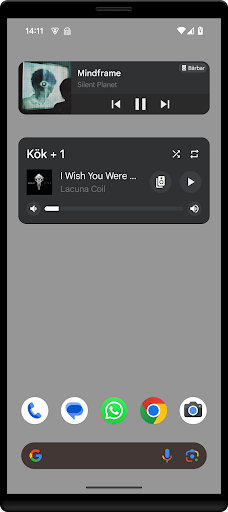
Sonos Widget is a powerful tool designed for music enthusiasts who want seamless control over their Sonos system directly from their home screen. This app offers two distinct widget styles, Compact and Enhanced, allowing users to choose the display that best suits their needs.

With features like volume control, grouping, playback options (Play, Pause, Next, Previous), and support for modes such as Shuffle and Repeat, Sonos Widget ensures you have complete control over your audio experience. The app displays relevant metadata, keeping you informed about what's playing.

Features

The app provides two different widgets: Compact and Enhanced, each offering unique ways to interact with your Sonos system. The Enhanced widget gives more detailed information, while the Compact widget saves space on your home screen.

Sonos Widget supports essential functions such as volume adjustment, grouping of speakers, playback controls, and modes like Shuffle and Repeat. These features ensure that you can manage your music effortlessly and efficiently, enhancing your overall listening experience.

Music library size & copyright authenticity

The Sonos Widget application offers a unique approach to managing your Sonos system directly from your home-screen which indirectly relates to the music library management and control. While the app itself does not host a music library it provides users with the ability to efficiently interact with their existing Sonos music ecosystem. This interaction includes volume control playback options like play pause next and previous as well as modes support such as shuffle and repeat. The importance of having an extensive music library with authentic content cannot be overstated for audiophiles and casual listeners alike. With the Sonos Widget users can ensure that their music streaming services or personal audio files are accessed in a streamlined manner maintaining the integrity and authenticity of the content. The app's features like grouping and displaying relevant metadata enhance the user's capacity to manage larger libraries with ease. By enabling quick access to these controls and information the Sonos Widget ensures that users can enjoy a diverse range of music without worrying about copyright infringement or unauthorized content. This seamless integration with the Sonos system allows users to focus on enjoying their music rather than managing it.

Audio quality options

Audio quality is paramount when it comes to music playback and the Sonos Widget excels in providing users with various options to tailor their listening experience. Although the app does not directly stream audio it facilitates superior sound output by offering precise controls over the Sonos system right from the home-screen. Users have access to volume adjustments ensuring they can fine-tune the loudness to their preference or environment. Additionally the widget supports different playback modes including shuffle and repeat which can influence how tracks are played thus affecting perceived audio quality through varied listening patterns. The ability to group speakers also means listeners can create a multi-room audio setup enhancing the overall soundstage and depth. Furthermore the display of relevant metadata ensures that users are always aware of what is playing allowing them to make informed decisions about their audio selections. These features combined provide a comprehensive toolkit for anyone looking to optimize their audio experience within the Sonos ecosystem. By simplifying access to critical functions the Sonos Widget empowers users to maintain high standards of audio fidelity and customization according to their individual tastes and requirements.

Props

User-friendly interface

Comprehensive widget options

Efficient volume control

Playback customization

Supports Shuffle and Repeat

Cons

Limited official support

No direct affiliation with Sonos

Requires initial setup

Metadata display only

Dependent on Sonos system

Features and Functions

What is this app and what can I use it for?

A widget app to control Sonos systems from your home screen

How do I download and install this app on my device?

Visit Google Play Store, search for Sonos Widget, and tap install

How do I get started after opening the app for the first time?

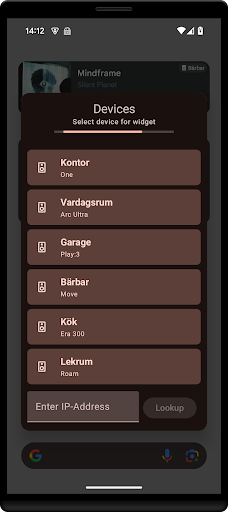
Add widget from drawer and follow setup instructions

What are the main features and capabilities of this app?

Volume control, grouping, playback options, and mode settings

How can I customize my experience and adjust preferences?

Adjust widget type and settings via the widget drawer

How do I save or bookmark my favorite content for later access?

Not applicable as it doesn't bookmark content

How can I share content with friends or on social media?

Share app via supported Android sharing methods

How do I access detailed information and explore more content?

Explore widget settings for detailed options and features

What permissions does this app need and how do I manage them?

Needs network access to connect to Sonos devices

How do I check for updates and keep the app running smoothly?

Check updates in Google Play Store under My apps
Show more

User Reveiws

{{ comment.reviewer_name }}
{{ comment.review_date_formatted}}
{{ comment.review_content }}
{{ tab.name }}
{{ comment.reviewer_name }}
{{ comment.review_date_formatted}}
{{ comment.review_content }}
No reviews with this rating