
Spark Driver

4.10

Information

Category:

Business

Price:

Free

Rank:

13

Rating:

4.10

Overview

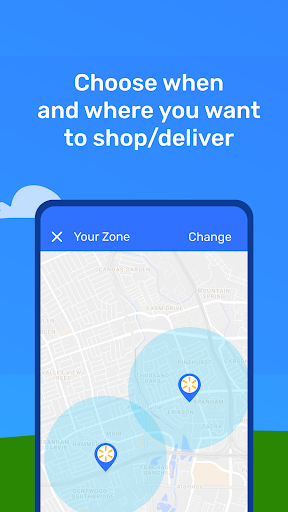
Spark Driver is a business app designed for individuals who want to earn money by delivering orders or shopping and delivering orders for Walmart and other businesses. With just a car, smartphone, and insurance, you can become an independent contractor and enjoy the flexibility of working on your own schedule. The app provides notifications when your local zone has availability, allowing you to access details for using the Spark Driver app.

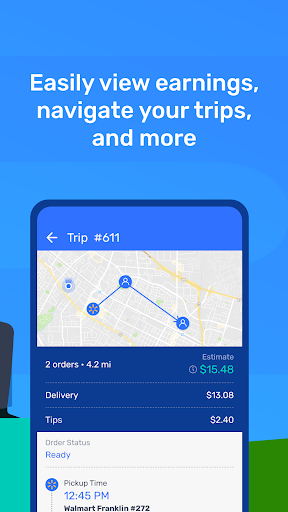
The core functionality of Spark Driver revolves around its ability to help users shop and deliver orders efficiently. After accepting a trip, the app assists with navigation to the store, finding items during the shopping trip, and delivering to the customer's location. This comprehensive support ensures that users can complete their tasks smoothly and earn money each time they finish a shopping or delivery order. Additionally, users keep 100% of confirmed customer tips, enhancing their earning potential.

Features

Spark Driver offers a range of features that make it easy for users to manage their delivery and shopping tasks. One key feature is the app's notification system, which alerts users when there is availability in their local zone. This ensures that users are always aware of opportunities to earn money. Another notable feature is the detailed guidance provided after accepting a trip, including navigation to the store, item location assistance during shopping, and delivery instructions to the customer's location.

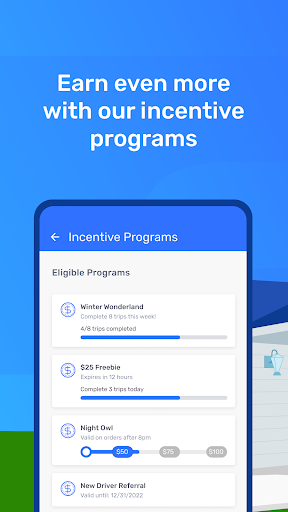
In addition to these practical features, Spark Driver also supports various incentive programs and referral offers. These initiatives provide users with additional ways to boost their earnings beyond the standard payment for completed orders. The combination of flexible work options, comprehensive task support, and extra earning opportunities makes Spark Driver a valuable tool for anyone looking to be their own boss and maximize their income potential.

Collaborative work features

Collaborative work features are essential for applications designed to facilitate business operations and independent contracting opportunities such as the Spark Driver app. These features enable seamless interaction between different users within the same platform, ensuring that all parties involved in a transaction or service delivery can effectively communicate and coordinate their efforts. In the case of Spark Driver, collaborative work features manifest through real-time notifications and updates regarding shopping and delivery orders. This ensures that drivers are always aware of the latest order statuses and can efficiently plan their routes and schedules. The app also supports collaboration by providing navigational assistance and item location services within stores, which is particularly useful when fulfilling complex orders. For users who wish to maximize their earning potential by optimizing their workflow, these collaborative elements are invaluable. They not only streamline the process of completing tasks but also enhance the overall user experience by fostering a sense of community among contractors. Furthermore, the ability to retain 100% of customer tips and participate in incentive programs adds another layer of collaborative benefit, as it encourages high-quality service and positive interactions between drivers and customers. Overall, the collaborative work features embedded within the Spark Driver app play a crucial role in empowering individuals to manage their own businesses while remaining connected to a larger network of support and opportunity.

Task management

Task management is a critical component of any business-oriented application, especially one like Spark Driver, which caters to independent contractors responsible for both shopping and delivering orders. Effective task management allows users to organize, prioritize, and execute their duties efficiently, thereby maximizing productivity and earnings. Within the Spark Driver app, task management capabilities are evident in several key functionalities. First, the app provides clear and concise instructions for each assignment, guiding users through every step from accepting a trip to navigating to the store, selecting items, and completing deliveries. This structured approach helps drivers maintain focus and reduces the likelihood of errors or oversights during the fulfillment process. Additionally, the app's interface is designed to be intuitive and user-friendly, minimizing the learning curve for new users and enabling them to quickly become proficient in managing their tasks. Another significant aspect of task management in Spark Driver is the integration of real-time updates and alerts. These notifications keep drivers informed about changes in order status, traffic conditions, and other relevant factors that may impact their schedules. By staying abreast of these developments, users can make timely adjustments to their plans and avoid unnecessary delays or complications. Moreover, the app's emphasis on flexibility and autonomy aligns perfectly with the needs of independent contractors, allowing them to tailor their workloads according to personal preferences and availability. Ultimately, the robust task management features offered by Spark Driver contribute significantly to its appeal as a versatile and reliable tool for anyone looking to capitalize on the gig economy while maintaining control over their professional endeavors.

Props

User-friendly interface

Flexible working hours

Comprehensive task support

Opportunities for extra earnings

Independence as a contractor

Cons

Background check required

Dependent on local demand

Limited to certain businesses

Potential for low tips

Need for personal vehicle

Features and Functions

What is this app and what can I use it for?

Spark Driver is a business app for delivering orders and earning money through shopping and deliveries.

How do I download and install this app on my device?

Download Spark Driver from Google Play Store and install it on your Android device.

How do I get started after opening the app for the first time?

After opening Spark Driver, complete enrollment and wait for local zone availability notifications.

What are the main features and capabilities of this app?

Main features include order notifications, navigation assistance, and delivery guidance.

How can I customize my experience and adjust preferences?

Customize your experience by setting work schedules and choosing delivery preferences.

How do I save or bookmark my favorite content for later access?

Save favorite content by bookmarking preferred delivery locations within the app.

How can I share content with friends or on social media?

Share your delivery achievements with friends via social media directly from the app.

How do I access detailed information and explore more content?

Access detailed information about each order and explore more delivery options.

What permissions does this app need and how do I manage them?

The app needs location permissions; manage them in your device settings.

How do I check for updates and keep the app running smoothly?

Check for updates in the Google Play Store to keep Spark Driver running smoothly.
Show more

User Reveiws

{{ comment.reviewer_name }}
{{ comment.review_date_formatted}}
{{ comment.review_content }}
{{ tab.name }}
{{ comment.reviewer_name }}
{{ comment.review_date_formatted}}
{{ comment.review_content }}
No reviews with this rating