TP-LINK tpCamera

4.20

Information

Category:

Libraries & Demo

Price:

Free

Rank:

46

Rating:

4.20

Overview

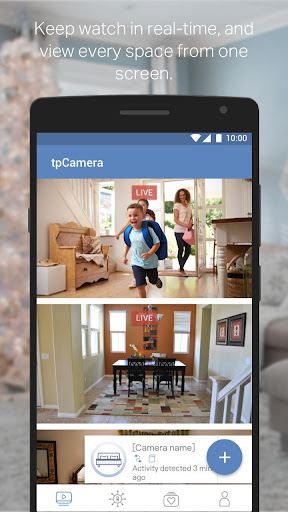
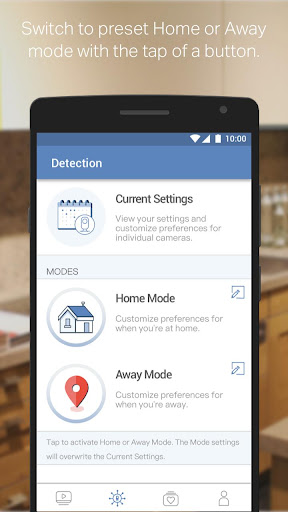
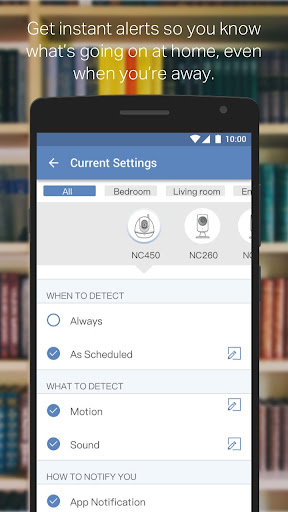
TP-LINK tpCamera is a cloud-based video monitoring app that allows users to stay connected to their homes, families, or pets remotely. With this app installed on your smartphone, you can access your cloud cameras anytime and from anywhere over the Internet. This ensures you never miss an important moment.

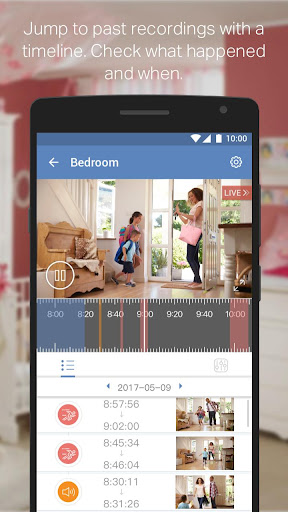
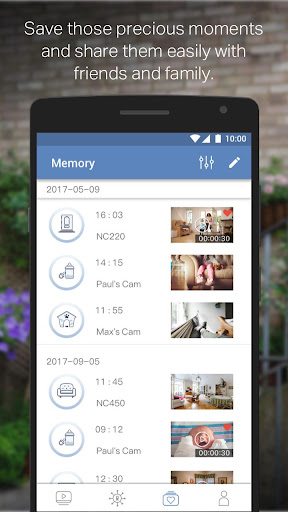
The app offers free cloud service for life, quick registration and setup, and the ability to manage and stream live videos from multiple cameras. It also allows you to store photos and videos so you can relive those moments later. Compatible devices include NC200, NC210, NC220, NC230, NC250, NC260, and NC450.

Features

TP-LINK tpCamera provides a range of features designed to enhance your remote monitoring experience. The app offers free cloud service for life, allowing you to store and access your videos without any additional cost. Quick registration and setup make it easy to connect to your home or office cameras.

You can manage and stream live videos from multiple cameras simultaneously, ensuring comprehensive coverage of your property. The app also allows you to store photos and videos, providing a way to preserve memories and important events. With support for various languages and compatibility with a range of devices, TP-LINK tpCamera is a versatile and reliable choice for video monitoring.

Functionality completeness & coverage

The TP-LINK tpCamera app offers a comprehensive suite of functionalities that cater to the needs of users who require constant monitoring and connectivity to their home or office environments. Functionality completeness in this context refers to the app's ability to provide all necessary features that ensure users can effectively monitor their spaces without limitations. The app scores high on this aspect by offering free lifetime cloud service, which allows uninterrupted access to live video streams and recordings. This is complemented by its quick registration and setup process, making it accessible even to those who may not be tech-savvy. Furthermore, the app supports multiple cameras, providing a centralized platform for managing various camera feeds simultaneously. This broad functional coverage ensures that whether you are monitoring your family, pets, or office space, the app delivers a seamless experience. Users benefit from this extensive functionality as they can maintain a vigilant eye on their properties, ensuring security and peace of mind. The ability to store photos and videos further enhances the app's utility, allowing users to relive moments or review footage as needed. Overall, the completeness and coverage of TP-LINK tpCamera's functionalities make it a reliable choice for anyone seeking an efficient and versatile video monitoring solution.

Usability & operational smoothness

Usability and operational smoothness are critical factors that determine how effectively users can interact with an application. In the case of TP-LINK tpCamera, these aspects are meticulously addressed to ensure a user-friendly experience. Usability is demonstrated through the app's intuitive interface, which simplifies navigation and control over multiple camera feeds. Users can easily switch between different views, manage settings, and access stored media without encountering complex procedures. Operational smoothness is evident in the app's performance, characterized by minimal lag during live streaming and swift response times when switching between cameras or accessing recorded content. This operational efficiency is supported by the app's compatibility with a wide range of devices, including NC200 NC210 NC220 NC230 NC250 NC260 NC450 models, ensuring consistent performance across various hardware setups. Additionally, the availability of the app in multiple languages such as English French German Spanish Portuguese Italian Russian Polish Traditional Chinese and Korean enhances its accessibility to a global audience. These usability and operational attributes collectively contribute to a positive user experience, enabling individuals to focus on what matters most staying connected to their loved ones and securing their environments without being hindered by technical difficulties or cumbersome interfaces. As a result, TP-LINK tpCamera stands out as a paragon of usability and operational excellence within its category.

Props

User-friendly interface

Free cloud storage

Multi-camera support

Quick setup process

Remote access capability

Cons

Limited device compatibility

No advanced analytics

Basic video quality

Occasional connectivity issues

Language support varies
Features and Functions

What is this app and what can I use it for?

A cloud-based video monitoring app for remote viewing.

How do I download and install this app on my device?

Search TP-LINK tpCamera on Google Play Store and install.

How do I get started after opening the app for the first time?

Register an account and add your camera devices.

What are the main features and capabilities of this app?

Live video streaming and free lifetime cloud storage.

How can I customize my experience and adjust preferences?

Adjust settings in the app's preferences menu.

How do I save or bookmark my favorite content for later access?

Save favorite moments via the app's storage feature.

How can I share content with friends or on social media?

Share videos directly through the app interface.

How do I access detailed information and explore more content?

Access detailed info in the app's content section.

What permissions does this app need and how do I manage them?

Grant necessary permissions during initial setup.

How do I check for updates and keep the app running smoothly?

Check updates in the app's settings or Google Play.
Show more

User Reveiws

{{ comment.reviewer_name }}
{{ comment.review_date_formatted}}
{{ comment.review_content }}
{{ tab.name }}
{{ comment.reviewer_name }}
{{ comment.review_date_formatted}}
{{ comment.review_content }}
No reviews with this rating