EmuReady Beta

4.30

Information

Category:

Tools

Price:

$ 4.49

Rank:

49

Rating:

4.30

Overview

EmuReady Beta is a comprehensive emulation compatibility tool designed to help users discover the best gaming experience tailored to their specific devices. The app provides detailed compatibility reports for various games, emulators, and device combinations.

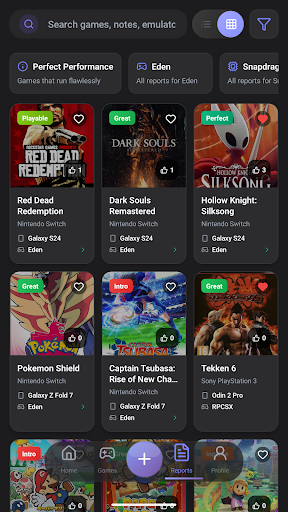
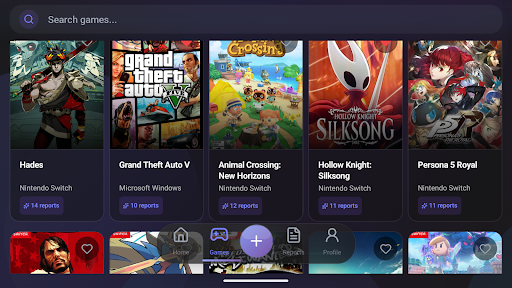
Key features include an extensive game compatibility database, community-driven reports, device-specific information, and support for multiple emulator systems. Users can filter results by performance ratings, save favorite games, and access detailed metrics like FPS and graphical fidelity.

This application is particularly useful for retro gaming enthusiasts who want to optimize their emulation setup without wasting time on trial and error. By providing reliable compatibility information, EmuReady ensures users can enjoy seamless gaming experiences.

Features

EmuReady Beta stands out with its robust set of features that cater to both novice and experienced emulation users. The app's game compatibility database allows users to browse thousands of titles, checking how each performs across different devices and emulators.

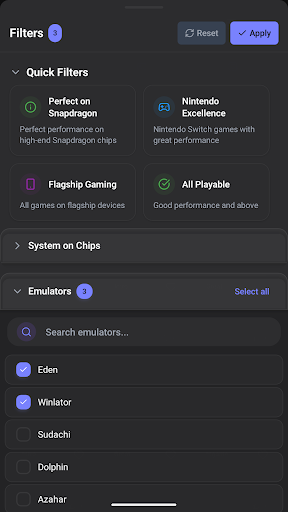
Community reports offer valuable insights from real users, including performance ratings and custom settings. Device-specific information ensures tailored recommendations, while multiple emulator support helps in comparing different platforms. Smart filtering options enable quick searches based on specific criteria.

Additional features such as a vote and comment system, performance tracking, saved favorites, and dark mode enhance user engagement and convenience. These functionalities collectively create a powerful tool for optimizing emulation setups efficiently.

Core function accuracy & effectiveness

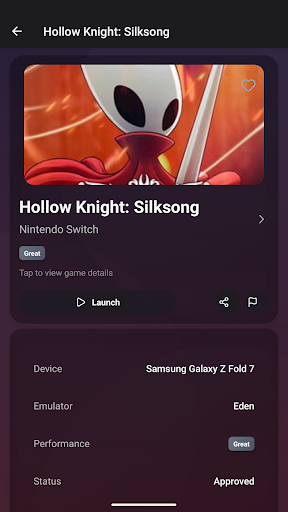
The core function accuracy and effectiveness of EmuReady Beta centers around its ability to provide precise compatibility reports for emulation enthusiasts. This feature is crucial as it eliminates the guesswork involved in determining whether a game will run smoothly on a user's specific device and emulator setup. EmuReady achieves this by maintaining an extensive and continuously updated database of games, meticulously cataloging their performance across various devices and emulators. When users search for a game, they receive instant feedback on how well it performs, including detailed metrics such as FPS, graphical fidelity, and overall playability ratings that range from Perfect to Unplayable. The app further enhances its effectiveness through community-driven reports where real users contribute their experiences, offering insights into custom settings and potential workarounds for better performance. This crowdsourced data significantly boosts the reliability of compatibility predictions. For users, this translates into substantial time savings and an improved gaming experience as they can focus on titles guaranteed to run well on their hardware. By providing device-specific information, EmuReady ensures that whether you are using a high-end smartphone or a budget tablet, you have access to tailored recommendations that maximize your deviceu2019s potential. The app's support for multiple emulator comparisons allows users to select the best software for each game, ensuring optimal performance. Additionally, smart filtering options enable quick navigation through thousands of reports, helping users find exactly what they need without unnecessary hassle. Overall, EmuReady Beta's commitment to accuracy and effectiveness in delivering compatibility information makes it an indispensable tool for anyone interested in retro gaming emulation.

Interface simplicity & intuitiveness

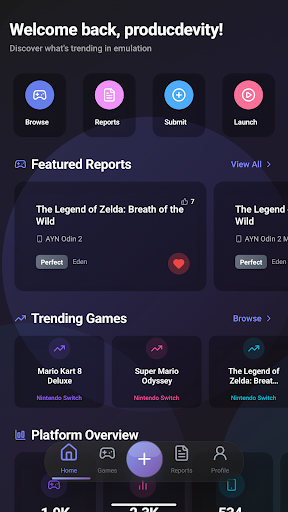
EmuReady Beta excels in providing an interface that balances simplicity with intuitiveness, making it accessible to both newcomers and seasoned emulation enthusiasts alike. The importance of an intuitive interface cannot be overstated, especially in applications dealing with complex technical data like emulation compatibility reports. EmuReady tackles this challenge by organizing its wealth of information into easily digestible sections, ensuring users can quickly find and understand the details they need. Upon launching the app, users are greeted with a clean layout that prioritizes essential functions such as searching for games and browsing compatibility reports. The search functionality is particularly noteworthy, allowing users to look up games by title, system, or browse through an extensive catalog seamlessly. Navigation within the app is streamlined, with clearly labeled categories and filters that help narrow down results based on device, emulator, performance rating, and more. This logical structuring reduces the learning curve typically associated with specialized tools, enabling users to become proficient faster. Moreover, EmuReady incorporates several user-friendly features that enhance the overall experience. For instance, the inclusion of a dark mode offers a comfortable viewing option regardless of the time of day, automatically adjusting to ensure optimal readability. The voting and commenting system adds another layer of interaction, encouraging community engagement while also serving as a valuable feedback mechanism for improving report quality. Users can save their favorite games, building a personalized library of compatibility information that simplifies future reference. Performance tracking is presented in a straightforward manner, displaying key metrics like FPS and graphical fidelity in an easy-to-understand format. These thoughtful design choices not only make EmuReady approachable but also empower users to harness its full potential without feeling overwhelmed. In essence, EmuReady Beta demonstrates that sophisticated tools can maintain simplicity and intuitiveness, thereby broadening their appeal and utility among diverse user groups.

Props

User-friendly interface

Comprehensive database

Active community support

Device-specific optimization

Multiple emulator compatibility

Cons

Limited to Android

Beta version bugs

No direct emulation

Dependent on user reports

Requires internet

Features and Functions

What is this app and what can I use it for?

An emulation compatibility tool for finding optimal game settings.

How do I download and install this app on my device?

Visit Google Play Store, search for EmuReady Beta, and tap install.

How do I get started after opening the app for the first time?

Grant necessary permissions, then explore the main menu to get started.

What are the main features and capabilities of this app?

Game database, community reports, device-specific info, multiple emulators.

How can I customize my experience and adjust preferences?

Adjust preferences through the settings menu for personalized use.

How do I save or bookmark my favorite content for later access?

Use the Save Favorites feature to bookmark games you wish to revisit.

How can I share content with friends or on social media?

Share reports via social media or messaging apps directly from the app.

How do I access detailed information and explore more content?

Access detailed metrics and filters to explore more content efficiently.

What permissions does this app need and how do I manage them?

Needs storage and network permissions; manage them in app settings.

How do I check for updates and keep the app running smoothly?

Enable automatic updates in Google Play Store to keep it current.
Show more

User Reveiws

{{ comment.reviewer_name }}
{{ comment.review_date_formatted}}
{{ comment.review_content }}
{{ tab.name }}
{{ comment.reviewer_name }}
{{ comment.review_date_formatted}}
{{ comment.review_content }}
No reviews with this rating