
Find93

4.2

Information

Category:

Maps & Navigation

Price:

$ 4.99

Rank:

14

Rating:

4.2

Overview

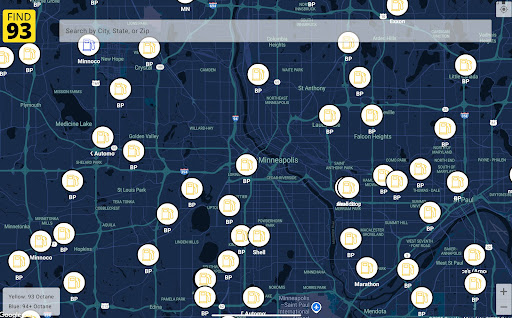
Find93 is a specialized navigation app designed to help drivers locate gas stations that offer 93 octane fuel or higher. The app's core functionality revolves around its crowdsourced map system, which provides real-time information about premium fuel availability across the United States.

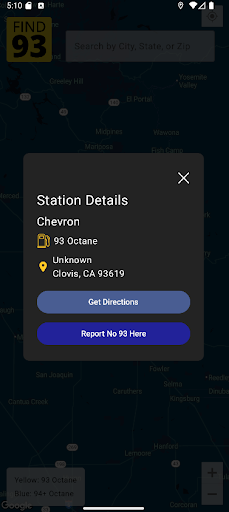
Beyond basic location services, Find93 offers detailed station information including precise addresses, fuel types, and additional descriptions. The app integrates seamlessly with major navigation platforms like Apple Maps, Google Maps, and Waze, providing users with multiple routing options to their chosen fueling location.

This application proves particularly valuable for owners of high-performance vehicles and certain luxury car models that require premium 93 octane gasoline. By maintaining an up-to-date database through community reporting features, Find93 ensures drivers can reliably find the specific fuel their vehicles need.

Features

Find93 distinguishes itself through several innovative features that enhance the fuel-finding experience. The app's crowdsourced map stands out as its primary advantage, allowing users to contribute real-time data about gas station offerings and ensuring the information remains current.

A key functionality is the station reporting system, which enables users to flag locations that no longer carry 93 octane fuel. This feature maintains data accuracy through community participation. Additionally, each station listing includes comprehensive details such as brand names, exact addresses, and available fuel grades.

The app's navigation integration represents another significant advantage, offering users multiple routing options through different mapping services. This flexibility allows drivers to choose their preferred navigation platform while searching for premium fuel stations, making Find93 a versatile tool for various driving needs.

Map accuracy

Map accuracy is a crucial feature for any navigation application as it ensures users can rely on the provided information to reach their destinations efficiently and without unnecessary detours or confusion. For Find93 which specializes in helping users locate gas stations that serve 93 octane gasoline or higher this feature is even more critical. The app employs a crowdsourced map model meaning its accuracy heavily depends on contributions from its user base. This community-driven approach allows Find93 to maintain an up-to-date database of gas stations ensuring that users have access to the latest information regarding locations that provide the specific fuel they need. When using Find93 users can be confident that the map reflects real-time data thanks to active participation from drivers who frequently update station statuses. This collaborative effort results in a highly reliable map where changes such as station closures or fuel availability are promptly reported and verified. Additionally detailed station information including names addresses fuel types and additional descriptions further enhances the map's precision by providing comprehensive details that help users make informed decisions about where to refuel. By integrating with popular navigation apps like Apple Maps Google Maps and Waze Find93 not only pinpoints the locations of suitable gas stations but also facilitates seamless route planning thus improving overall map accuracy. In essence the combination of crowdsourced updates detailed station info and navigation integration makes Find93u2019s map accuracy exceptionally reliable for drivers seeking high-octane fuel options.

Route planning

Route planning is an essential aspect of any maps and navigation application particularly for one like Find93 whose primary purpose is to assist users in locating gas stations that offer 93 octane gasoline or higher. Efficient route planning ensures that drivers can find the nearest suitable gas station quickly and conveniently minimizing travel time and fuel consumption. Find93 excels in this area by integrating with leading navigation platforms such as Apple Maps Google Maps and Waze. When a user identifies a desired gas station through the app they can effortlessly switch between these navigation services to determine the optimal route based on current traffic conditions road closures and other relevant factors. This flexibility empowers users to choose the best path tailored to their preferences whether prioritizing speed avoiding tolls or selecting the shortest distance. Moreover Find93u2019s route planning capabilities are enhanced by its crowdsourced map model which relies on real-time updates from the community. This means that if there are any changes to a stationu2019s statusu2014such as temporary closures or updated fuel offeringsu2014the app quickly incorporates this information into its route suggestions ensuring users receive the most accurate directions possible. Detailed station information including precise addresses and fuel types further supports effective route planning by allowing users to confirm the suitability of a location before embarking on their journey. Overall Find93u2019s robust route planning features combined with its commitment to maintaining current and comprehensive station data ensure that drivers can efficiently navigate to their chosen gas stations with confidence and ease.

Props

User-friendly interface

Real-time data updates

Multiple navigation options

Detailed station information

Community-driven accuracy

Cons

Limited to premium fuel

Depends on user reports

No offline functionality

US-focused coverage

Occasional data delays
Features and Functions

What is this app and what can I use it for?

Find93 helps locate gas stations with 93 octane fuel or higher.

How do I download and install this app on my device?

Search 'Find93' on Google Play Store and tap install.

How do I get started after opening the app for the first time?

Grant location access and view nearby premium fuel stations.

What are the main features and capabilities of this app?

Crowdsourced map, station reporting, detailed info, navigation.

How can I customize my experience and adjust preferences?

Adjust units, preferred navigation apps in settings menu.

How do I save or bookmark my favorite content for later access?

Save favorite stations by starring them in location details.

How can I share content with friends or on social media?

Share station info via text, email, or social media links.

How do I access detailed information and explore more content?

Tap station pins for details, use filters for specific needs.

What permissions does this app need and how do I manage them?

Needs location access, manage in device settings as needed.

How do I check for updates and keep the app running smoothly?

Enable auto-updates in Play Store for latest version.
Show more

User Reveiws

{{ comment.reviewer_name }}
{{ comment.review_date_formatted}}
{{ comment.review_content }}
{{ tab.name }}
{{ comment.reviewer_name }}
{{ comment.review_date_formatted}}
{{ comment.review_content }}
No reviews with this rating