


Gallery 2025

4.20

Information

Category:

Personalisation

Price:

Free

Rank:

49

Rating:

4.20

Overview

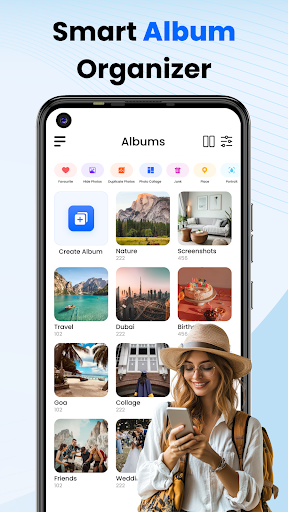
Gallery 2025 is a feature-rich photo management app designed to streamline the organization and enhancement of your photos and videos. With its smart organization capabilities, it automatically categorizes media by timeline, location, and path, making file management effortless. The app also supports easy transfer to and from SD cards, ensuring you can access your media wherever you go.

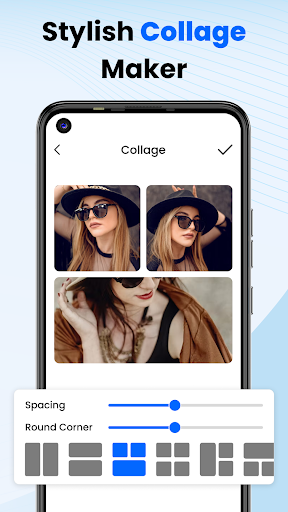
Beyond just organization, Gallery 2025 offers powerful editing tools and privacy features. You can enhance your images with built-in editing options or secure sensitive content in a PIN-protected vault. Whether you're looking to create collages or simply manage your personal memories safely, this app provides all the functionalities needed for comprehensive photo management.

Features

Gallery 2025 stands out with its robust set of features tailored for both casual users and photography enthusiasts. One key aspect is its Smart Organization, which uses advanced algorithms to sort photos and videos by date, location, and directory paths. This ensures that finding specific files is quick and intuitive.

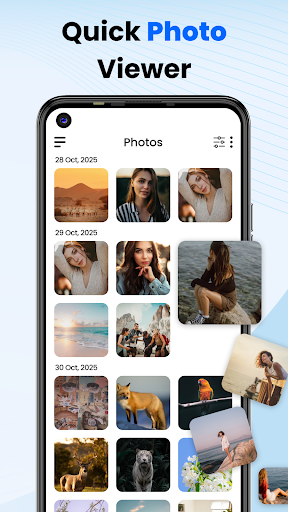
In addition to organizational prowess, the app includes an Effortless Search function, allowing users to locate media using filters such as places or dates. For peace of mind, the Private Vault feature encrypts confidential media behind a numeric PIN, pattern, or security question. Moreover, accidental deletions are no longer a worry thanks to recovery options that let you restore lost files from the recycle bin easily.

Customization options variety

The Customization options variety in Gallery 2025 is a crucial feature that allows users to tailor their photo management experience according to their preferences and needs. This app offers a comprehensive suite of customization tools that cater to both novice and advanced users, ensuring that everyone can organize and edit their photos in a way that suits them best. The Smart Organization functionality automatically categorizes photos and videos by timeline location and path which not only simplifies the process of finding specific images but also helps in maintaining an orderly gallery. Additionally users can easily copy and transfer files to and from SD Cards providing flexibility in storage management. The Effortless Search feature further enhances the customization experience by allowing users to quickly locate specific photos or videos sorted by places or dates. With the inclusion of a Private Vault and Gallery Lock users have the option to manage security with a numeric PIN pattern or security question adding another layer of personalization to their photo management. These customization options ensure that users can enjoy a personalized and secure experience making Gallery 2025 a versatile tool for managing precious memories. By offering such a wide array of customization possibilities Gallery 2025 empowers users to create a photo management system that aligns perfectly with their individual workflows and privacy requirements.

Theme compatibility

Theme compatibility in Gallery 2025 ensures that users can enjoy a visually cohesive experience across their devices while managing their photos and videos. This feature is important as it allows users to apply themes that resonate with their personal style or mood enhancing the overall aesthetic appeal of their photo gallery. Gallery 2025 supports a variety of themes which are designed to be compatible with different Android devices and screen sizes ensuring a seamless visual experience. The app's lightweight design contributes to the theme compatibility as it does not compromise on performance while offering visually pleasing interfaces. Users can choose from a range of themes that complement their deviceu2019s existing look and feel or opt for something entirely different to create a unique gallery atmosphere. Furthermore the Theme compatibility extends to the app's editing tools where users can apply various filters and effects that harmonize with their chosen themes resulting in a unified appearance for their edited photos. This attention to visual detail and compatibility ensures that Gallery 2025 stands out as a sophisticated photo management solution that values both functionality and form. By prioritizing Theme compatibility Gallery 2025 provides users with the ability to personalize their galleries beyond just organizational features creating an engaging and delightful environment for reliving their cherished moments.

Props

User-friendly interface

Advanced privacy controls

Comprehensive editing suite

Efficient search functionality

Secure vault storage

Cons

Limited cloud integration

Occasional performance lags

Ads in free version

Complex settings for beginners

Requires frequent updates

Features and Functions

What is this app and what can I use it for?

A photo management app for organizing, editing, and securing photos and videos

How do I download and install this app on my device?

Visit Google Play Store, search for Gallery 2025, and tap Install

How do I get started after opening the app for the first time?

Follow the on-screen tutorial to set preferences and organize media

What are the main features and capabilities of this app?

Smart organization, private vault, editing tools, and more

How can I customize my experience and adjust preferences?

Adjust settings via the Preferences menu for personalized use

How do I save or bookmark my favorite content for later access?

Use the Favorite option to bookmark important photos and videos

How can I share content with friends or on social media?

Tap Share button to send media to friends via social platforms

How do I access detailed information and explore more content?

Access detailed info through the Info tab or Explore section

What permissions does this app need and how do I manage them?

App needs storage and media permissions; manage in Settings

How do I check for updates and keep the app running smoothly?

Enable auto-updates in Google Play Store for latest version
Show more

User Reveiws

{{ comment.reviewer_name }}
{{ comment.review_date_formatted}}
{{ comment.review_content }}
{{ tab.name }}
{{ comment.reviewer_name }}
{{ comment.review_date_formatted}}
{{ comment.review_content }}
No reviews with this rating