
Panda Mouse Pro

4.30

Information

Category:

Tools

Price:

$ 5.99

Rank:

32

Rating:

4.30

Overview

Panda Mouse Pro is a powerful keymapper tool that revolutionizes mobile gaming by enabling gamers to use their keyboard and mouse for enhanced control. Designed for pro gamers, this app allows users to play various mobile games with precision and ease, offering features like direct game launch, secure Google Play login, and ban-proof gaming.

The app stands out through its universal compatibility with most keyboard and mouse brands, extensive support for multiple game genres, and hassle-free activation across different Android versions. Whether you're into shooters, MOBAs, or sports games, Panda Mouse Pro ensures an elevated gaming experience without the limitations of touch controls.

Features

Panda Mouse Pro offers several standout features that enhance the mobile gaming experience. First, it provides direct game launching, eliminating the need for cloning and allowing users to jump straight into gameplay. The secure Google Play login ensures users can access their accounts safely while avoiding potential bans associated with duplication running.

Another key feature is its universal compatibility, supporting virtually all keyboard and mouse brands, which makes it versatile for any setup. Additionally, the app supports a wide range of game genres, including shooters, MOBAs, and sports games, ensuring broad usability. With options for hassle-free activation on both rooted and non-rooted devices, Panda Mouse Pro delivers convenience alongside performance.

Core function accuracy & effectiveness

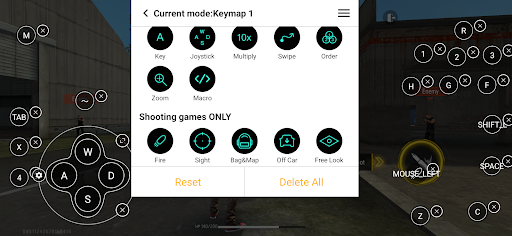
The core function of Panda Mouse Pro centers on providing an accurate and effective keymapping solution that transforms the mobile gaming experience by allowing gamers to use their keyboard and mouse for enhanced control. This functionality is crucial as it bridges the gap between traditional PC gaming controls and mobile gaming, offering a seamless transition for gamers who prefer the precision and tactile feedback of physical peripherals. The app achieves this through its advanced keymapping technology which ensures every keystroke and mouse movement translates accurately into in-game actions. It supports a wide array of games including shooters MOBAs sports games and more ensuring that no matter the genre players can expect consistent and reliable performance. By enabling direct game launch without the need for cloning and supporting secure Google Play logins Panda Mouse Pro not only streamlines the gaming process but also addresses security concerns. Gamers can enjoy pinpoint accuracy in their actions whether they are aiming in a shooter or executing complex maneuvers in a MOBA. The application's compatibility with virtually all keyboard and mouse brands further enhances its effectiveness making it a versatile tool for gamers. With features like ban-proof gaming and hassle-free activation across different Android versions Panda Mouse Pro provides users with peace of mind allowing them to focus solely on their gaming performance. This level of accuracy and effectiveness directly translates to improved gameplay experiences where users can react faster make precise movements and ultimately elevate their competitive edge in any game they play.

Interface simplicity & intuitiveness

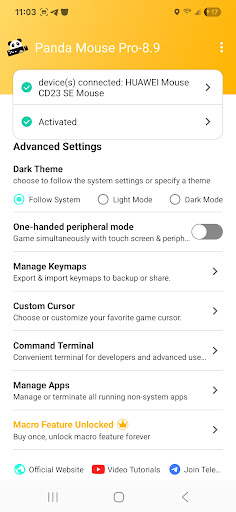
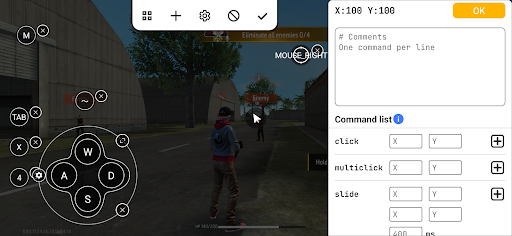
Panda Mouse Pro excels in delivering an interface that is both simple and intuitive ensuring that gamers can easily navigate and utilize its powerful features without a steep learning curve. The importance of such an interface cannot be overstated especially in fast-paced gaming environments where quick access to controls can mean the difference between victory and defeat. Upon launching the app users are greeted with a clean layout that prioritizes functionality and ease of use. The design philosophy behind Panda Mouse Pro focuses on minimizing distractions while maximizing accessibility to key features. For instance the direct game launch capability allows players to jump straight into their favorite games without wading through complicated menus or settings. This streamlined approach extends to the keymapping process itself where assigning keys and customizing controls is made straightforward even for those new to using keyboards and mice with mobile games. Additionally the app offers extensive tutorials and guides accessible via links within the description ensuring that users have all the resources they need to master its functionalities quickly. Whether activating on Android 11+ devices or going through a PC or Mac for older versions the steps are clearly outlined reducing potential frustration. Furthermore the inclusion of automatic activation for rooted devices showcases the appu2019s commitment to catering to diverse user needs without compromising on simplicity. Overall Panda Mouse Pro strikes an excellent balance between offering advanced customization options while maintaining an interface that remains approachable and user-friendly. This thoughtful design empowers gamers to fully leverage the benefits of using a keyboard and mouse without being bogged down by unnecessary complexity thus enhancing their overall gaming experience significantly.

Props

Enhanced precision

Ban-proof technology

Wide game support

Easy activation

Universal compatibility

Cons

Requires initial setup

Premium version needed

Device compatibility issues

Learning curve for beginners

Limited free features

Features and Functions

What is this app and what can I use it for?

Panda Mouse Pro is a keymapper for mobile gaming using keyboard and mouse.

How do I download and install this app on my device?

Download it from Google Play Store and install it on your Android device.

How do I get started after opening the app for the first time?

Launch the app, connect your devices, and start playing supported games.

What are the main features and capabilities of this app?

Key features include direct game launch, secure login, and ban-proof gaming.

How can I customize my experience and adjust preferences?

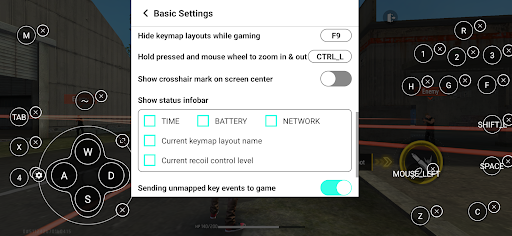
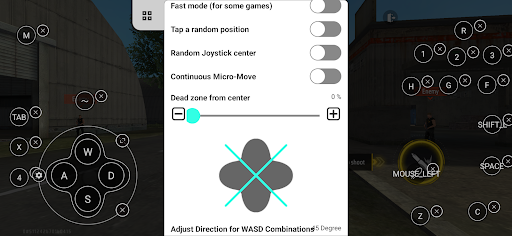
Customize controls in settings to adjust preferences for your playstyle.

How do I save or bookmark my favorite content for later access?

Save favorite configurations in the app for quick access later.

How can I share content with friends or on social media?

Share your gaming progress via social media directly from the app interface.

How do I access detailed information and explore more content?

Access detailed guides and explore more content on the official website.

What permissions does this app need and how do I manage them?

The app needs device permissions for optimal performance; manage them in settings.

How do I check for updates and keep the app running smoothly?

Check for updates in the app or through the Google Play Store regularly.
Show more

User Reveiws

{{ comment.reviewer_name }}
{{ comment.review_date_formatted}}
{{ comment.review_content }}
{{ tab.name }}
{{ comment.reviewer_name }}
{{ comment.review_date_formatted}}
{{ comment.review_content }}
No reviews with this rating















