APK Explorer

4.10

Information

Category:

Tools

Price:

$ 0.99

Rank:

56

Rating:

4.10

Overview

APK Explorer is a powerful tool designed for Android users who need to explore and manage installed applications on their devices. This app provides a comprehensive set of features that allow users to navigate through the contents of APK files, decompile DEX and resource files, and export APKs with ease.

The application stands out with its beautifully designed interface that supports auto-dark/light themes, making it user-friendly in various lighting conditions. Whether you are a developer or an advanced user, APK Explorer offers valuable tools for app management and analysis.

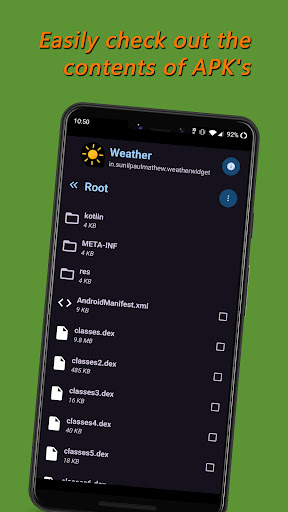
One practical use case is for developers who need to inspect the structure and resources of their apps during development. The ability to extract app icons and view important resource files makes this process more efficient and insightful.

Features

APK Explorer boasts an impressive array of features that cater to both casual and power users. The app presents a well-organized list view of all installed applications, allowing for easy navigation and selection.

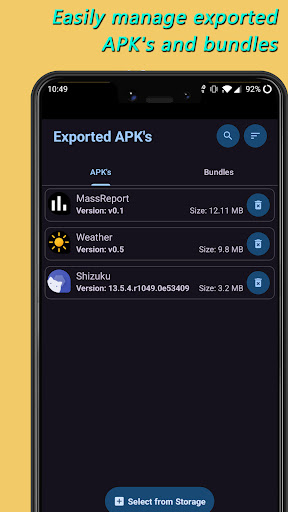
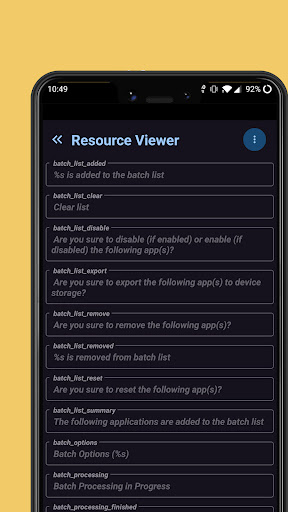
Among its standout capabilities is the ability to decompile and view the contents of DEX (classes.dex) and resource (resources.arsc) files. This feature is particularly useful for developers who need to analyze the inner workings of their applications. Additionally, the app allows exporting and managing APKs, including split APKs, with options to delete or share them directly from the device storage.

Another innovative aspect is the single-click extraction of app icons and the ability to save or export individual resource files. These features, combined with the elegant user interface design, make APK Explorer a versatile tool for Android app exploration and management.

Core function accuracy & effectiveness

APK Explorer is a comprehensive tool designed to provide users with the ability to explore and manage installed applications on Android devices effectively. The core functions of this application revolve around its capacity to decompile and view the contents of DEX and resource files, which are integral components of any Android application. This functionality allows developers and advanced users to inspect the internal structure of APK files, providing insights into the application's architecture and resource management. The accuracy of these core functions is paramount as it ensures that the information retrieved from the APK files is reliable and usable for further analysis or modifications. Furthermore, the app facilitates exporting and managing APKs and Split APKs, allowing users to perform actions such as deletion or sharing with precision. With an elegantly designed user interface that supports both dark and light themes, APK Explorer enhances usability while maintaining operational efficiency. The effectiveness of these features is evident in the seamless navigation and management capabilities provided to the user, making APK exploration not only accurate but also efficient. Users benefit significantly from these core functions as they can extract app icons with a single click, view graphics, texts, binary XML, and more, thus gaining a deeper understanding of the application components. Additionally, the ability to save or export individual or a set of resource files to device storage adds another layer of utility, empowering users to manipulate and utilize resources as needed. Overall, the accuracy and effectiveness of APK Explorer's core functions make it an indispensable tool for anyone looking to delve into the intricacies of Android applications.

Interface simplicity & intuitiveness

The interface simplicity and intuitiveness of APK Explorer play a crucial role in enhancing the user experience by providing a streamlined and accessible platform for exploring Android applications. Upon launching the app, users are greeted with a beautifully designed list view of installed applications, which immediately sets the tone for an intuitive navigation experience. This well-organized presentation allows users to quickly locate and select the desired application for exploration without unnecessary complexity. The design philosophy behind APK Explorer emphasizes clarity and ease of use, ensuring that even those new to Android development can efficiently interact with the app's features. For instance, the process of exploring and navigating through the contents of an installed application or APK file selected from device storage is straightforward, thanks to the logical layout and clear labeling of options. Moreover, the app provides basic information about important resource files, presenting this data in a digestible format that does not overwhelm the user. The inclusion of an auto-dark/light theme further demonstrates the attention to detail in creating an environment that adapts to user preferences and ambient lighting conditions, thereby reducing eye strain and improving readability. Another aspect that highlights the app's intuitive nature is the single-click functionality for extracting app icons, which simplifies what could otherwise be a tedious process. Additionally, the ability to view various file types such as graphics, texts, and binary XML within the app eliminates the need for external tools, consolidating all necessary functions into one intuitive package. By focusing on interface simplicity and intuitiveness, APK Explorer ensures that users can fully leverage its powerful features without facing a steep learning curve, ultimately leading to increased productivity and satisfaction.

Props

User-friendly interface

Advanced decompiling tools

Efficient APK management

Auto-dark/light theme

Open-source project

Cons

Complex for beginners

Limited customer support

No iOS version available

Occasional bugs reported

Requires technical knowledge

Features and Functions

What is this app and what can I use it for?

APK Explorer lets you explore and manage Android apps' contents.

How do I download and install this app on my device?

Download APK Explorer from Google Play Store on your Android device.

How do I get started after opening the app for the first time?

Upon first launch, grant necessary permissions and view app list.

What are the main features and capabilities of this app?

Main features include APK decompiling, file exporting, and icon extraction.

How can I customize my experience and adjust preferences?

Customize experience via settings menu for theme and display options.

How do I save or bookmark my favorite content for later access?

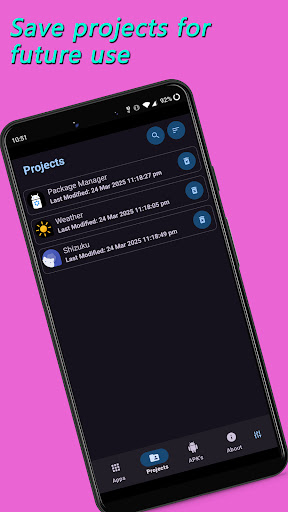
Save favorite content by exporting files to device storage.

How can I share content with friends or on social media?

Share content using built-in sharing options for APKs and resources.

How do I access detailed information and explore more content?

Access detailed information through decompiled DEX and resource files.

What permissions does this app need and how do I manage them?

App needs storage and app info permissions; manage in settings.

How do I check for updates and keep the app running smoothly?

Check updates via Google Play Store or GitHub repository.
Show more

User Reveiws

{{ comment.reviewer_name }}
{{ comment.review_date_formatted}}
{{ comment.review_content }}
{{ tab.name }}
{{ comment.reviewer_name }}
{{ comment.review_date_formatted}}
{{ comment.review_content }}
No reviews with this rating

















