SonicNest — Music Player

3.40

Information

Category:

Music & Audio

Price:

Free

Rank:

45

Rating:

3.40

Overview

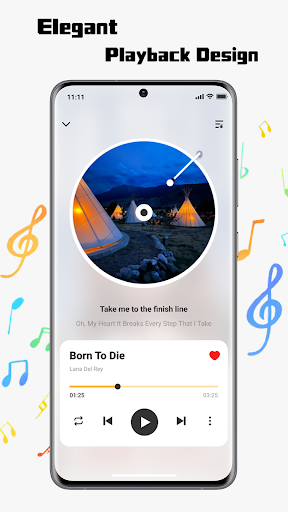
SonicNest is a premium music player app designed to enhance your audio experience through advanced features and intuitive design. The app allows seamless import of local music files, making it easy to consolidate your entire music library in one place. With smart management tools, users can organize tracks by albums, artists, or custom playlists tailored to specific moods and activities.

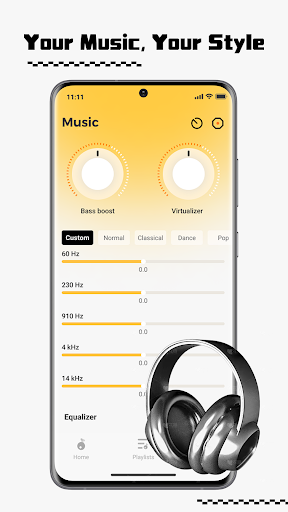
One standout feature is the built-in equalizer that offers precision sound customization. Whether you're looking to boost bass for workouts or fine-tune vocals for relaxed listening, SonicNest provides both presets and manual controls to suit every preference. This combination of powerful organization tools and customizable audio settings makes SonicNest an ideal choice for audiophiles and casual listeners alike.

Features

SonicNest stands out with its comprehensive suite of features tailored for music enthusiasts. The app's local music import functionality simplifies the process of transferring your personal audio collection from your device to the app. By browsing your storage, you can effortlessly add tracks to SonicNest, eliminating the need to switch between multiple apps.

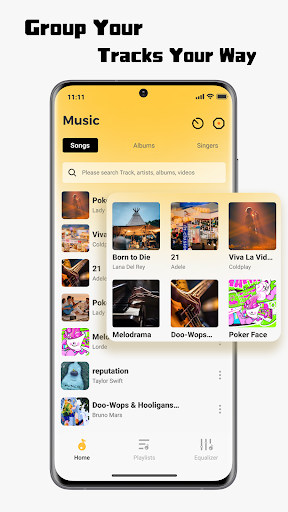
The smart music management system ensures your library remains well-organized. You can edit track details, sort songs by various criteria, and create custom folders for different occasions. Additionally, the app includes a sophisticated equalizer that lets you adjust sound profiles with precision. Choose from pre-set options or manually tweak settings to achieve the perfect audio balance, catering to both casual listeners and dedicated audiophiles.

Music library size & copyright authenticity

The size and authenticity of a music library are crucial factors for any music application as they determine both the breadth of content available to users and the legality of the service. SonicNest addresses these aspects by allowing seamless local music import directly from the user's device storage. This feature ensures that users can consolidate their entire personal music collection within the app without worrying about copyright infringement since all tracks are user-owned. The ability to browse and add tracks effortlessly not only enhances convenience but also guarantees that the library remains personalized and authentic. Furthermore, SonicNest provides smart local music management tools which enable users to edit track details and organize their music into custom folders based on mood or activity. This meticulous organization ensures that the music library is not just extensive but also tailored to individual preferences. By focusing on user-owned content and offering powerful management features, SonicNest delivers a music experience that is both rich in variety and fully compliant with copyright laws. Users benefit from having a neatly categorized and easily accessible music collection that reflects their unique tastes while ensuring complete legal protection.

Audio quality options

Audio quality options play a pivotal role in enhancing the listening experience for users who demand high-fidelity sound reproduction. SonicNest excels in this area by incorporating a precision-built-in equalizer that allows users to fine-tune every track according to their preferences. Whether it's boosting bass for energetic workout sessions or enhancing vocals for focused lyrical appreciation, SonicNest offers expertly crafted presets alongside manual customization options for audiophiles seeking exact sound profiles. This level of control over audio output ensures that each listening session is optimized for maximum enjoyment and immersion. Additionally, SonicNestu2019s commitment to delivering rich and immersive sound extends beyond mere equalization; its sleek interface integrates seamlessly with advanced audio processing technologies to provide an unparalleled auditory experience. By prioritizing audio quality through innovative features like customizable equalizers, SonicNest empowers users to experience their favorite tracks exactly as intended by artistsu2014with depth, clarity, and emotional resonance. This dedication to superior sound quality makes SonicNest stand out among other music applications as it caters not only to casual listeners but also to discerning audiophiles who value nuanced acoustic details.

Props

User-friendly interface

Advanced equalizer

Smart library management

Seamless music import

Customizable sound profiles

Cons

Limited streaming options

No cloud sync

Heavy on storage

Few social features

Premium-only EQ

Features and Functions

What is this app and what can I use it for?

SonicNest is a music player app for managing and enjoying local audio files with advanced playback options.

How do I download and install this app on my device?

Visit Google Play Store, search for SonicNest, and tap Install to download and set up the app on your device.

How do I get started after opening the app for the first time?

Open SonicNest, grant necessary permissions, and import your music files to start building your library.

What are the main features and capabilities of this app?

Key features include local file import, smart library organization, and a customizable built-in equalizer.

How can I customize my experience and adjust preferences?

Adjust sound settings via the equalizer and organize tracks into custom playlists based on your preferences.

How do I save or bookmark my favorite content for later access?

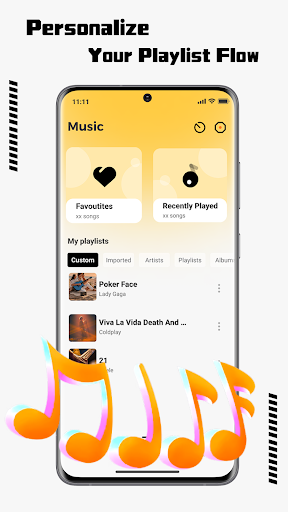
Create personalized playlists or folders within SonicNest to save favorite tracks for easy access later.

How can I share content with friends or on social media?

Share your favorite tracks directly via messaging apps or social media platforms supported by your device.

How do I access detailed information and explore more content?

Use the appu2019s sorting and filtering tools to explore detailed track info and discover new content in your library.

What permissions does this app need and how do I manage them?

SonicNest requires storage and media permissions; manage these in your device settings under App Permissions.

How do I check for updates and keep the app running smoothly?

Enable automatic updates in Google Play Store settings to ensure SonicNest stays up-to-date with the latest features.
Show more

User Reveiws

{{ comment.reviewer_name }}
{{ comment.review_date_formatted}}
{{ comment.review_content }}
{{ tab.name }}
{{ comment.reviewer_name }}
{{ comment.review_date_formatted}}
{{ comment.review_content }}
No reviews with this rating