Step Counter - Pedometer App

4.70

Information

Category:

Health & Fitness

Price:

Free

Rank:

42

Rating:

4.70

Overview

Step Counter - Pedometer App is a comprehensive health and fitness tool designed to help users track their daily physical activity. The app automatically counts steps and calculates distance traveled, making it ideal for those looking to monitor their walking or running routines.

In addition to basic step tracking, the app offers advanced features such as daily, weekly, and monthly activity charts, training courses, and personalized plans. These features make it easier for users to set and achieve fitness goals, whether they aim to lose weight, maintain health, or simply stay active.

This app is particularly useful for individuals who want to track their progress without needing any additional wearable devices. With its user-friendly interface and compatibility with most Android devices, Step Counter - Pedometer App provides an accessible solution for all ages to improve their overall well-being.

Features

Step Counter - Pedometer App stands out with its automatic step counting feature, which ensures accurate tracking without manual input. This functionality is supported by advanced algorithms that work seamlessly with the phone's sensors, providing reliable data on steps and distance covered.

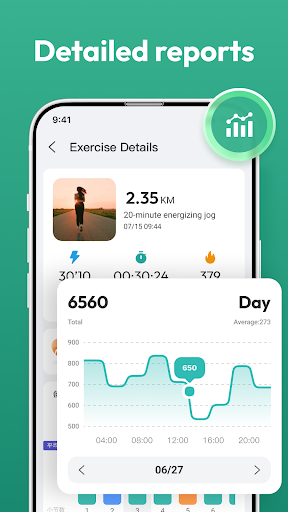
The app also includes detailed activity charts that display daily, weekly, and monthly progress. Users can view their achievements over time, helping them stay motivated and adjust their fitness plans accordingly. Additionally, the inclusion of training courses and personalized plans offers structured guidance for users striving to reach specific fitness milestones.

Another notable feature is the app's ability to function without any external wearable devices. By utilizing the phone’s built-in sensors, it delivers precise health data while maintaining ease of use. This makes Step Counter - Pedometer App a versatile tool for anyone seeking to enhance their fitness routine.

Personalized planning

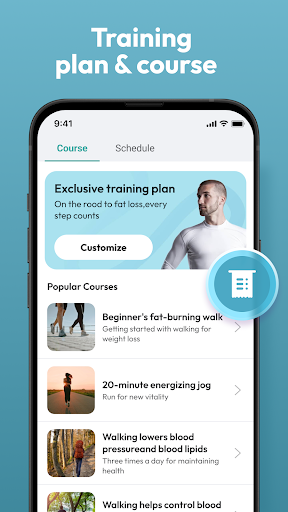
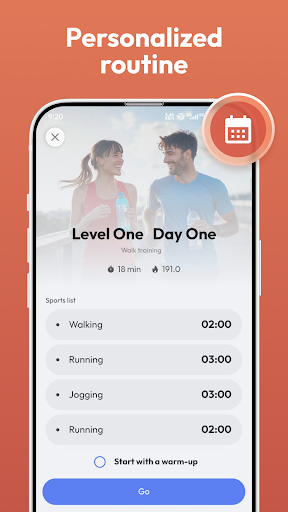
In the realm of health and fitness applications the Step Counter Pedometer App offers a compelling personalized planning feature that caters to individual needs and goals. Personalized planning refers to the app's ability to adapt its functionalities according to user-specific data ensuring that each person receives tailored recommendations and insights. This is crucial for users who have unique health objectives such as weight loss maintaining general wellness or achieving a daily step goal of 10000 steps. The Step Counter Pedometer App achieves this by leveraging automatic step counting which works seamlessly with most Android devices without the need for additional wearable technology. It tracks not only steps but also distance covered whether walking or running providing a comprehensive overview of physical activity. Furthermore it presents this data through daily weekly and monthly charts allowing users to visualize their progress over time. By integrating training courses and plans the app ensures that users can select a program that aligns with their personal aspirations thus enhancing motivation and adherence to healthier habits. The true value of personalized planning in the Step Counter Pedometer App lies in its capacity to transform generic health advice into actionable insights based on real-time data collection empowering users to make informed decisions about their fitness journey.

Progress visualization

Progress visualization stands as a pivotal element within the Step Counter Pedometer App offering users an intuitive way to monitor and comprehend their fitness achievements. This feature pertains to the graphical representation of user activity data enabling individuals to easily track their advancements towards personal health goals. In today's fast-paced world where instant feedback significantly boosts motivation and engagement visualizing progress becomes indispensable. The Step Counter Pedometer App excels in this area by providing detailed charts that cover daily weekly and even monthly performance metrics. These visual tools are not mere numbers and graphs; they tell a story of user dedication improvement and milestones reached over time. For instance seeing a steady increase in walked steps week after week can be incredibly rewarding and encouraging for someone striving to lead a more active lifestyle. Moreover these visual aids help identify patterns or trends in oneu2019s activity levels which might otherwise go unnoticed. Perhaps a user discovers they're less active during certain days of the week prompting them to adjust their routine accordingly. Additionally by displaying various health data collected through automatic step counting and other means without requiring any wearables the app democratizes access to sophisticated tracking technologies making it easier than ever before for anyone regardless of age or tech-savviness to engage with their own wellbeing actively. Ultimately progress visualization within the Step Counter Pedometer App serves not just as a reporting tool but as a powerful motivator driving continuous improvement and fostering long-term commitment to healthier living.

Props

User-friendly interface

Accurate step tracking

No external devices needed

Comprehensive activity charts

Personalized training plans

Cons

Limited to Android devices

Drains battery quickly

Occasional inaccuracies

No iOS version available

Ads in free version

Features and Functions

What is this app and what can I use it for?

A free pedometer app for tracking steps and distance.

How do I download and install this app on my device?

Visit Google Play Store, search for Step Counter, and tap install.

How do I get started after opening the app for the first time?

Grant necessary permissions and set your fitness goals.

What are the main features and capabilities of this app?

Automatic step counting, activity charts, and training plans.

How can I customize my experience and adjust preferences?

Adjust settings via the preferences menu for a tailored experience.

How do I save or bookmark my favorite content for later access?

Use the save option to store favorite workouts or data views.

How can I share content with friends or on social media?

Share achievements directly through the app's sharing feature.

How do I access detailed information and explore more content?

Explore detailed stats and more content in the analytics section.

What permissions does this app need and how do I manage them?

Requires motion sensors access; manage in phone settings.

How do I check for updates and keep the app running smoothly?

Enable auto-updates in Google Play Store to keep the app current.
Show more

User Reveiws

{{ comment.reviewer_name }}
{{ comment.review_date_formatted}}
{{ comment.review_content }}
{{ tab.name }}
{{ comment.reviewer_name }}
{{ comment.review_date_formatted}}
{{ comment.review_content }}
No reviews with this rating