

Magic DosBox

4.10

Information

Category:

Tools

Price:

$ 3.99

Rank:

36

Rating:

4.10

Overview

Magic DosBox is a highly optimized and fast DOSBox emulator for Android, designed to bring your favorite DOS and Windows games to your mobile device. With full support for mouse, keyboard, sound, and gamepads, it allows you to play classic games anywhere without the need for external hardware.

The app features a unique control system tailored for touch devices, making it easy to enjoy gaming on the go. It supports IPX networking for multiplayer experiences and offers advanced customization options for controls and screen layouts. Whether you're revisiting nostalgic titles or exploring retro games for the first time, Magic DosBox provides a seamless and immersive experience.

Features

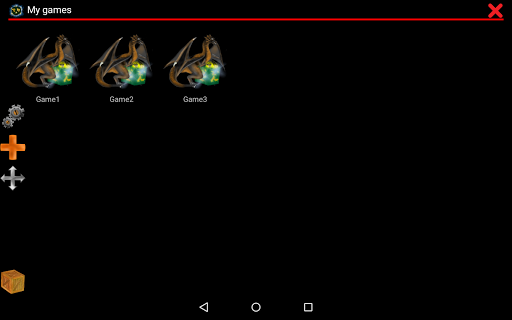
Magic DosBox stands out with its extensive feature set tailored for both casual gamers and enthusiasts. The app includes a game collection system where each game profile can be customized extensively, allowing users to tailor their gaming experience precisely to their liking.

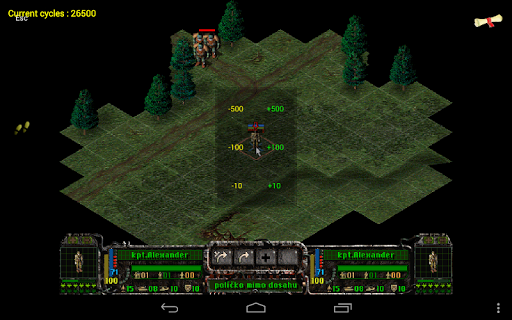
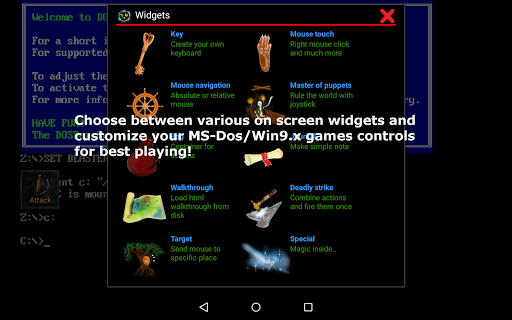
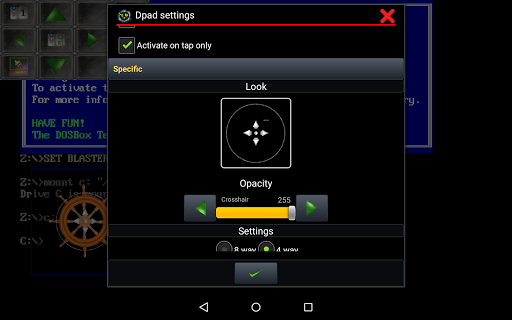
One of the key highlights is the ability to create on-screen widgets such as buttons, D-pads, and keyboards, with over 10 types available. These widgets are highly customizable in terms of appearance and functionality, supporting gestures like swipes, long presses, and double taps. Additionally, Magic DosBox supports external controllers, physical mice, and various sound systems, ensuring compatibility with a wide range of games and devices.

Other notable features include multi-language support, orientation lock, resizable screens, and network play through IPX and serial modem connections. These capabilities make Magic DosBox not just an emulator but a comprehensive platform for enjoying classic games on modern devices.

Core function accuracy & effectiveness

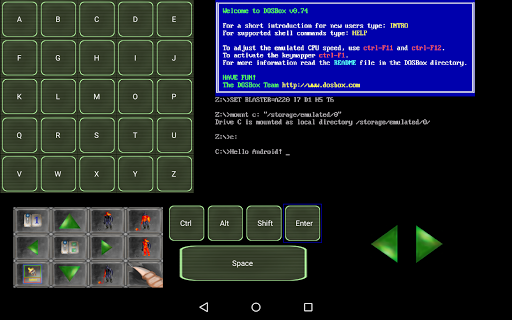
The core function of Magic DosBox centers on its ability to emulate the DOS environment on Android devices allowing users to run their favorite DOS and Windows games with precision and efficiency. This capability is crucial for enthusiasts who wish to relive classic gaming experiences on modern hardware without the need for original equipment. The app achieves this through a highly optimized version of the DOSBox emulator tailored specifically for touch devices. It supports full mouse keyboard sound and gamepad functionalities ensuring that users can interact with their games as if they were using a traditional computer setup. Furthermore Magic DosBox introduces unique control systems designed for playing anywhere without external hardware. These include customizable on-screen widgets such as virtual buttons and Dpads which are essential for adapting old games to new form factors. Users benefit from the app's extensive customization options including the ability to create shortcuts for games export or import profiles and design personalized layouts. This level of personalization enhances user engagement by allowing gamers to tailor their experience according to individual preferences. Additionally features like multi-language support and compatibility with various controllers underscore the app's commitment to accessibility and convenience making it an invaluable tool for retro gaming enthusiasts.

Interface simplicity & intuitiveness

Magic DosBox excels in providing an interface that balances simplicity with powerful functionality ensuring that users of all technical backgrounds can navigate and utilize its features effectively. At its core the application offers two primary modes design mode and play mode each serving distinct purposes in the user journey. Design mode allows users to customize their gaming experience by arranging on-screen widgets which include keys mouse controls dpads and more. These widgets are not only numerous but also highly configurable offering dozens of settings to tweak their appearance and behavior. Such flexibility ensures that even the most specific control schemes can be replicated on a touch screen granting users an intuitive way to interact with their games. In play mode the focus shifts to delivering a seamless and immersive gaming session where all customizations come to life. The app's dedication to user-friendly design extends to its support for various input methods including Samsung stylus external gamepads and physical mice catering to different play styles and preferences. Moreover Magic DosBox incorporates smart features like mappable swipe gestures long press actions and double taps which further enhance the intuitiveness of the interface. By prioritizing clarity and ease of use alongside advanced customization options Magic DosBox successfully bridges the gap between complex emulation technology and accessible mobile gaming creating an environment where nostalgia meets innovation effortlessly.

Props

User-friendly interface

Highly customizable controls

Wide game compatibility

Supports external controllers

Regular updates and optimizations

Cons

No included games

Complex setup for beginners

Occasional performance issues

Limited free version features

Requires technical knowledge

Features and Functions

What is this app and what can I use it for?

An emulator to run DOS games on Android devices

How do I download and install this app on my device?

Search Magic DosBox on Google Play Store and tap install

How do I get started after opening the app for the first time?

Visit the website for setup guides and add your first game

What are the main features and capabilities of this app?

Customizable controls and support for various input methods

How can I customize my experience and adjust preferences?

Adjust widget settings and customize control layouts

How do I save or bookmark my favorite content for later access?

Use the export function to save game profiles

How can I share content with friends or on social media?

Share profiles via export or IPX network features

How do I access detailed information and explore more content?

Explore detailed settings for widgets and controls

What permissions does this app need and how do I manage them?

Needs storage and input device permissions managed in settings

How do I check for updates and keep the app running smoothly?

Check Google Play Store for updates regularly
Show more

User Reveiws

{{ comment.reviewer_name }}
{{ comment.review_date_formatted}}
{{ comment.review_content }}
{{ tab.name }}
{{ comment.reviewer_name }}
{{ comment.review_date_formatted}}
{{ comment.review_content }}
No reviews with this rating















