
Network Cell Info & Wifi

4.20

Information

Category:

Tools

Price:

$ 1.99

Rank:

33

Rating:

4.20

Overview

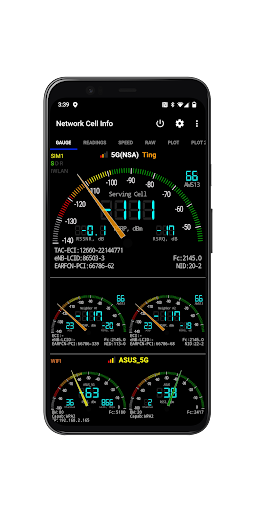
Network Cell Info & Wifi is a comprehensive mobile network and Wi-Fi monitoring tool designed for users seeking to optimize their connectivity experience. The app provides detailed diagnostic data about cellular networks (5G, LTE+, LTE, CDMA, WCDMA, GSM) and Wi-Fi signals, helping troubleshoot reception issues and identify the strongest available connections.

A standout feature of this app is its Bad Signal Reporter functionality, which allows users to report poor signal areas directly to mobile network operators. This crowdsourced data can significantly improve network coverage over time. Additionally, Network Cell Info offers advanced tools such as real-time signal monitoring, speed tests, dual-SIM support, and historical signal strength tracking, making it an essential utility for both casual users and tech enthusiasts.

This app is particularly valuable for travelers, remote workers, or anyone experiencing inconsistent network performance. By providing insights into connected cell towers, signal history, and location-based signal mapping, it empowers users to make informed decisions about their mobile connectivity.

Features

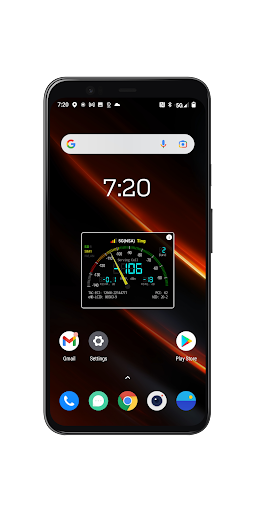
Network Cell Info & Wifi stands out with its extensive range of features tailored for network diagnostics and optimization. One of its core capabilities is almost real-time (1-second interval) monitoring of cellular and Wi-Fi signals, presented in both gauge and raw data formats. It supports multiple network types, including 5G, LTE+, LTE, CDMA, and GSM, ensuring compatibility across various devices and carriers.

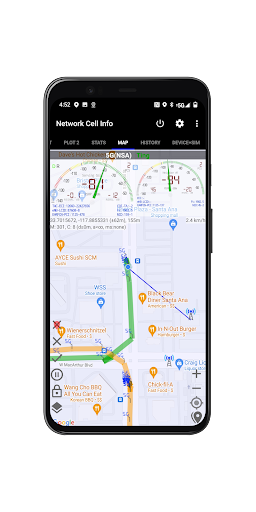
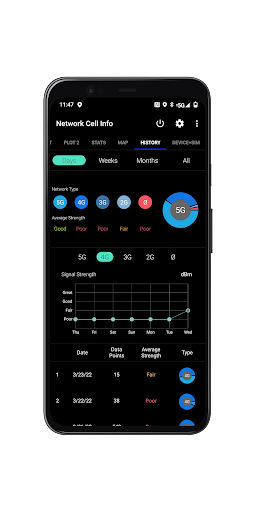
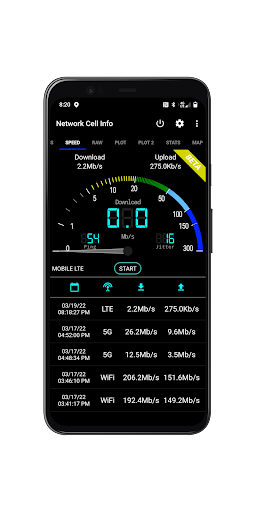
The app includes a one-tap speed test feature that measures download, upload, ping, and jitter performance, giving users a complete picture of their internet connection quality. Its dual-SIM support and multi-signal meter gauges provide flexibility for users with multiple carriers. Advanced mapping tools display network information, signal strength, and even crowdsourced best signal locations, while personal signal history graphs allow long-term tracking of connectivity trends.

Additional functionalities include customizable measurement settings, database export options for historical data, and detailed device and SIM card information. These features collectively enable users to diagnose issues, optimize their network settings, and maintain reliable connectivity in any environment.

Core function accuracy & effectiveness

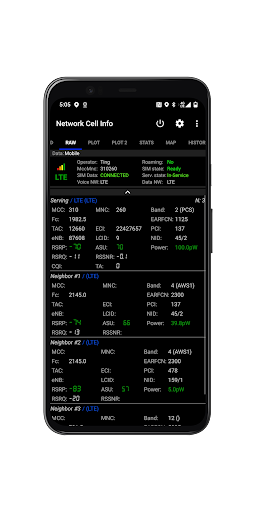
Network Cell Info is a comprehensive mobile network and Wi-Fi monitoring application that provides users with an extensive set of measurement and diagnostic tools to troubleshoot reception and connectivity issues. The core function accuracy and effectiveness of this app lie in its ability to deliver almost real-time monitoring of cellular carrier and WiFi signals, supporting a wide range of network types including 5G, LTE+, LTE, CDMA, WCDMA, and GSM. This ensures that users are equipped with precise information about their network status at any given moment. One of the standout features contributing to the app's effectiveness is the Bad Signal Reporter. This feature automatically collects data on poor signal experiences from users who have consented, enabling the generation of detailed reports for mobile network operators. Such reports can significantly aid in network improvements if acted upon. Additionally, the app offers one-tap performance speed tests for both WiFi and mobile internet, measuring download, upload, ping, and jitter, which adds another layer of functional accuracy by providing quantifiable metrics on network performance. Dual-SIM support further enhances its utility for users with multiple carriers. The inclusion of up to six signal-meter gauges for both SIMs and WiFi allows for simultaneous monitoring of multiple connections, ensuring that users can manage complex network environments effectively. Moreover, the app's capability to display readings in raw tabs and provide connection statistics across different generations of network technology (2G/3G/4G/5G) underscores its commitment to delivering accurate and actionable insights. Users benefit from these precise measurements as they can make informed decisions regarding their network usage, optimize their connectivity, and potentially contribute to broader network enhancements through shared data.

Interface simplicity & intuitiveness

The interface simplicity and intuitiveness of Network Cell Info play a crucial role in enhancing user experience by making advanced network monitoring accessible to a broad audience. Despite offering a plethora of sophisticated features, the app maintains an approachable design that minimizes the learning curve for new users. At the heart of its intuitive interface are the Gauge and Raw Tabs, which present cellular carrier and WiFi signal information in an easily digestible format. These tabs allow users to toggle between simplified graphical representations and more detailed technical readouts, catering to both casual users and tech-savvy individuals. The implementation of signal plots for up to six cells alongside clear indicators for band numbers and SIM preferences exemplifies how the app balances depth with accessibility. By integrating a map feature that overlays network cellular info and signal-meter gauges, the app provides spatial context to signal strength data, aiding users in visually identifying areas of strong or weak coverage. Furthermore, the Personal Best Signal Finder and Crowdsourced Best Signal Finder layers add interactive elements that encourage exploration and discovery without overwhelming the user. These features guide users toward optimal network conditions while maintaining straightforward navigation paths. Additional functionalities such as history logs, measurement settings, and database export options are thoughtfully integrated into the interface, ensuring that power users can access advanced configurations without disrupting the overall flow for less experienced users. The presence of network information in the status bar and the availability of raw views of carrier network cellular info underscore the app's dedication to transparency and control. Overall, the combination of well-organized layout, contextual help through visual aids, and customizable settings results in an interface that empowers users to harness the full potential of Network Cell Info without feeling intimidated by its technical capabilities.

Props

Comprehensive network diagnostics

Real-time signal monitoring

Dual-SIM support

Free Bad Signal Reporter

Advanced mapping tools

Cons

Complex for beginners

Requires technical knowledge

Limited CDMA support

Premium features locked

Heavy on battery usage

Features and Functions

What is this app and what can I use it for?

A tool for monitoring mobile network and Wi-Fi signals.

How do I download and install this app on my device?

Search 'Network Cell Info' on Google Play Store and tap Install.

How do I get started after opening the app for the first time?

Grant necessary permissions and explore the dashboard.

What are the main features and capabilities of this app?

Signal monitoring, speed tests, dual-SIM support, and mapping tools.

How can I customize my experience and adjust preferences?

Adjust settings via the Preferences menu for customization.

How do I save or bookmark my favorite content for later access?

Use History Logs to save signal measurements for later.

How can I share content with friends or on social media?

Share reports via email or export options in the app.

How do I access detailed information and explore more content?

Access detailed info through Raw View and Status Bar tabs.

What permissions does this app need and how do I manage them?

Needs location access; manage in device settings.

How do I check for updates and keep the app running smoothly?

Enable auto-updates in Google Play Store settings.
Show more

User Reveiws

{{ comment.reviewer_name }}
{{ comment.review_date_formatted}}
{{ comment.review_content }}
{{ tab.name }}
{{ comment.reviewer_name }}
{{ comment.review_date_formatted}}
{{ comment.review_content }}
No reviews with this rating

















