Vivid Navigation Gestures

4.30

Information

Category:

Tools

Price:

$ 2.49

Rank:

83

Rating:

4.30

Overview

Vivid Navigation Gestures is a cutting-edge tool that revolutionizes the way users interact with their Android devices. This app enables gesture-based control, eliminating the need for traditional button presses. With compatibility across various Android versions and devices, it offers an intuitive navigation experience without requiring new hardware.

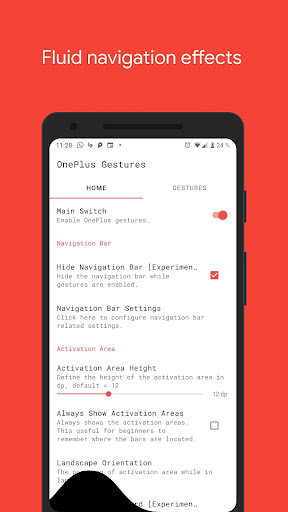
The application stands out with its fluid visual effects during gesture execution and multiple trigger points across the screen. Whether you're looking to launch Google Assistant, toggle split-screen mode, or take screenshots, this app provides extensive functionalities through simple swipe motions. Its value lies in enhancing user convenience while delivering a futuristic mobile experience.

Features

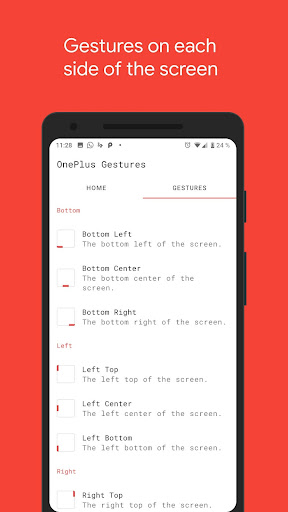
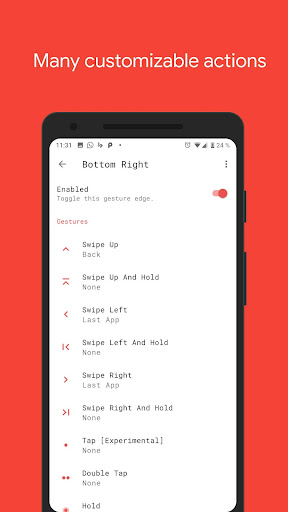
One of Vivid Navigation Gestures' most notable features is its support for multiple gesture triggers from different screen locations, including bottom left, center, right, and more. Each trigger point supports various gestures such as swipe up, swipe left, double tap, and hold, offering versatile control options.

In addition to gesture variety, the app allows users to execute numerous actions like opening notifications, recent apps, quick settings, and even taking screenshots. It also integrates accessibility services to perform system-level tasks such as back navigation and home button functions programmatically. The option to hide the stock navigation bar further enhances the immersive experience, provided users have ADB or root access.

Core function accuracy & effectiveness

Gesture-based navigation represents a significant advancement in how users interact with their devices offering an intuitive and efficient alternative to traditional button presses Vivid Navigation Gestures excels in this domain by providing precise and reliable gesture controls that respond accurately to user inputs The app supports a wide array of gestures including swipe up down left right and various combinations each linked to specific device actions such as launching the Google Assistant returning to the home screen or accessing recent apps This extensive gesture vocabulary ensures that users can perform nearly any navigation task without relying on physical buttons Furthermore the app's implementation of accessibility services allows it to execute system-level actions programmatically such as toggling the navigation bar or opening quick settings without requiring root access This approach not only enhances functionality but also maintains system security and stability Users benefit from faster more natural interactions as they can trigger complex actions with simple swipes or taps Additionally the ability to customize gesture mappings enables personalized workflows tailored to individual preferences Whether performing basic navigation tasks or executing advanced commands like taking screenshots or controlling media playback Vivid Navigation Gestures delivers consistent and accurate performance making device interaction smoother and more enjoyable

Interface simplicity & intuitiveness

A well-designed user interface is crucial for ensuring that users can easily adopt and effectively utilize new technologies Vivid Navigation Gestures achieves this through its straightforward setup process and intuitive gesture mapping system Upon installation users are greeted with clear instructions and visual aids that guide them through enabling necessary permissions and configuring initial settings The app presents gesture options in a logical grid format corresponding to different screen regions such as bottom left center right and similar divisions along the sides This spatial organization helps users quickly understand where to initiate gestures based on their preferred hand position or device orientation Furthermore the inclusion of fluid visual effects during gesture execution provides immediate feedback reinforcing correct usage patterns For those who prefer additional customization the app offers extensive action mapping allowing users to assign specific functions to each gesture type These actions range from basic navigation commands to more sophisticated operations like launching particular applications or toggling system settings Importantly the app maintains a clean uncluttered interface avoiding unnecessary complexity while still providing advanced features for power users The optional ability to hide the stock navigation bar when gestures are enabled further enhances the streamlined experience creating a more immersive full-screen environment Overall Vivid Navigation Gestures strikes an excellent balance between powerful functionality and user-friendly design making gesture-based navigation accessible to both casual users and tech enthusiasts alike

Props

Intuitive gesture controls

Wide range of actions

Fluid visual effects

Customizable triggers

No new device required

Cons

ADB setup can be complex

Root access may be needed

Limited iOS compatibility

Learning curve for gestures

Battery consumption concerns

Features and Functions

What is this app and what can I use it for?

A tool for gesture-based device control, enabling navigation without buttons.

How do I download and install this app on my device?

Search 'Vivid Navigation Gestures' on Google Play Store and tap install.

How do I get started after opening the app for the first time?

Enable permissions, then follow the in-app tutorial to set up gestures.

What are the main features and capabilities of this app?

Gesture controls, action triggers, nav bar hiding, and accessibility tools.

How can I customize my experience and adjust preferences?

Adjust gesture preferences and trigger points in settings menu.

How do I save or bookmark my favorite content for later access?

Save favorite gestures by assigning them to specific actions.

How can I share content with friends or on social media?

Share app via Play Store link or social media platforms directly.

How do I access detailed information and explore more content?

Access help section or Reddit page for detailed feature exploration.

What permissions does this app need and how do I manage them?

Needs accessibility permissions; manage in app settings or system.

How do I check for updates and keep the app running smoothly?

Check Google Play Store updates section for latest version.
Show more

User Reveiws

{{ comment.reviewer_name }}
{{ comment.review_date_formatted}}
{{ comment.review_content }}
{{ tab.name }}
{{ comment.reviewer_name }}
{{ comment.review_date_formatted}}
{{ comment.review_content }}
No reviews with this rating