Shimeyu

3.30

Information

Category:

Personalisation

Price:

Free

Rank:

32

Rating:

3.30

Overview

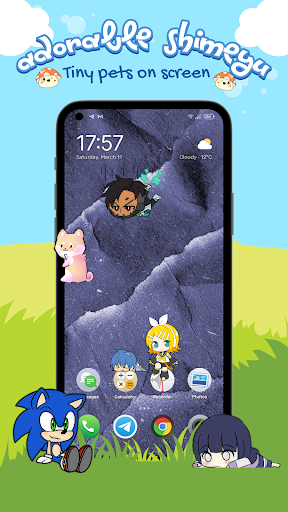
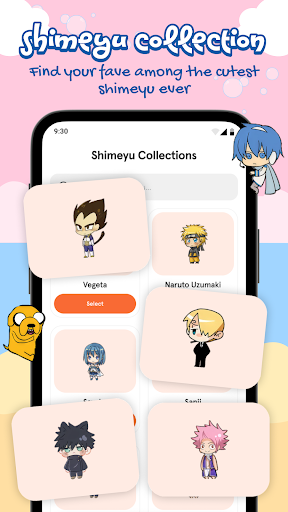
Shimeyu is a delightful personalization app that brings your smartphone screen to life with adorable, animated pets. These charming companions interact with your device's interface, roaming freely across the screen and responding to touch gestures. With an extensive collection of cute characters ranging from kawaii mascots to anime-inspired buddies, Shimeyu allows users to customize their digital environment like never before.

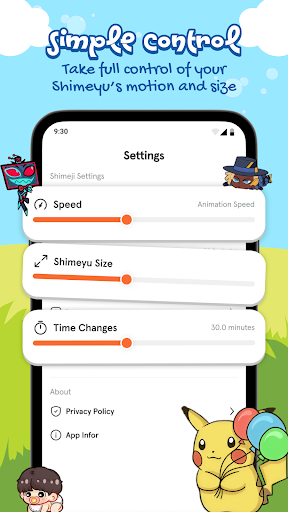
The app offers various customization options, letting you adjust pet size, speed, and behavior settings. Whether you're looking for chibi animals or fantasy creatures, Shimeyu provides a playful way to add personality to your everyday device experience. Perfect for anime fans and anyone who loves cute digital companions, this app transforms a regular phone into a lively world full of charm and entertainment.

Features

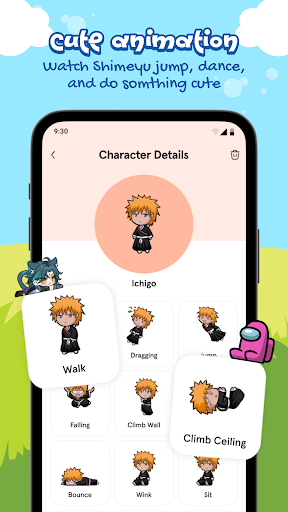
Shimeyu stands out with its impressive array of features designed to enhance user interaction and enjoyment. The app's signature feature is its animated screen pets that can roam freely across your device, interacting with icons and wallpaper while responding to various touch gestures. Users can choose from a vast library of cute characters, including kawaii mascots, anime-inspired buddies, and seasonal themes, ensuring there's always something new to discover.

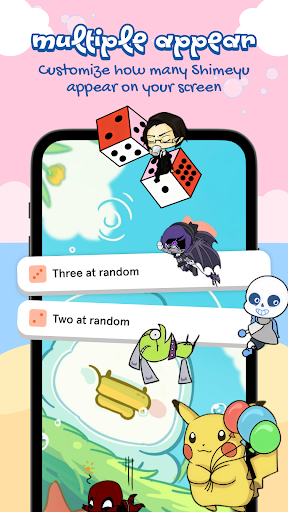
One of the most engaging aspects of Shimeyu is its interactive touch controls. You can tap to pet your digital companions, drag them around the screen, or even toss them for fun reactions. The app also supports multi-pet mode, allowing multiple characters to interact with each other on screen simultaneously. With customizable settings for size and speed, plus the ability to enable screen overlay or widget mode, Shimeyu offers unparalleled flexibility in creating your perfect personalized screen environment.

Customization options variety

Customization options variety refers to the range and flexibility of personalization features that allow users to tailor an application to their specific preferences and needs. In the context of Shimeyu, this pertains to the numerous ways in which users can modify and adapt their screen pets to create a personalized and engaging experience. The importance of customization options lies in enhancing user satisfaction by providing control over the aesthetics and behavior of the app elements. Shimeyu offers extensive customization through its features such as Animated Screen Pets Everywhere, Huge Collection of Cute Characters, Interactive Touch Controls, and Customization & Settings. Users can adjust the size and speed of their pets, select from a vast array of adorable characters including kawaii mascots and anime-inspired buddies, and interact with them via taps and drags. This level of customization ensures that each user's experience is unique and closely aligned with their personal tastes. By allowing users to choose their favorite characters and tweak settings to their liking, Shimeyu fosters a deeper connection between the user and their digital companions. This not only makes the interaction more enjoyable but also encourages prolonged app usage as users continue to discover new ways to personalize their experience. The ability to have multiple pets on screen simultaneously adds another layer of customization, enabling users to create a dynamic and lively environment on their devices. Overall, Shimeyu's rich customization options empower users to transform their screens into personalized havens of cuteness, significantly enhancing the everyday device experience.

Theme compatibility

Theme compatibility involves the seamless integration and functioning of various themes within an application, ensuring that visual elements align with user preferences while maintaining performance and aesthetic coherence. For Shimeyu, theme compatibility is crucial as it allows users to enjoy a diverse selection of cute characters and seasonal themes without compromising the app's overall look and feel. The significance of theme compatibility is evident in its ability to cater to different tastes and moods, offering users the flexibility to switch between themes effortlessly. Shimeyu achieves excellent theme compatibility by supporting a wide range of themes, from chibi animals to anime mascots, all designed to work harmoniously within the app's ecosystem. This compatibility extends to how these themes interact with other app features, such as animated pets roaming around the screen and responding to user interactions. By ensuring that every theme integrates smoothly with interactive touch controls and customization settings, Shimeyu provides a cohesive and immersive experience. Users benefit from this compatibility as they can continually refresh their screen's appearance with new and exciting themes, keeping their device experience vibrant and engaging. Moreover, the assurance that all characters are used with respect to their original creators adds a layer of authenticity and trust. Ultimately, Shimeyu's commitment to theme compatibility enriches the user experience by delivering a versatile and visually pleasing environment that resonates with fans of various fandoms and enhances the charm of having personalized digital companions on screen.

Props

User-friendly interface

Highly customizable options

Vast character selection

Interactive touch controls

Multi-pet functionality

Cons

May impact device performance

Limited free content

Requires screen overlay permission

Potential battery consumption

Some features need premium access

Features and Functions

What is this app and what can I use it for?

Shimeyu adds animated pets to your screen for entertainment

How do I download and install this app on my device?

Download Shimeyu from Google Play Store on your Android device

How do I get started after opening the app for the first time?

Choose favorite characters and enable screen overlay mode

What are the main features and capabilities of this app?

Animated pets interact with screen elements and respond to touch

How can I customize my experience and adjust preferences?

Adjust pet size speed and behavior through settings menu

How do I save or bookmark my favorite content for later access?

Save favorite pets by adding them to your active collection

How can I share content with friends or on social media?

Share screenshots of pets directly from the app interface

How do I access detailed information and explore more content?

Explore more content through the app's character library

What permissions does this app need and how do I manage them?

App needs overlay permission managed in device settings

How do I check for updates and keep the app running smoothly?

Check updates via Google Play Store for latest version
Show more

User Reveiws

{{ comment.reviewer_name }}
{{ comment.review_date_formatted}}
{{ comment.review_content }}
{{ tab.name }}
{{ comment.reviewer_name }}
{{ comment.review_date_formatted}}
{{ comment.review_content }}
No reviews with this rating