

Messenger Chat Home

4.50

Information

Category:

Personalisation

Price:

Free

Rank:

49

Rating:

4.50

Overview

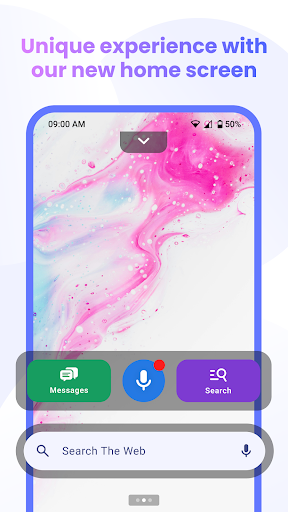
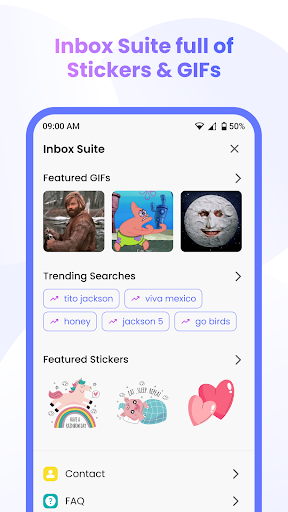
Messenger Chat Home is a unique personalization app that transforms your Android home screen into an efficient messaging hub. This innovative application allows users to send and receive SMS & MMS messages, initiate group chats, and express themselves using free stickers, GIFs, and emojis without leaving the home screen.

The app combines the simplicity of traditional texting with advanced launcher capabilities, offering features like Home Screen Launcher Access and Smart Widget for Messages. These tools enable quick access to recent chats and allow users to preview unread texts directly from their home screen. With its ad-light experience and privacy-focused design, Messenger Chat Home ensures smooth performance while maintaining user confidentiality.

Features

Messenger Chat Home stands out with its comprehensive feature set tailored for modern communication needs. The app's core functionality includes reliable SMS & MMS messaging integrated directly into the home screen, allowing for instant message sending and receiving without switching between apps.

One of the standout features is the Home Screen Launcher Access, which lets users open their inbox and recent chats with a single swipe. The inclusion of free stickers, GIFs, and emojis adds a creative touch to conversations, while the Group Chat & Media Sharing capability keeps users connected through multimedia exchanges. Additionally, the Voice to Text feature enables hands-free messaging, enhancing accessibility and convenience.

The Smart Widget for Messages provides a practical way to preview unread texts and reply quickly without fully opening the app. This combination of features creates a seamless and efficient messaging experience that prioritizes both functionality and user engagement.

Customization options variety

Customization options variety refers to the range and flexibility of personalization features available within an application allowing users to tailor their experience to better suit individual preferences and needs In the case of Messenger Chat Home this concept is brought to life through its innovative approach to integrating messaging capabilities directly into the Android home screen The app provides a unique blend of classic texting functionalities with modern launcher features enabling users to customize not only how they communicate but also how they interact with their device on a daily basis One of the standout customization features of Messenger Chat Home is its ability to transform the home screen into a fully functional messaging hub Users can send and receive SMS and MMS messages start group chats and even express themselves with free stickers GIFs and emojis all without needing to open a separate messaging app This seamless integration streamlines communication making it faster and more convenient Additionally the app offers a smart widget that allows for quick previews of unread texts and swift replies further enhancing the user's ability to stay connected The level of personalization extends to the visual and interactive aspects of messaging as well With access to thousands of creative stickers GIFs and emojis users can add a personal touch to every conversation reflecting their mood tone or personality This extensive library of expressive tools empowers users to communicate in a way that feels authentic and engaging Beyond the aesthetic and functional customizations Messenger Chat Home also supports practical features like voice-to-text dictation and media sharing These functionalities not only cater to diverse communication styles but also ensure that users can adapt the app to various contexts whether they are at work on the go or simply relaxing at home By offering such a wide array of customization options Messenger Chat Home significantly enhances user engagement and satisfaction It addresses the growing demand for personalized digital experiences by providing tools that allow individuals to mold their messaging platform according to their unique preferences and habits This focus on customization ultimately leads to a more intuitive efficient and enjoyable user experience setting Messenger Chat Home apart as a leader in personalized communication solutions

Theme compatibility

Theme compatibility in an application pertains to the app's ability to adapt and integrate with various visual themes ensuring a consistent and visually appealing user interface across different devices and settings For Messenger Chat Home theme compatibility plays a crucial role in delivering a cohesive and personalized user experience that aligns with individual preferences and device configurations The app excels in this area by offering seamless integration with the Android home screen while maintaining visual harmony and functionality As a messaging solution that transforms the home screen into a communication hub Messenger Chat Home demonstrates exceptional theme compatibility by allowing users to maintain their preferred visual styles without compromising the app's performance Whether using a light dark or custom-themed home screen the app ensures that all messaging features remain easily accessible and visually coherent This adaptability enhances the overall user experience by preserving the aesthetic continuity between the app and the deviceu2019s native interface Moreover Messenger Chat Home supports a wide range of customization options that extend to theme-related features Users can personalize their chat backgrounds choose from various color schemes and apply different font styles to match their unique tastes These theming capabilities enable users to create a messaging environment that feels both familiar and tailored to their specific needs The app's commitment to theme compatibility is further evidenced by its optimization for various screen sizes and resolutions Ensuring that graphical elements like stickers GIFs and emojis display correctly regardless of the device being used This attention to detail guarantees that users enjoy a high-quality visual experience without encountering formatting issues or inconsistencies Another significant aspect of Messenger Chat Home's theme compatibility is its support for third-party themes and launchers This openness allows users to incorporate the app into their existing customized setups without restrictions or conflicts By embracing a wide ecosystem of themes and customization tools the app fosters greater flexibility and choice for its users Ultimately the emphasis on theme compatibility in Messenger Chat Home translates into tangible benefits for users They can enjoy a messaging platform that not only meets their functional needs but also aligns with their visual preferences and device configurations This holistic approach to design ensures that every interaction with the app feels natural intuitive and aesthetically pleasing reinforcing the app's position as a leader in personalized communication solutions

Props

Fast and reliable messaging

Intuitive home screen integration

Rich media expression tools

Efficient widget functionality

Privacy-focused design

Cons

Limited customization options

Occasional notification delays

Basic voice recognition

Storage space required

No cross-platform support

Features and Functions

What is this app and what can I use it for?

A smart SMS launcher app for Android home screens

How do I download and install this app on my device?

Search 'Messenger Chat Home' on Google Play Store and tap Install

How do I get started after opening the app for the first time?

Grant necessary permissions and follow the setup wizard

What are the main features and capabilities of this app?

SMS messaging home screen integration and rich media tools

How can I customize my experience and adjust preferences?

Adjust notification settings in the app preferences menu

How do I save or bookmark my favorite content for later access?

Use the Smart Widget to save important conversations

How can I share content with friends or on social media?

Share content directly through integrated messaging features

How do I access detailed information and explore more content?

Explore additional features in the app's main menu

What permissions does this app need and how do I manage them?

Manage app permissions through device settings

How do I check for updates and keep the app running smoothly?

Enable automatic updates in Google Play Store settings
Show more

User Reveiws

{{ comment.reviewer_name }}
{{ comment.review_date_formatted}}
{{ comment.review_content }}
{{ tab.name }}
{{ comment.reviewer_name }}
{{ comment.review_date_formatted}}
{{ comment.review_content }}
No reviews with this rating